
mnjbicdjnijihbdofokbideajmnjenlk
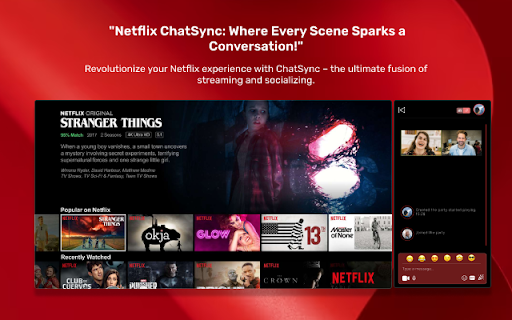
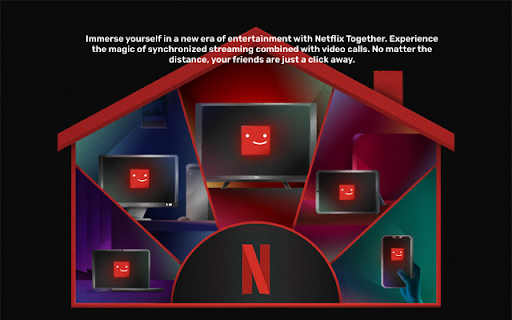
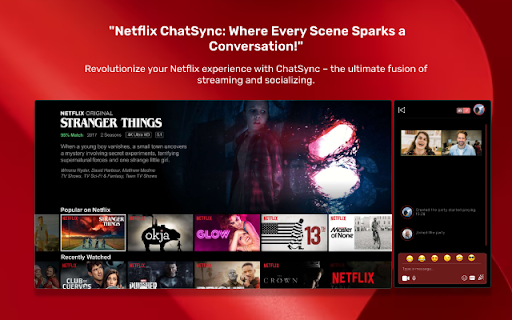
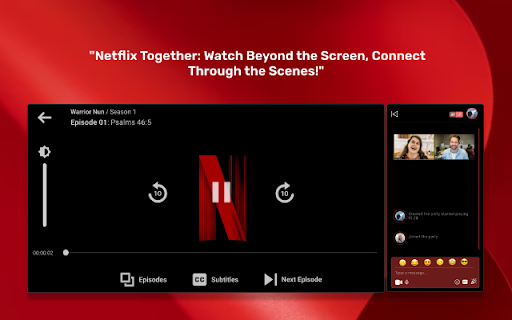
Watch Netflix videos in sync with friends and family Netflix Party with video call,' enhances the Netflix experience by enabling users to watch movies and TV shows simultaneously with their friends while enjoying real-time video and text chat. Netflix Party with video call fosters a sense of togetherness and social interaction, allowing users to stay connected with loved ones, share reactions, and discuss their favorite shows and movies as if they were in the same room. Plus, with real-time synchronization, everyone can enjoy the same content at the same time, making Netflix more engaging and enjoyable for all.

terastore
Free Powerful Chrome Extension: Find market intelligence and track hit products of Shopify stores in one step. Stores Quickly grasp the basic store information and sales overview to improve the efficiency of product selection Quickly lock the top 50 hot-selling products and new products in the store, and provide product selection ideas Display keyword search volume, ranking, click volume, percentage of paid clicks and click cost Products Quickly preview the order quantity, price, SKU quantity, and launch time of products on the current page The basic information of commodities is updated in real time, and the estimated order quantity and sales are updated weekly Customize sorting indicators, support one-click downloading of product information, and one-click jumping to the product details page Social Media One-click convenient view of competitors' main social media channels and their account influence Click on the logo image of the social media account to jump to the account homepage to view the details Refer to competing social media operation ideas to unlock independent stations + social media high-conversion channels Traffic Display the current store website traffic data, and quickly analyze the traffic distribution area and traffic source Quickly obtain social media traffic, website referral traffic, and keyword traffic ratio Traffic data is updated monthly, and the rate of change in referral traffic and search traffic is accurately presented Shopify Stores 60W+shopify store data on-demand search, showing the list of the top 500 stores in monthly sales Display store name, domain name, number of products, monthly sales, Alexa global ranking Quickly view shopify's website area, product quantity, sales, category distribution

Netflix Party
Watch Netflix videos in sync with friends and family 'Netflix Party,' enhances the Netflix experience by enabling users to watch movies and TV shows simultaneously with their friends while enjoying real-time video and text chat. Netflix Party fosters a sense of togetherness and social interaction, allowing users to stay connected with loved ones, share reactions, and discuss their favorite shows and movies as if they were in the same room. Plus, with real-time synchronization, everyone can enjoy the same content at the same time, making Netflix more engaging and enjoyable for all.

Quality control for Youtube tv
Enhance viewing in a single click!Effortlessly control video quality and elevate YouTube TV experience. Tired of constantly adjusting video settings on YouTube TV? Install our 'Quality Control for YouTube TV' Chrome extension 🛠️ for easily adjusting video quality settings 🎚️ to enjoy enhanced viewing 👀 of any YouTube content. Whether you're catching up on your favorite series 📺, exploring new content 🔍, or streaming live events 🎉, our extension makes it seamless and enjoyable. 🚀 Key Features of Quality control for youtube tv chrome extension 1. Easy Activation: A simple click or shortcut to enable PiP mode directly from YouTube TV. 2. Resizable Window: Allow users to adjust the size of the PiP window to their preference. 3. Customizable Positioning: Enable users to drag and place the PiP window anywhere on the screen. 4. Playback Controls: Integrate basic controls like play, pause, and skip within the PiP window. 5. Auto-Adjustment: The PiP window could automatically move or resize during tasks like opening new tabs or applications to avoid obstruction.. 6. Multi-Screen Support: Compatibility with multiple monitors for users working with extended displays. 8. Auto-Pause on Tab Change: Automatically pause the video when the user switches tabs or windows. 9. Quality Adjustment: Ability to change the video quality within the PiP mode. 10. Favorites and Playlist Integration: Quick access to favorite channels or playlists directly from the PiP interface. Open your Google Chrome browser and navigate to the Chrome Web Store. In the Chrome Web Store, use the search bar to find the "Quality Control for YouTube TV" extension. Click on the extension in the search results. Then, press the "Add to Chrome" button to initiate the installation. Once installed, the "Quality Control for YouTube TV" extension icon will appear in the top right corner of your Chrome browser. If you are an Indian user, you need to install VPN extension also and select the country USA . (https://chromewebstore.google.com/detail/free-vpn-for-chrome-vpn-p/majdfhpaihoncoakbjgbdhglocklcgno) Open YouTube and select any video of your choice to play. While your chosen video is playing, click on the extension icon in your browser. A menu will appear, providing various quality options for your video. Select your desired video quality. With your preferred quality selected, you can now enjoy an enhanced, high-definition streaming experience on YouTube.

Netflix Party
Watch Netflix Together, Chat, Share Emojis, Create Parties, And Enjoy Synchronized Viewing With The Netflix Party Extension. Netflix Party: Watch Together, Chat, and Enjoy Experience the ultimate group streaming with the must-have Chrome web store extension that lets you watch Netflix together with friends and family, no matter where you are. With this extension, you can chat, share emojis, and enjoy synchronized viewing for a truly social streaming experience. Synchronized Viewing Netflix Party ensures that everyone in your party is watching the same scene at the same time. Start or join a Netflix party and stream your favorite shows and movies in perfect sync with your friends. Real-Time Chat Enhance your watching experience with real-time chat. Share your thoughts, reactions, and jokes as you watch. Our extension chat feature keeps everyone connected and engaged throughout the viewing experience. Share Emojis Express yourself with a wide range of emojis in the chat. Add a fun and personal touch to your conversations while watching together. Easy Party Creation Creating a Party is simple and quick. Install the Netflix Party extension, open Netflix, and click the extension icon to generate a shareable link. Invite your friends to join, and start streaming together instantly. Share Party Link Invite friends and family to join your Party with a single click. Share the party link via email, social media, or messaging apps and start watching together in seconds. Personalized Viewing Customize your Party with user-friendly settings. Adjust the chat window, choose your preferred nickname, and enjoy a personalized streaming experience. Seamless Integration It integrates seamlessly, providing an uninterrupted and high-quality streaming experience. Watch your favorite content with the added joy of sharing it with others. 1. Install the Extension: Add Netflix Party to your Chrome browser from the Chrome web store. 2. Open Netflix: Log in to your account and start playing a video. 3. Create a Party: Click on the Netflix Party extension icon to generate a party link. 4. Share the Link: Invite friends by sharing the party link via email, social media, or messaging apps. 5. Start Watching: Join the party and enjoy synchronized viewing with real-time chat and emojis. It is perfect for movie nights, binge-watching sessions, and staying connected with loved ones. Download the Netflix Party extension today and transform your experience into a social event. Disclaimer: Netflix Party is an unofficial extension and is not affiliated with or endorsed by Netflix. This extension is intended for personal, non-commercial use only. All rights to Netflix and its content belong to their respective owners.
