
mnciblcffhckcaalpmhjelkjgjoahehp
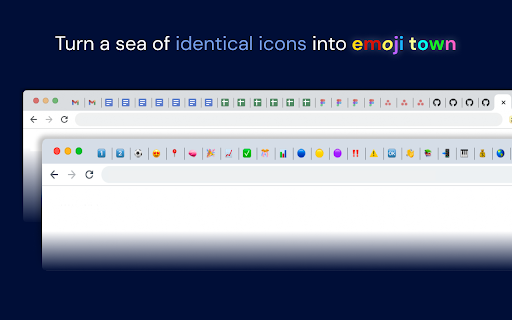
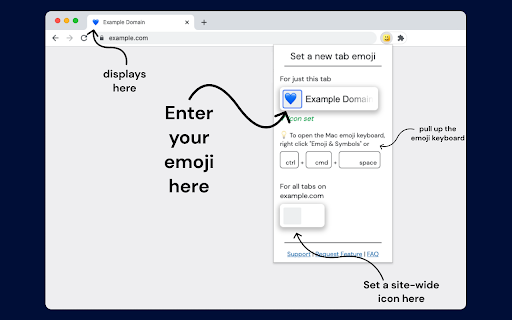
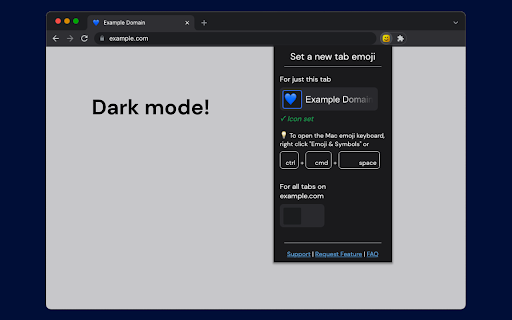
Replace the favicon icon of a chrome tab with custom emoji – so you can finally tell your tabs apart. Emojitab lets you set custom emoji favicons for your chrome tabs, so tabs with the same icon are easy to tell apart at a glance. - Making individual Google Docs, Sheets, or Slides documents have unique emoji - Setting emoji for individual Figma files - Setting different emoji for software engineering "dev," "staging," "local," "docs," or "prod" instances without needing to build that yourself This extension is in Beta and we would love your feedback or feature requests at emojitabapp@gmail.com . If you find any bugs or websites not supported, please email emojitabapp@gmail.com . We may at some point charge a small amount to cover the cost of ongoing support, but we'll give all beta users a full year of free usage if we do so. On installation, this chrome extension asks for a number of permissions because we need to be able to modify the pages you visit in order to attach the emoji tab icons. We ask for and need: - storage permissions to save your icons - activeTab permissions to populate the extension popup when you open the extension - host/content script permissions ("modify web pages you visit") so we can modify web pages in order to replace the tab icon encoded on the page with your custom icon - scripting and tabs permissions in order to "run once" on pages you have already loaded when you first install the extension, so you don't have to refresh all your many tabs (because if you forget to refresh, it appears broken) This extension does not track any personal information, does not track the sites you visit, and does not track any custom text you might input to the fields on the extension. We do track a few generic and anonymous events, in order to understand if people are using this extension and we should continue to support it. Specifically: - We track an "event" when you set an icon or when you delete it - We track an "event" when you load a page with a previously-set icon (but we *do not* track the url or title or any info about that page you loaded, just a generic "icon loaded" event) For these events, we track what the icon is *only if* the icon is an emoji. If it's a custom string we only track the length of the string in characters, so that your custom inputs remain fully private. We use Plausible (https://plausible.io/) for analytics because it's especially privacy-conscious and uses no tracking cookies.

Custom Tab Appearance
Customize website titles and favicons based on rules Allows you to customize website titles and favicons based on custom rules. Custom Titles: Change tab titles based on domain, title content, or regex patterns Custom Favicons: Choose from a variety of emoji icons or upload your own custom images Rule Management: Enable/disable rules Edit existing rules Import/export rules as JSON Flexible Matching: Domain matching (e.g., "github.com") Title matching (e.g., "Pull Request") RegEx matching for advanced patterns Click the extension icon to open the settings Select a match type (Domain, Title, or RegEx) Enter the pattern to match Enter the new title you want to display (Optional) Choose a favicon: Select from the emoji grid Import your own image using the "+" button Click "Add Rule" to save Enable/Disable: Toggle rules on/off using the enable/disable button Edit: Modify existing rules using the edit button Delete: Remove rules using the delete button Bulk Actions: Export all rules to a JSON file Import rules from a JSON file Remove all rules at once

Development favicon
Assign colored stripes to favicons, based on URL and title regex matching. This extension lets you target URLs and titles with a regex match pattern (so `.*\.local.*` for my local environment) and apply effects to the favicon. I've got my local with a green stripe across the top, the staging server with a yellow one, and could set different production environments with different colors and effects. Another idea would be to match and apply effects for different signed-in Google accounts, so I'd know which Google Drive is open.

Tab Customizer
Change the icon and title of any tab! Transform your browsing with Tab Customizer, the ultimate Chrome extension for personalizing your tabs! You can effortlessly modify tab titles and icons to match your style or organizational needs. Express yourself uniquely by adding emojis and letters as icons. Whether you’re looking to streamline your workflow, add a touch of personality to your browser or simply looking for more privacy 😉, Tab Customizer is the perfect tool for you!

Favicon Changer Pro
Change favicons of websites easily and manage your favicon entries Easily customize website favicons directly from your browser. How it works: - Click the extension icon when visiting any website - Upload your own favicon or enter a URL for a new icon - The favicon changes instantly and persists across visits Features: - Change favicons on any website - Upload custom favicon images (PNG, JPG, ICO, SVG, WebP supported) - Use existing favicons from other websites - View and manage all your custom favicons in one place - Instantly revert to original favicons when needed - All favicon data stays local on your device - Fast and lightweight - won't slow down your browsing - Modern, intuitive interface - Compatible with both light and dark browser themes - Translated to all 47 languages in your browser Additional benefits: - Perfect for organizing bookmarks with custom icons - Ideal for differentiating between multiple instances of similar sites - Great for personalizing your browsing experience - Useful for web developers testing favicon implementations No account needed, no complicated settings. Just install and start customizing website favicons instantly.
