
mnbjlpbmllanehlpbgilmbjgocpmcijp


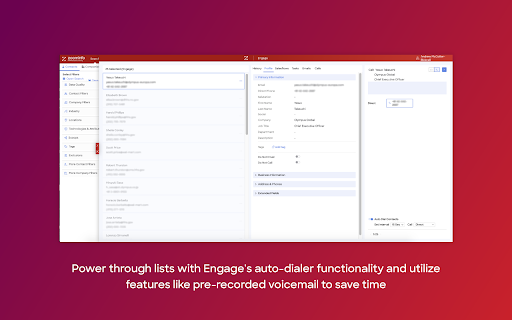

Call and email contacts from ZoomInfo or Salesforce with one click. Tap into the power of ZoomInfo Engage with multi-channel prospecting campaigns, email templates, and sales dialer. The Engage Chrome Extension allows you to view lists in ZoomInfo or Salesforce and take immediate action: - Create and schedule multi-channel prospecting campaigns with Salesflows - Leverage email templates with dynamic fields to personalize at scale - Call lists of prospects without interruption using the auto-dialing feature

Lusha - Easily find B2B contact information
Get access to the world's most accurate global B2B data. Find the most accurate and up-to-date emails and mobile phone numbers of decision makers from all around the world, together with rich company data, directly in your chrome browser. 👨💼🏢 Find Contact and Company Data Lusha extension goes beyond contact data, it provides you with comprehensive knowledge and insights into prospects and companies you're looking for, including: 1. Job changes 2. Buyer intent signals 3. Fundings 4. Revenue 5. Industry and specialties 6. Company employees and more! 🆓 Free to use Unlock prospecting power from the get-go with Lusha’s free tier and get free credits to use across Lusha platform and extension, no credit card required. 🔑 Extension Key Features - Enrich Data in Bulk: Quickly reveal and collect multiple contact details. - Save to a List: Organize your prospects for seamless follow-up. - Export to Your CRM: Sync your contacts instantly with your favorite CRM. - Add to an Email Sequence: Launch personalized outreach with Lusha Engage. 💻 Use it Everywhere Lusha’s extension simplifies your prospecting, ABM and ABS efforts, giving you instant access to decision-makers, wherever you work so you can stay productive and focus on closing deals: - On LinkedIn and Sales Navigator: Quickly discover verified emails, and phone numbers directly on decision-makers' profiles - On Company Websites: Instantly uncover decision-makers within the company and access their contact information. - In Gmail and Google Calendar: Learn more and enrich data of prospects you have connected via email or booked meetings with. - In Your CRM: Enrich and update the data of existing contacts and leads, ensuring your CRM is always accurate and actionable. 👩🏾💼 “Lusha is highly accurate, so I don’t need anything else, really.” - Catherine Gomis, SDR at Anaplan 👩🏻💼 “Lusha is the easiest way to find B2B contact information with just one click.” - Ines Ennaji, Head of Global Development at MONOGRAM PARIS 👨🏻💼 “The hardest part of my job is cold calling and getting in touch with the right people. Now with Lusha, I have a way in.” - Thayer Selleck, Account Manager at Insight Global

Lavender
Easily write more thoughtful and effective e-mails using social data and linguistic AI. 📧 Increase reply rates Your Email Coach grades your email and gives tips to improve. It’ll find and fix anything that hurts your chance of getting a reply, using generative AI and data from millions of emails. You'll receive more replies when you send emails with a high score (90 or above). 👩💼 Personalization made easy The Personalization Assistant brings prospect data directly to your inbox (or wherever you send emails). We'll suggest ways to personalize your email based on the data. We also surface personality-based insights to help create deeper connections with your recipients. 📈 Improve over time The Lavender email score moves with you. You'll receive real-time coaching based on your inbox and billions of data points. When email behavior evolves, our recommendations do too (thanks to generative AI). So you’re always using the best practices. 👏 Data-driven coaching Managers are empowered to coach with real data-backed email insights — from you and your team’s inboxes. Lavender helps you track performance, ROI, what’s working across your team, and who needs help (and where). 🔗 Integrates with your favorite tools Use the magic of Lavender wherever you send email. ✅ Join thousands of other salespeople to supercharge your outbound messaging. 🔒 Lavender is 100% encrypted and private. SOC 2 & GDPR Certified 🥰 If you need help on an email, just forward it to us at team@lavender.ai

Consensus SNAP™
Record, Send, and Track instant webcam and screen recording video right inside Chrome This native Chrome app puts your Consensus interactive video demos instantly in your sales reps' work flow. Use our new side-panel extension to create links you can paste anywhere such as LinkedIN or Facebook, or use Consensus SNAP with direct integration inside Gmail. Create custom branded experiences for prospects and customers (called DemoBoards) right from the browser. Create thumbnail, button, or text links and share them instantly. Set up team-based notifications so that SDRs, AEs, and SEs can all be notified when a key prospect and buying group begins engaging with or sharing your demo. But don't stop there. Consensus SNAP allows your AEs and SEs to quickly Record, Send, and Track instant webcam and screen recording video right inside Chrome. Use these videos within a DemoBoard and create reusable libraries of video FAQ responses or create a tailored response to a prospect's burning question, and track how they watch and share with others in the buying group. With a simple click, anyone can create, send and track a custom video within a DemoBoard. Record your webcam and capture anything on your screen, such as PowerPoint, a sales proposal, or visually explain your software. Consensus Snap notifies you when your prospect watches or shares your video. Drill down and look at the engagement statistics to see what they watched and rewatched.

Sendoso
The Official Sendoso Chrome Extension. We source, store, ship, and track ROI for anything you ever need to send. Sendoso is the most effective way for revenue-driving teams to stand out with new ways to engage at strategic points throughout the customer journey. By sending personalized gifts, branded swag, and eGifts at scale with Sendoso, you’ll see significant time savings per campaign, an increase in conversion rates, and higher retention rates. Sendoso’s Chrome Extension allows you to send from where you already work. By using the Chrome Extension, users can send and measure their efforts directly from Salesforce, Amazon, Outreach, and SalesLoft. Not a Sendoso user? Contact Sendoso: https://sendoso.com/demo-request/ for more information.
