
mmhppjppflaomdeikgkijjiiicakbfki
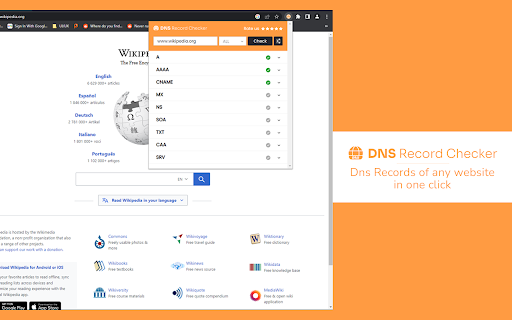
DNS Record Checker Chrome extension allows you to easily check DNS records and troubleshoot issues for any domain DNS Record Checker is a tool used to check the DNS records associated with a particular domain name. DNS records are used to store information about a domain, such as the IP address of the server hosting the website, the email servers associated with the domain, and other settings such as DNSSEC (DNS Security Extensions) records. >>Comprehensive DNS record check: The extension provides a comprehensive DNS record check for any domain, including A, AAAA, MX, CNAME, TXT, and NS records. This can be useful for troubleshooting issues related to website or email delivery. >>Easy to use: Simply enter the domain name you wish to check, and the extension will display the associated DNS records and their current status. >>IP information: The extension provides information about the IP address associated with the domain, including the location and organization associated with the IP address. >>Install the DNS Record Checker Chrome extension from the Chrome Web Store. >>Click on the extension icon in your browser toolbar to open the tool. >>The extension will display the associated DNS records and their current status.

DNS Checker Pro
DNS Info Viewer for the current website DNS Checker Pro is a powerful Chrome extension that provides instant, comprehensive insights about any website you visit. With a single click, you can access crucial domain information right in your browser. This tool is perfect for web developers, IT professionals, digital marketers, and anyone curious about the technical details behind websites. 1-WHOIS Information: Quickly view registration details, including domain owner, registration and expiration dates, and registrar information. 2-DNS Records: Access a full breakdown of DNS records, including A, AAAA, CNAME, MX, NS, SOA, and TXT records, giving you a complete picture of the domain's DNS configuration. 3-MX Records: Easily check mail exchanger records to understand the email setup for the domain. 4-SSL Certificate Details: Get in-depth information about the domain's SSL certificates, including issuer, validity period, and encryption algorithms used. 5-User-Friendly Interface: All information is presented in a clean, easy-to-read format directly in the extension popup. 6-One-Click Access: Simply click on the extension icon while on any website to instantly view its domain information. 7-Link to More Tools: Direct access to additional web tools on HTTPFY.io for further analysis and information. Whether you're troubleshooting website issues, conducting security assessments, or just satisfying your curiosity about web infrastructure, Domain Information Viewer provides valuable insights at your fingertips. Install now to enhance your browsing experience with instant access to comprehensive domain information!

DNS Config
This is especially useful for cases you don't have root permission on the compute. And you are visit some website that has custom hostname. This tool can help you auto direct from the custom host name to the ip. ## Port Handling This extension preserves the original port number when redirecting requests. For example: ## IP Address Handling This extension ignores URLs that already have IP addresses as hostnames. For example: 10.0.0.1:8080/path → Not modified (IP addresses are not affected) example.com:8080/path → Will be mapped to the configured IP

HTTP-DNS
FProxy HTTP Extension. Thay đổi địa chỉ IP cho chrome browser

dns-killer
DNS缓存杀手,一键清除chrome的DNS缓存, 并刷新当前选项卡。 web开发的利器。 DNS缓存杀手,一键清除chrome的DNS缓存, 并刷新当前选项卡。 web开发的利器。
