
mmcbhofcoihkjaminjckjghlmiefoicd

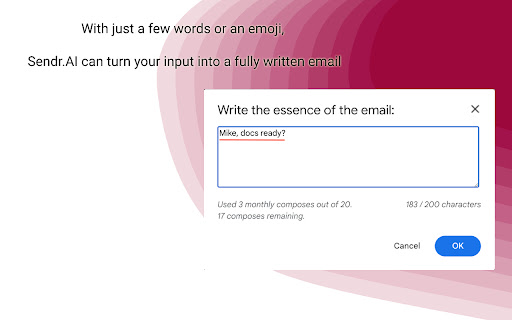

Write awesome emails with one word or less. Are you tired of spending hours crafting the perfect email, only to second-guess yourself and end up starting from scratch? Do you struggle to find the right words to convey your message effectively? Look no further, because Sendr.AI has got you covered. With just a few words or even an emoji, Sendr.AI can turn your input into a fully professional, beautifully crafted email in no time. No more writer's block or tedious editing. Simply input your idea and let our AI do the rest. But that's not all. Sendr.AI doesn't just spit out generic, cookie-cutter emails. It uses advanced natural language processing to understand your unique writing style and tone, and creates emails that sound like they were written by you. Not only will Sendr.AI save you time and effort, it will also help you communicate more effectively and make a stronger impression on your recipients. Whether you're sending an email to a colleague, a client, or a friend, you can trust that Sendr.AI will help you deliver a message that is clear, concise, and engaging. So why wait? Try Sendr.AI now for free and take the stress out of email writing. Your colleagues, clients, and friends will thank you for it. - Sendr.AI is AI-powered tool that helps you craft professional, engaging emails with ease - With just a few words or an emoji, Sendr.AI can turn your input into a fully written email - Sendr.AI uses advanced natural language processing to understand your unique writing style and tone, ensuring that your emails sound like they were written by you - Sendr.AI saves you time and effort by eliminating the need for tedious editing and writer's block - Sendr.AI is private and secure, doesn't access or send emails, ensuring that your data remain confidential - With Sendr.AI, you can communicate more effectively and make a stronger impression on your recipients, all at no cost to you - Try Sendr.AI today for free and revolutionize the way you write emails! We understand that privacy and security are important concerns for anyone using an online tool, and we take these issues very seriously at Sendr.AI. That's why we want to assure you that our tool does not access your emails or send emails on your behalf. Instead, Sendr.AI works by providing you with a fully written email based on your input. It is up to you to review the email and decide whether to send it or make any changes. This means that you remain in control of your emails and your privacy is never compromised. We use secure, encrypted connections to ensure that your data remains safe and confidential at all times. In short, you can trust that Sendr.AI is a secure and private tool that will help you write better emails without compromising your privacy. Give it a try and see the difference it can make in your communication.

Compozee - ChatGPT Email Writer
Compozee is the AI assistant powered by Chat GPT that takes your writing to the next level. ⏱️Unlimited Access - Write as many emails as you need without capacity issues. ✉️Fine-tuned for Emails - Compozee is fine-tuned specifically for email communication. 😇Easy to Use - Write better emails with ease, thanks to our intuitive and user-friendly interface. ⌛Save time: No more spending hours agonizing over the perfect email. Compozee's AI takes care of the heavy lifting, leaving you free to focus on what really matters. 💻Boost your confidence: Writing the perfect email can be daunting, especially if you're not a natural wordsmith. Compozee's is designed to help you feel more confident in your writing. ⬆️Improve your results: Whether you're trying to land a new job, win a new client, or simply stay in touch with your contacts, Compozee can help you achieve your goals by ensuring that your emails are clear, concise, and effective. 📜News in popup: Compozee provides a news popup that displays information about the most recent product releases and improvements. This allows users to stay informed about new features and updates without having to leave their current browsing session.

Addy AI - AI for Mortgage Pros
Close loans 10x faster with AI (Works with your favorite tools) Addy AI is an AI-powered platform that transforms the way mortgage professionals process loans. From reviewing files to searching guidelines, from pricing loans to answering questions in real time, Addy AI helps you work faster and smarter. With our Chrome extension, you also get a sidebar that connects to your LOS, CRM, and other websites you already use, making Addy AI available everywhere you work. Loan officers and processors spend hours on repetitive work — reviewing documents, checking guidelines, pricing loans, and chasing conditions. Addy AI automates these workflows so you can focus on closing loans. Our AI Loan Processing Checklist instantly reviews files, flags missing documents, and surfaces underwriting conditions. The Guideline Search lets you ask any loan program question and get fast, accurate answers. The Pricing Tool helps you quote rates and scenarios on the fly. And with the Addy AI Sidebar, you can ask questions or run workflows while inside your LOS or CRM. - AI Loan Processing Checklist: Review files automatically, track tasks, and clear conditions faster. - Guideline Search: Ask guideline questions and get instant, reliable answers. - Loan Pricing: Price loans and compare options directly in Addy AI. - Sidebar Assistant: Ask questions, run checklists, or price loans without leaving your LOS or CRM. - Seamless Connectors: Pull in documents and data from LOS, CRM, and other websites to enhance workflows. - Compliance Ready: Audit trails and accurate documentation for every file. - Upload a loan file or connect your LOS/CRM. - Addy AI runs the AI Loan Processing Checklist automatically. - Ask guideline questions or borrower-specific scenarios with AI-powered Q&A. - Price loans instantly and share results with borrowers or teammates. - Use the Addy AI Sidebar in Chrome to access features inside any website. - AI Loan Processing Checklist (automated task generation) - LOS and CRM integration connectors - Document recognition and classification - AUS findings extraction and mapping - Borrower doc request email generation - AI Guideline Search and Q&A - Loan Pricing Engine - Chrome Sidebar for in-workflow AI assistance - Customizable checklist tasks - Full audit trail for compliance - Real-time dashboard filters Your connected data is used only to power Addy AI workflows. We do not sell or share your data. Security and compliance are built into the platform. Let Addy AI be your: - AI Loan Processing Assistant - AI Guideline Researcher - AI Loan Pricing Tool - Always-on Sidebar Assistant Addy AI brings everything into one platform, so you spend less time clicking and more time closing loans.

Clippit AI - AI Email Writer
Write emails, messages, and more using ChatGPT, Claude AI and Gemini AI (privacy-frendly). Works on all sites. Clippit.ai - Your AI-Powered Email & Message Assistant ✨ Elevate your email and messaging experience with Clippit AI, the ultimate AI-powered writing assistant. Seamlessly integrate with your favorite email platforms and enjoy high-quality responses generated by leading AI models like ChatGPT, Claude, and Gemini AI. Key Features: ✅Free to Try: Experience the capabilities of Clippit.ai with no initial cost. ✅Write E-Mails & Messages with AI: Harness the power of advanced AI models such as ChatGPT, Claude Sonnet 3.5, and Gemini 1.5 Flash to craft perfect emails and messages every time. ✅Advanced Gmail Integration: Enjoy seamless integration with Gmail for a smooth user experience. ✅Reply with Context: Ensure your replies are relevant by using contextual information from previous conversations. ✅Highest Quality Responses: Get professionally written responses tailored to your needs. ✅Supports Multiple AI Models: Switch between AI models like GPT-4o, Claude Sonnet 3.5, Gemini 1.5 Flash, and more for varied and precise outputs. ✅Privacy Friendly: Your data security and privacy are our top priorities. ✅Lightweight & Fast: With a size of less than 100kb, Clippit.ai is designed to be incredibly fast and efficient. ✅Supports All Languages: Communicate effectively in any language. ✅Multiple Ways to Launch: Flexibly initiate Clippit.ai through various methods for your convenience. ✅Customizable Writing Tone & Length: Choose the perfect tone (Professional, Casual, Straightforward, Confident, Friendly) and length (Short, Medium, Long) for your message. ✅Easy Text Selection: Simply select any text, right-click, and use Clippit AI to generate context-aware responses. 📧 Compose Emails & Messages: Seamlessly create the ideal message. 📝 Correct Grammar: Easily remove typos and grammatical mistakes. 🔄 Revise Text: Enhance clarity and impact with rephrasing. 🎨 Adjust Tone: Quickly change the mood of your communication. 📚 Summarize Content: Transform lengthy texts into brief summaries in no time. Clippit AI is designed for users who value efficiency, privacy, and quality in their email and messaging communications. Whether you're drafting a professional email or a casual message, Clippit AI provides the tools you need to communicate effectively and effortlessly. Transform the way you write emails and messages with Clippit AI. Download now and start experiencing the future of AI-assisted communication! VARIOUS METHODS TO ACTIVATE ON ANY WEBSITE: ➡️ Activate via Extension Icon ➡️ Activate with a Shortcut Key ➡️Activate by Selecting Text: Simply highlight any text on a page, right-click, and select the extension icon to use the selected text as context. UTILIZING ADVANCED GMAIL INTEGRATION: Clippit AI comprehends your email content to craft the ideal response every time. 1. Open Gmail, find an email, and begin your reply. 2. Click the Clippit AI extension button within the Gmail reply interface. 3. Briefly describe what you wish to reply, then press the "Generate" button. We support a wide range of popular languages. Just specify the language in your text prompt. For example: "Compose an email in Spanish regarding a job application." What information is shared with the AI model? When creating a new email, only the user prompt is transmitted. For replies, the text from the previous email (which can be edited to exclude sensitive details) and the user prompt are shared. What is your privacy policy? We prioritize your privacy and are dedicated to protecting it. Your data is not used for AI training purposes nor sold to third parties. We utilize industry-standard encryption and security practices to ensure the safety of your information.

Email Whisperer - GPT AI Email Writer
Email Whisperer - Write emails with ai Email Whisperer is an innovative Chrome extension designed to seamlessly integrate with both Gmail and Outlook, transforming the way you compose emails. Say goodbye to the daunting blank page and hello to efficiency, accuracy, and confidence in your email communications. Intelligent Email Drafting: With Email Whisperer, you no longer have to start from scratch. Our AI-driven technology suggests complete email drafts based on the context and purpose of your message. Whether you're drafting a professional request, a warm greeting, or a detailed report, Email Whisperer offers tailored suggestions to get you started. Advanced Spell Check: Beyond basic spell checking, Email Whisperer provides comprehensive proofreading tools. Our extension catches not just spelling mistakes, but also grammatical errors, awkward phrasings, and even tone inconsistencies. Ensure your emails are not only error-free but also perfectly polished. Seamless Integration: Email Whisperer works within your Gmail or Outlook interface, providing a smooth and uninterrupted experience. There's no need to switch between apps or disrupt your workflow. With just a click, you can activate our drafting and proofreading features right where you write your emails. Customizable Suggestions: Tailor Email Whisperer to your unique writing style and preferences. Customize the level of assistance you receive, from full email drafts to gentle nudges for improving your grammar and spelling. Privacy-Preserving: We understand the importance of confidentiality in email communication. Email Whisperer is designed to respect your privacy, with all suggestions generated on-the-fly and no content stored or analyzed beyond what is necessary for immediate assistance. Add Email Whisperer to Chrome from the Chrome Web Store. Log into your Gmail or Outlook account and compose a new email. Enjoy automatic drafting and spell-check suggestions as you type. Elevate Your Email Game: With Email Whisperer, you can focus on conveying your message, leaving the nuances of drafting and proofreading to us. Enhance your productivity, improve your writing, and communicate with confidence. Install Email Whisperer today and experience a smarter, faster way to handle your email correspondence.
