
mmadlggmpkpiockpjfepaohcllbnakej

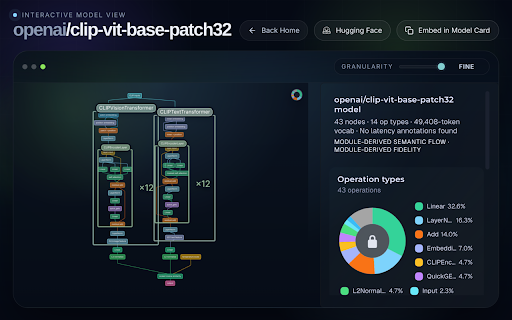


Display a model visualization at each huggingface.co model page. Bring the model visualization from hfviewer.com into every supported model on the Hugging Face website. Click the visualization to explore a more detailed view where you can slide between granularity levels and inspect each layer.

CogniTube: AI YouTube Summaries, Notes & Bookmarks
Turn any YouTube video into clear summaries, notes and bookmarks — without leaving YouTube. CogniTube uses AI to transform videos into structured summaries you can quickly understand — and lets you add notes and bookmarks to revisit what matters. Perfect for podcasts, courses, interviews, tutorials, and lectures. Key features ✅ Instant AI summaries – understand videos in seconds ✅ Timestamped key moments – jump to the most important parts ✅ Add notes to any video – capture insights while watching ✅ 3 summary styles – choose the level of detail you need ✅ Summaries in 15 languages – learn in your preferred language ✅ Personal video library – revisit your saved summaries, notes and bookmarks ✅ Dark mode – comfortable viewing for late-night learning CogniTube is currently in beta. To give early adopters the full experience, we're giving everyone full Pro access for free — no credit card required, no catch. • Unlimited AI summaries • Access to Quick and Advanced summary styles • Timestamped insights and deeper summaries • Unlimited bookmarks and notes • Personal video library — revisit everything you've saved • Cloud storage & sync across devices • Choose your preferred summary language • Priority Support • Early access to new features How to use 1. Install CogniTube 2. Open any YouTube video 3. Click the CogniTube icon in the YouTube sidebar 4. Generate your AI summary instantly 5. Save key moments and add notes as you watch Ideal for students, researchers, podcast listeners, busy professionals, and anyone who wants to learn through YouTube. Frequently Asked Questions Q1: Does CogniTube work on any YouTube video? A1: Yes. CogniTube works on most YouTube videos that include transcripts. Q2: Where are my summaries and notes stored? A2: Your summaries, bookmarks and notes are stored locally in your browser by default. With CogniTube Pro, you get cloud storage and sync across devices. Q3: How does the beta period work? A3: During our beta, all users get full Pro access for free — unlimited summaries, bookmarks, and cloud sync. This is our way of saying thank you to early adopters. Q4: Does CogniTube collect personal data? A4: No. CogniTube only processes the video transcript required to generate summaries. We do not store or sell personal data. Q5: Can I choose the language of the summary? A5: Yes. CogniTube supports 15 languages, so you can read summaries in your preferred language.

Drift - Scroll While AI Thinks
Opens a scrollable feed while ChatGPT, Claude, and Gemini generate responses. Reclaim your AI wait time. Drift opens a side window while ChatGPT, Claude, or Gemini is generating a response — giving you something to scroll instead of staring at a blinking cursor. When the answer is ready, it snaps you back. No tab juggling. No "wait what was I doing again." You know the loop: you send a prompt, the AI starts thinking, and you open random tabs or fall into reels and forget why you opened the browser. Drift handles that dead time for you. While the AI is generating, it automatically offers you a side window to scroll, watch, or chill. The second the response is ready, it gets out of the way. You set it up once, tweak it to your taste, and forget it exists. It doesn't nag you. It doesn't gamify your attention. It just quietly eats the empty seconds that normally turn into 20 minutes of scrolling. How it works: — Send a message on ChatGPT, Claude, or Gemini — After a configurable delay, a floating button appears — Click it to open a customizable side window (Instagram Reels by default, or any URL) — When the AI finishes, the window minimizes and you're back Features: — Adjustable trigger delay (2–30 seconds) — Choose which AI sites activate Drift — Calibrate window size and position to your screen — Set any custom URL as your drift content — Soft focus or full focus mode — Auto-close timer — Keyboard shortcut (Alt+D) — Guided onboarding walkthrough — Export/import settings — Session stats Drift only runs on LLM sites you choose. Everything stays local. It doesn't read your prompts, your responses, or your browsing. No account, no tracking, no paywalls, no ads. It's not trying to keep you hooked — it's trying to give you your brain back. Built for people who live in AI tabs: students, developers, researchers, writers, and anyone who values flow and accepts reality. Waiting happens. Losing time doesn’t have to. If you like Drift, please help spread the word by giving me a 5 star rating, or share it with your friends! Feel free to contact me at fireheartjerry@gmail.com and I will make sure to help. More info: https://fireheartjerry.github.io/drift-extension/drift.html

c-gpt
Summarise articles and ask follow-up questions using LLMs such as OpenAI's GPT (Chat GPT). Helps summarise and highlights main points of any article, without having to read the whole article. You can also ask follow-up questions about the article, and it will provide you with answers based on page contents of a current tab.

ProvenBase
ProvenBase chrome extension ProvenBase is an AI-powered deep search sourcing tool that helps recruiters and hiring teams find, engage, and hire hard-to-find talent directly from the web. Using advanced AI and deep search, ProvenBase surfaces qualified, often-overlooked candidates and turns sourcing into a faster, more strategic, data-driven workflow.
