
mlimohmgngjmnpllmnbjgkggclnmcdbn
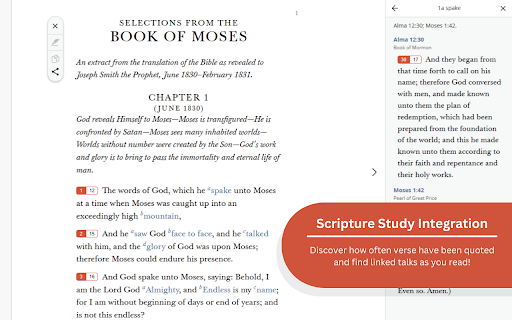


Extension to create reverse footnotes between scriptures and General Conference talks. General Conference talks from the Church of Jesus Christ of Latter-Day Saints feature large footnote sections that link to relevant scriptures meant for deeper study opportunities. But, the scriptures from the Church of Jesus Christ of Latter-Day Saints do not feature references to General Conference talks. What if you could see the number of times a scripture verse has been referenced in General Conference talks and click through to read what the speaker had to says about that scripture? Creating footnote buttons between scriptures from the Church of Jesus Christ of Latter-Day Saints and General Conference talks is what the Gospel Genius is for! Buttons represent the number of times a scripture appears as a footnote on General Conference Talks. Clicking the Gospel Genius verse buttons will display a table of links to General Conference Talks with that scripture verse in the footnotes. Use the Gospel Genius settings tab to change the colors of the verse buttons and use the "Apostles only" setting to only view footnotes from General Conference talks by Apostles of the Church. The Gospel Genius is an excellent way to deepen scripture study by combining the scriptures from the Church of Jesus Christ of Latter-Day Saints with the words of living Prophets. Enhance your study of the Come Follow Me program from the Church of Jesus Christ of Latter-Day Saints using the Gospel Genius! This extension is designed to create verse button in the chapter navigator and footnote sections of the Church's website. Does the Come Follow Me Lesson for this week reference a scripture quoted frequently in General Conference? Want to know what Prophets and Apostles have to say about this week's Come Follow Me reading? The Gospel Genius can help! The Gospel Buddy is an extension for members of the Church of Jesus Christ of Latter-Day Saints (LDS Church). The Gospel Buddy can quickly lead to more in depth study of General Conference talks and Come Follow Me lessons.

Church of Jesus Christ Site Side by Side
Read the Church of Jesus Christ of Latter-Day Saints website in up to 4 different languages side by side. This app allows language learners to study spiritual content in up to 4 different languages side-by-side from the churchofjesuschrist.org website. Just hover over a paragraph or verse of scripture and all of the browser windows will stay in sync and scroll with you.

Auto Bookmark
Keeps a pinned bookmarks page open to prevent the browser window from closing when the last tab is closed. [Overview] A simple extension designed to prevent browser windows from accidentally closing when you close your tabs. ・Automatic Pinning: Automatically opens and pins the bookmarks page (or favorites page) at the far left of every normal window. ・Prevent Window Closure: Even if you close the last active tab, the pinned bookmarks page remains open, preventing the entire window from closing. ・Duplicate Cleanup: If multiple bookmarks pages accidentally open, it automatically cleans them up and keeps just one. The extension monitors tab states in the background to ensure that at least one pinned bookmarks page is always safely maintained.

Pup Hunt
Pop up, click, and score! Become a top pup hunter in this addictive and adorable casual game, Pup Hunt! "Welcome to Pup Hunt, the must-have Chrome extension that adds a delightful twist to your browsing experience! As you surf the web, adorable pups will unexpectedly appear on your screen. Quick reflexes are key as you click on these furry friends to score points and brighten your day. With its charming visuals, addictive gameplay, and seamless integration into your browsing routine, Pup Hunt offers endless moments of joy and relaxation. Install now and let the cuteness take over your browser – perfect for dog lovers, casual gamers, and anyone in need of a playful break!"

InfoSE
Quickly access relevant information for selected word Introducing "InfoSE," the ultimate extension for lightning-fast access to relevant information right at your fingertips. With InfoSE, effortlessly explore top relevant results for selected word, neatly organized within accordion-style panels, each offering a concise summary for quick insights. Key Features: Effortless Access: Simply highlight any word or phrase on your browser, and InfoSE springs into action, fetching relevant information instantaneously. Accordion Interface: InfoSE presents search results in a sleek accordion format, allowing you to expand and collapse each panel effortlessly. This intuitive design enables efficient browsing without cluttering your screen. Comprehensive Summaries: Dive into succinct summaries within each accordion panel, providing essential details without overwhelming you with excessive information. Whether it's definitions, explanations, or background context, InfoSE delivers the highlights at a glance. Wikipedia Integration: Seamlessly explore Wikipedia entries directly within InfoSE. With a single click, delve into comprehensive articles, gaining in-depth understanding on your chosen topic without leaving your browsing session.
