
mleepjflfnmbhojompkpheinajoapmeo
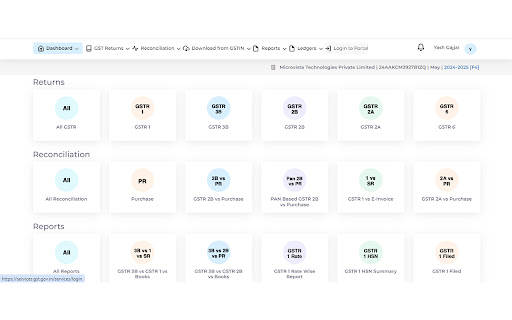
PowerGST Extension simplifies navigating GST portal for 'Login' and 'Downloads'. PowerGST Extension simplifies navigating GST portal for 'Login' and 'Downloads'.

WOP GSTR Downloader
Automation helper for GST return downloads. WOP GSTR Downloader helps you automate GST return and ledger file downloads from official GST portals after you click `Run`. Prerequisites: - Chrome browser - Logged in GST account on official GST portal - Extension installed and enabled - Download location permissions allowed in Chrome Basic Usage: 1. Open GST portal and log in. 2. Open the extension popup. 3. Select FY, Return, and File type. 4. Click Run to load review status. 5. In Review Status, choose month-wise action: - Download / Generate as applicable - Select All Download / Select All Generate where available 6. Click Run Selected Months to execute. 7. Use Stop anytime to stop flow. Stop and Completion Behaviour: - Clicking Stop halts the active flow and status becomes Stopped. - After all selected items finish successfully, status becomes Completed. - If session logout is detected, flow stops and asks user to log in again. Ledger Date Range Behaviour: - You can choose: - Continue with Selected FY Date Range - Select Specific period to download - Specific period date inputs are shown only when that option is selected. - FY mode does not use future dates; end date is capped to current date. Troubleshooting - If Quarter/Period selector is temporarily missing, the extension waits and refreshes automatically. - If portal page changes or slow load happens, retry with stable internet and keep the GST tab active. - If a file is slow to appear for download, the extension retries click as per flow logic. - If anything is stuck, click `Stop`, return to dashboard, and run again. Data and Safety - Works only on GST domains: - Uses local Chrome storage for runtime state. - No third-party ad sharing. Before using, for smooth performance: 1. Go to Chrome `Settings -> Downloads` and turn off `Ask where to save each file before downloading`. 2. Set your preferred default download folder. 3. Open Chrome settings (`Ctrl + K`), go to `General`, and uncheck `Always open PDFs saved from the web`. Important: - This extension is a personal project built to automate repetitive GST workflow tasks. Open for feedback: worldofprofessionalsin@gmail.com

Notice Alert
Notice Alert Extension simplifies navigating GST and Income Tax portals for 'Additional Notice replies' and 'Notice submission'. Notice Alert Extension simplifies navigating GST and Income Tax portals for 'Additional Notice replies' and 'Notice submission'.

XLSDEAL GSTR-N
Quick GSTR-N JSON data download/View/Update from the GST Portal || Developed by gst.xlsdeal.com Radhe Radhe!! This is a free Tool: that helps you to Bulk Download(s) JSON, PDF & EXCEL data files and also you can View Live data without download > [GSTR1, GSTR2A, GSTR2B, GSTR3B, GSTR9] in Excel, PDF & JSON Bulk Download > Cash Ledger, Credit Ledger View in (IGST,CGST & SGST Wise) in Excel > M2M Returns Info & Compairison > Notices Views in a Single Table > Search GSTINs (Active/Inactive, Name & Address, Current Filling Status) > IMS Manage (Both Inward & Outward) Quickly bulk excel upload to update > All Challans Download for the full year at once in Tabular format from the GST Portal at one place by single click for several months at once. You can also Export/Download data to Excel file. Optional: You can transfer json downloaded files to gst.xlsdeal.com by singe click, which will reduce your manual effort to upload files one by one to gst.xlsdeal.com. This will reduce your time and effort to move one window to another and waiting for download the GST data and for further reconciliations. This will be your most efficient way to download/Mange offline gst data without using any paid/third party apis. Thanks for using 'XLSDEAL GSTR-N" tool developed by www.gst.xlsdeal.com Notes: You can visualize your downloaded json file data in the tabular format(s) or export to excel file format also here.

Taxtribute GST Assistant
GST Extension to quickly download GST returns from GST Portal This extension will enable the users to automate the entire process of downloading Json, excel and PDF files from GST portal. Taxtribute extension will assist tax professionals to download following returns from GST portal: Rather than generating and downloading 12 files for each month (i.e. 24 clicks), the entire data for a financial year will be generated and downloaded in merely 2 clicks. We have ensured that the common is in compliance with the guidelines issued by Google Chrome: 1. Our extension does not display product ratings/ reviews and we do not intend to inject ads into web pages. 2. Services provided vide this extension are intended for a single purpose (i.e. to efficiently download data from GST portal) 3. Our extension is no way related to email notifiers combined with a news aggregator. 4. We are not providing PDF converter and will not change default search engine of any user.
