
mkpmadpjiphhpondccmkndccfjknbjdi
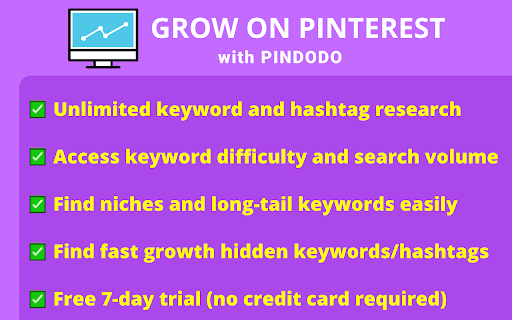
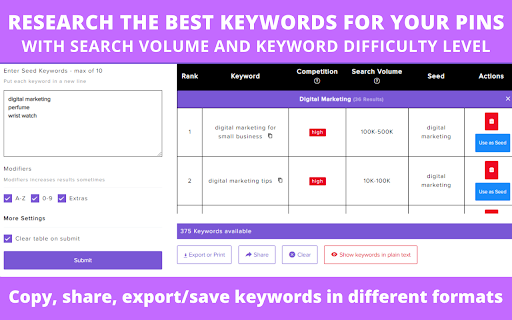
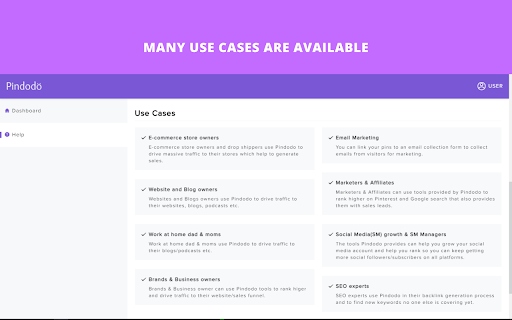
Get huge traffic with your Pinterest pins 🚀 Boost Your Pinterest Growth with Pindodo - The Ultimate Pinterest SEO Tool! 👉 Pindodo has the best tools to help you gain more visibility/traffic on Pinterest. 👀 Discover hidden Pinterest keywords/hashtags for your pins to get seen by more people and rank faster than your competition using Pindodo's advanced keyword and hashtag research tools. 🚩 Pinterest shows about 5 to 12 keywords/hashtags to everyone, just like your competitors. Using the similar keywords and hashtags as your competitors will yield lower results. 💡 Pindodo gives you a massive competitive advantage by helping you discover hidden Pinterest keywords and hashtags unavailable to everyone else. 👉 Start growing your Pinterest account the easy way today with Pindodo. 🧐 Find out exactly what your audience is looking for. 📊 Uncover hidden keywords/hashtags for exceptional results. 🌐 Explore keywords in English and other languages to boost your local SEO. 🎯 Find niches and long-tail keywords easily. 📈 Gain insights into keyword search volume and difficulty. 🔄 Copy keywords with a single click for seamless integration. To boost your pin's reach and gain more followers, you must use the right keywords and hashtags in your Pinterest pins. With our Pinterest SEO tool, you can easily find the most relevant keywords and hashtags to gain more followers/views! ✅ Optimize your Pinterest SEO and see results in five (5) days. ✅ Identify the most relevant keywords and hashtags for your pins. ✅ Access keyword difficulty and search volume. ✅ Discover long-tail keywords. ✅ Copy keywords with a single click. ✅ Export your keywords and hashtags in Excel, CSV, or PDF formats. ✅ User-Friendly UI & Extremely Easy to Use. ✅ Live chat and email support for assistance. ✅ Free 7-day trial (no credit card required). 🚀 Open Pindodo, log in/register, and choose Keyword or Hashtag research. 🎯 Supercharge your Pinterest strategy with targeted suggestions. 🏆 PINNING SUCCESS WITH PINDODO: ============================== Our tool assists bloggers, E-commerce store owners, brands and businesses, Etsy shop owners, SEO experts, Social Media Managers and Affiliates marketers daily to identify the best niche keywords and top keywords to boost their pin's clicks and SEO growth. 🚀 Pindodo vs. the Rest: ===================== Pindodo is the best alternative to cliprise, tailwind, keywordtool, keysearch, ubersuggest, ahrefs, semrush and pin inspector as it is your ultimate Pinterest SEO companion, offering exclusive insights and advanced research tools to skyrocket your growth. 👉 Ready to boost your Pinterest growth? Install Pindodo now! Share your thoughts! We thrive on your feedback for continuous improvement. Happy Pinning on Pinterest! ❓ Disclaimer ============= We are not associated with Pinterest.

Etsy™ Tags Tool for EHunt
Free Etsy Tags Tool. Find the Best Listing Tags or Keywords for Etsy SEO Strategy. This Etsy Tags extension is used to check competitors' tags directly from Etsy. You can start it from the home page, a keyword search page, a specific category page, a popular product detail page or an Etsy shop page. Features: >Etsy Tags Analyzer Researching Etsy tags and keywords is the key to get your shop listings seen. With this Etsy plugin, you will get all your competitors' tags in real-time search results in one click. Besides, you will see a clean table show the tags performance: ‒ Tags Frequency ‒ Tags Views, Favorites, Competition, Sales ‒ Google Trends >Etsy Tags Extractor You are able to Bulk copy or export Etsy Tags to csv after exploring popular Etsy tags. >Etsy Tags Generator Etsy Tags Generator can help you find relevant, low competition Etsy tags/keywords to improve your listings. (This feature is under development, so stay tuned!) 💡Need to Know: Both new and existing sellers may be stuck optimizing their Etsy Shops. EtsyHunt is a all-in-one Etsy seller tool, allowing you to make informed decision. Please check in https://etsyhunt.com. The term 'Etsy' is a trademark of Etsy,Inc. And is not endorsed or certified by Etsy

Pinterest Pin Stats - Sort Pins
Reveal Pinterest stats for each pin! Sort pins by likes, comments or creation date with this marketing analyzer tool 🚀 Looking for a powerful tool to optimize your Pinterest strategy? Meet our Chrome extension, the ultimate solution for creators and marketers. This extension provides unmatched functionality for analyzing and improving your content strategy. 🔑 Unlock the Power of Pinterest Analytics Our extension offers unmatched capabilities, providing you with real-time Metrics, such as saves, likes, comments, and creation dates. Use these Pinterest Pins checker to craft a data-driven content strategy tailored to your audience. • Stats Display: View vital stats like saves, likes, shares, comments, and creation date on each pin. • Pin Stats Viewer: Analyze and gain actionable Pinterest insights to guide content strategy. • Local Data Storage: Automatically saves data of the displayed pins to your browser's local storage. • Filter pins: Easily filter the displayed pins by Saves. More filters will come soon. • Advanced Pin Analytics on Demand: Click the “Open Pin Stats Table” button to open a dedicated page with a detailed data table. ⚠️ The extension displays stats on the following pages: - Home Feed - Search Page - Ideas Page - Detailed Pin Page For the best experience, please ensure you are logged into Pinterest. 🔀 Effortless Sorting and Filtering Say goodbye to manual sorting! Use the extension’s Data Sorting Tool to: ➤ Sort Pinterest pins by likes, comments, or date. ➤ Filter Stats to focus on specific metrics. ➤ Enhance your workflow with advanced filtering and sorting options. 🎯 Boost Your Pinterest Content Strategy Understanding pin performance has never been easier. With features like sort by number of comments, sort by likes, and sort by date, you can identify top-performing content. Use our Pinterest stats checker to: 1️⃣ Discover engaging content ideas. 2️⃣ Improve Content Strategy. 3️⃣ Elevate your Pinterest marketing efforts. The Pin Stats Table page allows you to: • Sort pins by any metric. • Use filters to narrow down your focus. • Get a comprehensive view of Pinterest Pin Stats. Pinterest Pin Stats extension is perfect for: ▸ Content creators looking for Insights. ▸ Marketers aiming to Analyze and Sort Pins for campaigns. ▸ Anyone seeking Enhanced Social media experiences through deeper analytics. 🤔 Why Choose This Online Marketing Extension? 💡 Image and videos Data Insights: Gain a competitive edge with detailed metrics. 💡 Pin Sorting App: Streamline your workflow by sorting posts effortlessly. 💡 Filter and categorize ideas: Quickly identify high-performing content. 📌 Install the extension. 📌 Browse Pinterest as usual. 📌 View Pinterest Pin Stats directly on the page. 📌 Access saved items on the Pin Stats Table page for further analysis. ⏫ Elevate Your Pinterest Game With the ability to Analyze Pinterest Pins, you’ll always know what’s working. Our Pinterest stats checker makes it simple to: 📍 Spot trends with Pinterest stats checker. 📍 Create better-performing posts using Pin Stats Insights. 📍 Organize and analyze your pins with Sorting App features. ➤ Save time with automated pin data collection. ➤ Make informed decisions with Pinterest Analytics. ➤ Stay ahead of competitors with idea Insights. ➤ Generate actionable ideas to improve your content strategy. 😌 Simplify Your Workflow This extension integrates seamlessly into your daily creative workflow. With features like sorting and filtering, it’s never been easier to analyze ideas. Install the Stat Viewer now and unlock the potential of Pinterest Image Metrics. Whether you're a seasoned marketer or just starting, this tool will revolutionize the way you Analyze Pinterest Pins. 🎉 Transform your Social media strategy today ➡️ Gain valuable Performance Insights and create content that resonates. ➡️ This Pin stats checker is your ultimate companion for achieving content success. ➡️ Maximize your Pinterest potential with this Online Marketing Extension. ➡️ From Analyzing Posts to sorting and filtering, it’s your all-in-one solution. Designed with ease of use in mind, this extension ensures that you spend less time on manual tasks and more time crafting engaging strategies. Every feature is tailored to provide clarity and enhance decision-making. By leveraging detailed analytics, you gain a clear understanding of trends and opportunities. This empowers you to make smarter choices and consistently achieve better outcomes in your campaigns.

Pin Trends - Search Volume, Pin Stats and More on Pinterest!
See search volume metrics on Pinterest Trends, your own pin stats, and more for better content strategy decisions. Pin Trends helps Pinterest marketers and content creators make data-driven decisions by displaying search volume and account pin stats directly on Pinterest. Key Features: • See real search volume numbers alongside Pinterest trend data • See your own pin, board and URL stats on your profile page • One click access to explore any account on PinClicks Perfect for Pinterest marketers, content creators, and businesses looking to optimize their Pinterest strategy with real data insights. No ads, no tracking, no distractions - just valuable search volume data when you need it. Note: This extension requires an active subscription to PinClicks.com

Amazon Keyword Tool for free : SellerApp
Generate tons of Amazon suggest keywords in ONE click for free! Amazon keyword tool trusted by Power Amazon sellers worldwide. Find tons of Amazon long-tail keywords for your products with ONE click for free! Whether you're in the product research phase or trying to improve your listing to boost visibility and rank higher, the Amazon keyword research tool helps you uncover the most profitable and relevant long-tail keywords that help you rank better and improves conversions. The Amazon Keyword tool pulls thousands of keywords from Amazon search auto-suggests from your chosen marketplace. Currently, you can select the following marketplaces: 1. USA 2. India 3. Chain 4. Japan 5. France 6. Germany 7. Italy 8. Netherlands 9. Spain 10. UK 11. Canada 12. Mexico 13. Australia 14. Brazil Plus, you can select the modifiers [a-z] or [1-9] to get more long-tail keywords from the seed keywords. With these keywords, you can optimize your product listings, add keywords to the backend, or run ads on them to generate sales. 1. Is SellerApp keyword research extension free? The SellerApp Amazon keyword research tool is absolutely free. Just install and start using it. 2. How to use SellerApp's free Amazon keyword research tool? Enter the seed keyword in the search box, select the marketplace and the modifiers, and wait for the tool to fetch all the keywords from Amazon. The best part is you can extract all the keywords and analyze them further. 3. What is seed and rank in the SellerApp Amazon keyword research tool? Seed: Once you enter the main keyword and select either [a-z] or [1-9] modifiers, the tool will combine your provided keyword with each letter of the alphabet or number from 1 to 9, respectively, and create a list of seed keyword variations for your main keyword. For example, if you provide the keyword "water bottle" and select [a-z] modifiers, the tool will show you results for "water bottle a, " "water bottle b," "water bottle c," and so on, up to "water bottle z." These are all seed keywords and can be a useful way to discover long-tail keywords for your product. Rank: Rank refers to the keyword position in the auto search suggestion when a shopper search with the seed on Amazon. These keywords appear in a drop-down menu as you start typing in the search bar. 4. Where does the Keyword Research tool extract these keywords from? All these keywords are fetched in real-time from the Amazon auto search suggestions. So rest assured, you get the most recent keyword data from our tool.
