
mkoilfkdbaokgababihloledfpgjilkm
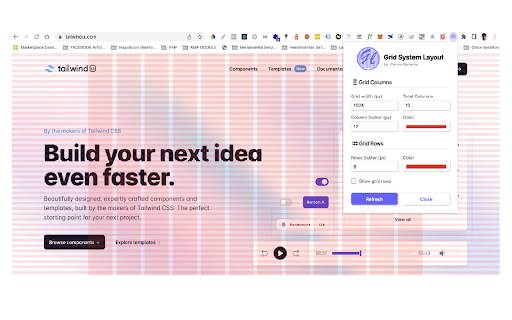
The grid system allows frontend developers, QA, and designers to check their websites according to the column and row grid system they used. You can enter the width, columns, height, gutter of your container and choose any color and hit the "Update" button to apply it quickly. It ensures frontend developers that their websites are in accordance with the UI/UX grid system. It works for all screen sizes. I hope you find it useful.

CSS Grid Overlay
Easily check the grid alignment of your page across breakpoints. Supports multiples breakpoints and the usual grid values (gutters, columns, max width, etc). Configurations can easily be saved and shared among team members as json objects. [ { "columns": 4, "margins": 16, // px before and after the first and last column // these gutters work like margins: // if distance between columns is 32px, gutters are 16 "gutters": 16, "from": 0, // start of breakpoint in px // Optional values // "to": 599, end of breakpoint in px // grid will be centered after this maxWidth in px // otherwise it'll be full width // "maxWidth": 1440, // if you want to move the grid // (e.g. in a style guide with a left sidebar // you'd use offsetLeft to push the grid to the right // "offsetTop": 0, // "offsetRight": 0, // "offsetBottom": 0, // "offsetLeft": 0, // "backgroundColors": { // "columns": "rgba(234, 23, 140, .3)", // "gutters": "rgba(0, 231, 255, .3)", // "margins": "rgba(0, 191, 165, .3)" // } } ]

Layout Grid Visualizer
A Chrome extension to visualize and customize grid layouts on webpages 🟦 Layout Grid Visualizer 🟦 A must-have Chrome extension for web developers and designers! Instantly overlay a fully customizable grid on any webpage to visualize, debug, and perfect your responsive layouts. ✨ Key Features: 🛠️ Customizable Grid Settings: Adjust grid width, number of columns, gutter size, color, and opacity to match your design system. 🧩 Split Grid Mode: Define custom column widths for advanced, non-uniform grid layouts. 🖱️ Grid Clickability Toggle: Make the overlay interactive or pass-through for seamless page interaction. 🎹 Keyboard Navigation: Move and position the grid overlay precisely using arrow keys (with Shift for larger steps). 🎹 Keyboard Shortcut: Toggle grid overlay with Alt+Shift+G — no popup needed. 💾 Persistent Overlay Position: The grid’s position is saved and restored per tab for a consistent workflow. 🛡️ Auto-correction & Tooltips: Invalid values are auto-corrected with helpful tooltips. ♿ Accessibility: Fully keyboard navigable with ARIA labels for an inclusive experience. ⚡ Instant Feedback: All changes update the grid in real time. 🔄 Reset to Defaults: One-click reset for all settings, including split grid state. 🚀 Performance Optimized: Efficient DOM updates and storage for a smooth experience. 🚀 How It Works: 1️⃣ Click the Layout Grid Visualizer icon in your Chrome toolbar. 2️⃣ Instantly overlay a grid on any webpage. 3️⃣ Customize grid settings and modes to fit your needs. 4️⃣ Use keyboard shortcuts or drag to reposition the overlay. 5️⃣ Toggle the grid on/off or reset to defaults anytime. 🌟 Why Choose Layout Grid Visualizer? Whether you’re building a new layout, debugging CSS, or reviewing responsive breakpoints, this extension gives you the power and flexibility to see your grids in action—no code changes required! 🔒 Privacy: No data is collected or shared. All settings are stored locally in your browser.

CSS Grid Overlay
Visual grid system for web developers - Create custom column and row grids for any website Visual Grid Overlay for Web Design & Dev A flexible, privacy-first grid system built for designers and developers. Quickly create custom column and row grids—fine-tuned to your layout needs—right inside your browser. 🔧 Key Features • 🎯 Custom Grids – Control columns and rows: count, gutter, margin, color, opacity • 📱 Responsive Breakpoints – Toggle layouts for Desktop, Tablet, Mobile (Landscape & Portrait) • 🚀 Live Editing – Adjust and preview changes instantly • 🎨 Fully Customizable – Every detail is tweakable • 💾 Per-Site Settings – Your grid config is saved per domain • 🖤 Dev-Friendly UI – Dark mode to match your browser dev tools ⚙️ How to Use 1. Toggle Grid – Click the extension icon to turn the grid on or off 2. Pick a Breakpoint – Choose from Desktop, Tablet, Landscape (L), or Portrait (P) 3. Customize Columns: • Count – 0–24 columns • Gutter – Spacing between columns • Margin – Outer padding • Color & Opacity – Set visibility and look 4. Customize Rows – Same controls as columns 5. Reset – Revert to default settings anytime Grids adapt automatically as you resize your browser. 💡 Tips • Set column or row count to 0 to hide that grid • Use low opacity (5–15%) for subtle overlays • Choose different colors for columns and rows for clarity • Settings are saved per domain and persist across sessions 🔒 Privacy-First by Design • No data collection • No tracking • No remote storage • Only runs on sites you activate it on • All settings are saved locally on your device 🛠 Support • Make sure the extension is enabled • Refresh the page after installing • Won’t work on Chrome internal pages (chrome://, chrome-extension://) Made with ❤️ for web developers and designers.

Grid Master Pro
Premium customizable grid system overlay for web developers Transform your web development workflow with Grid Master Pro - the essential tool for precise grid layout visualization and implementation. ## Overview Grid Master Pro is a lightweight yet powerful browser extension that provides real-time grid overlay visualization for web developers. Built specifically for Bootstrap 5, it enables pixel-perfect responsive design implementation with zero configuration. ### 🎯 Professional Grid Visualization - Real-time customizable grid overlay system - Built on Bootstrap 5's grid architecture - Instant visual feedback for layout adjustments ### 📱 Responsive Design Tools - Support for all Bootstrap 5 breakpoints (xs to xxl) - Real-time breakpoint indicator - Live screen size display - Comprehensive responsive testing ### 🛠️ Developer Experience - One-click grid toggle - Non-intrusive overlay system - Local settings storage - Zero impact on page performance ## Perfect For - Front-end Developers - UI/UX Designers - Web Development Teams - Quality Assurance Engineers Elevate your responsive design workflow with Grid Master Pro - the professional's choice for grid system visualization.
