
mkdaolldfcljbalhclcakgjjiklajdof
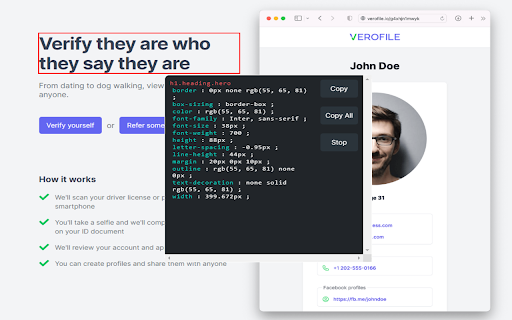
A script to inspect, scan and copy CSS properties of any element on the web page A free tool to inspect and edit CSS right in the browser without a need to open developer tools. Press 'alt + s' to start the inspection. Click on "Copy" to copy the CSS properties of the element. Click on "Copy All" to copy the CSS properties of the element as well of its children.

Highlight Focus
This chrome extension will help you to highlight the current focused element in a webpage Elevate your frontend development experience with the Focus Highlighter Chrome Extension. This indispensable tool empowers frontend developers by providing a swift and efficient way to highlight the active element or focused element on any web page. With just a click on the extension icon or the Ctrl+Shift+E shortcut, streamline your workflow and gain instant clarity in your accessibility compliance frontend project.

CopyCss - Copy css scan from any website.
This browser add-on enables you to extract CSS from any website and also allows you to clone the code as components for JSX or Tailwind CSS. Increase your productivity and reduce development time to lightning speed. 【changelog on March 21th:】 Toggles selection of parent, child or sibling elements of the selected element 【changelog on March 18th:】 1. Fixed the display issue during JSX preview 2. Fixed the issue that the style is missing when the class form is in the class form 3. Fixed the removal of some redundant styles -Features- Copying the CSS of this element manually is a hassle. With CopyCss, you can simply click to obtain it. Design your perfect page effortlessly. You can get the code for any element on any website and rapidly copy it as HTML/JSX, CSS/Tailwind CSS, or any other format of your choice. Save the HTML and CSS code of individual elements along with their child elements as complete components. You can store these Codepen snippets in the cloud and build a library of attractive elements for your projects starting today.

CSS Peeper
Inspect website styles in seconds. Supercharge your workflow, and save hours of work. CSS Peeper is the ultimate Chrome extension for designers and developers who want a seamless way to inspect and extract design properties from any website. Say goodbye to digging through complex code. CSS Peeper provides an intuitive, organized interface to access key design details. Professionals deserve tools that save time. Let CSS Peeper streamline your workflow and help you work smarter, not harder. Join 500,000+ professionals who are already making the most of their time. Supercharge your workflow with advanced design inspection features and save hours of work. No more digging in a code. 👉 Get CSS Peeper for Free! Install now and start inspecting websites in seconds. Visit https://csspeeper.com for more details. ✦ Inspect design properties effortlessly. Stop digging through the code. Save hours by quickly inspecting element properties with a simple point-and-click. ✦ Explore colors used on your favorite sites. Browse a variety of colors, find inspiration, and easily check contrast. Love a palette? Export it to your favorite design tool. ✦ Identify typography. Explore the typography across any site, uncover unique font pairings, and check the most relevant text properties. ✦ Explore assets. Browse and download all images, icons, and graphics used across a website. ✦ Instantly preview and copy the CSS of any element, turning great design into reusable code. ✦ Browse and explore the typography in use on any website. Preview the typography hierarchy to understand font choices, sizes, and styles, helping you design confidently and efficiently. ✦ Effortlessly identify typography instances and gain deeper insights into font style applications. Navigate to a dedicated screen to inspect each type of style with precision. ✦ Browse colors by semantic grouping including typography, background, border, and more. Identify colors in context to get more insights. ✦ Inspect individual color instances and explore their use cases, including value, category, class, and design token. ✦ Explore gradients color by color and preview every shade to recreate stunning visual effects with precision. ✦ Contrast scanner helps you stay aligned with the best accessibility practices. Instantly assess contrast issues, ensuring your websites are beautiful and accessible. ✦ Smart Inspector offers an advanced way to inspect design details at a glance. It provides deeper insights into design properties, including color contrast, shadows, and elevation effects. ✦ Switch to Sidebar Mode to gain full access to the website’s viewport. You can see the full list of available features at https://csspeeper.com/pricing By using the CSS Peeper extension, you agree to our Terms & Conditions (https://csspeeper.com/terms-and-conditions) and Privacy Policy (https://csspeeper.com/privacy-policy). CSS Peeper is proud to support Learn to Code, a nonprofit that supports our mission to help everyone become better coders. By using affiliate links, we invite you to help our mission when you are shopping at partner stores, at no cost to you. Support is always optional, and can be permanently disabled at any time.

Inspect CSS
The easiest way to inspect and edit CSS Features: 🔎 Get CSS Properties from any element by selecting it ✏️ Get and edit element attributes 📷 Download website assets ⌨️ Add your custom CSS to the website 🎨 Get the color palette of the website 🧭 DOM Navigation 🎯 Color picker
