
mkblmpbpgpgkbmnkmjbkgcblifibpddd
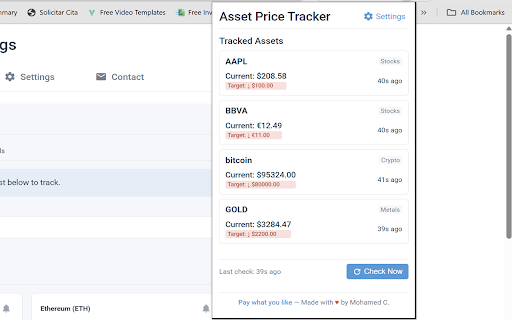


Tracks prices of cryptocurrencies, stocks, and precious metals, providing alerts when target prices are met. **Never Miss a Price Movement Again with Asset Price Tracker!** Tired of constantly checking different websites and apps for the latest prices of your investments? Asset Price Tracker is your all-in-one solution, right in your Chrome browser! Monitor cryptocurrencies, stocks, and precious metals effortlessly and get instant sound notifications when prices hit your specific target levels. Stay informed and make timely decisions without interrupting your workflow. **Key Features:** * **Multi-Asset Tracking:** Keep tabs on all your important assets in one place: * Cryptocurrencies (e.g., Bitcoin, Ethereum, Dogecoin - powered by CoinGecko) * Stocks (e.g., AAPL, TSLA, AMZN - powered by Finnhub) * Precious Metals (e.g., Gold, Silver, Platinum - powered by Metals.live) * **Custom Price Alerts:** Set unlimited alerts! Choose an asset, specify a target price, and decide if you want to be notified when the price goes ABOVE or BELOW that threshold. * **Instant Sound Notifications:** Get immediate audio cues the moment your price target is reached. Choose from several distinct sounds so you always know what's happening. * **Clean & Simple Interface:** Accessing your tracked assets and adding new ones is quick and intuitive via the extension popup. * **Customizable Refresh Rate:** You control how often the extension checks for price updates (from every 30 seconds to every 15 minutes) to balance real-time data with resource usage. * **Currency Conversion:** Prices can be displayed in your preferred local currency (powered by ExchangeRate-API). **How It Works:** 1. Click the Asset Price Tracker icon in your toolbar. 2. Select the asset type (Crypto, Stocks, Metals). 3. Enter the ticker symbol (e.g., BTC, AAPL, XAU). 4. Set your 'Notify Above' or 'Notify Below' price target. 5. Click "Add Asset". 6. That's it! The extension will monitor prices in the background and alert you. **Important Note on Stock Data (Finnhub API):** This extension uses the Finnhub API for stock data. By default, it uses a free sandbox key which has limitations on the number of requests. For the most reliable and frequent stock price updates, we **strongly recommend** getting your own FREE API key from [https://finnhub.io/](https://finnhub.io/) and entering it in the extension's options page. Your API key is stored locally and only used to fetch data directly from Finnhub. **Privacy Focused:** * Your list of tracked assets and price targets are stored locally on your computer using Chrome's storage. * The extension only makes external requests to the necessary APIs (CoinGecko, Finnhub, Metals.live, ExchangeRate-API) to fetch the latest price data. * If you enter your own Finnhub API key, it is also stored locally and only used for its intended purpose. Please review our Privacy Policy for full details. [**

Price Tracker
Use price tracker to monitor websites for products, flight tickets. Get price drop alerts, check price history, find the lowest one Meet the ultimate solution for skilled shoppers: the Price Tracker extension for Google Chrome is your intelligent assistant for smarter shopping. It automates the tedious work of monitoring costs so you never overpay. Stop refreshing product pages and guessing when to buy. This price tracking tool gives you control and clarity, turning uncertainty into confident purchasing decisions. 👨💻 Here is what our extension helps you avoid: • Wondering if the price will drop tomorrow • Manually checking flight tickets every day • Missing limited-time sales on platforms like Steam • Lacking historical data to know a good deal Imagine knowing the exact moment a product hits your desired value. This Price Tracker makes that a reality. It’s a powerful websites monitoring tool that works silently in your browser. 🚀 Getting started takes less than a minute: 1️⃣ Install the Price Tracker extension from the Chrome Web Store. 2️⃣ Navigate to any product page, like on Amazon or Walmart. 3️⃣ Click the extension icon to activate monitoring with one click. The core of any effective strategy is visibility. Our tool provides exactly that through clear, actionable alerts and comprehensive history. 💎 Key features that set this tracker apart: ➤ Universal Compatibility: Track prices on almost any retail website. ➤ Custom Alerts: Get notified via Telegram bot when values change. ➤ Historical Charts: Visualize trends with an intuitive price history tracker. ➤ Multi-Platform Tracking: Simultaneously monitor products, flights, and game sales from a single dashboard. ➤ Constant Vigilance: Maintain a reliable price watch on your items. Whether you're a casual shopper or a reseller, this tool adapts to your needs. It functions as a reliable Amazon tracking assistant and a vigilant Walmart price tracker. ⚙️ Customizable Tracking Settings Each tracking card comes with a variety of customizable settings to suit your needs: ✅ Tracking Status: Enable or disable tracking based on your preferences. ✅ Check Interval: Set the frequency of checks, ranging from 1 minute to 24 hours. ✅ Notification Preferences: Choose to receive alerts in Telegram when prices change. ✅ Condition-Based Alerts: Configure notifications to trigger only when the cost meets your specific conditions. 🎯 Consider these everyday use cases for the extension: ➤ Monitoring a specific laptop model or a smartphone ➤ Tracking flight costs for your next vacation ➤ Watching seasonal items like air conditioners or heaters ➤ Observing stock price history for investment research For avid gamers, it doubles as a savvy steam sales tracker. For homeowners researching the market, it can signal when home prices drop in listings. It serves as both a retail price monitoring tool and a solution for specialized scenarios. The built-in historical price tracker gives you perspective. You can see if today’s “deal” is truly the lowest price finder has seen, or just a marketing tactic. 💻 User-Friendly Interface Navigating through your tracking list is simple and intuitive. You can filter by tracking status, view the history of value changes, and edit tracking titles for better organization. 🕐 Value History and Alerts Use the price history checker to analyze trends and make informed purchasing decisions. 📈 🔔 How the intelligent alert system works: 🔹 You set a desired value threshold for any item. 🔹 The extension monitors it continuously. 🔹 When the condition is met, you receive a price drop alert in Telegram. 🔹 You click the notification to go directly to the deal. This automation replaces manual checks, letting you track price changes effortlessly. Your privacy is paramount: all your data remains secure on your device. ⚡️ Helpful Tips for Enhanced Experience To make the most of the extension, consider these helpful tips: 🔸 Press Escape to reset filters quickly. 🔸 Double-click on the gray background to expand settings for all cards. 🔸 Use the search field to find specific items and save search strings as tags for easy access. ⁉️ Can I track value on any website? Yes, our price tracking software is designed to work on most major retail and travel sites. ⁉️ How often are values checked? You control the frequency. You can set up automatic checks as often as every few minutes or just once a day. ⁉️ What kind of alerts will I get? You will receive notifications from a Telegram bot about value changes. This way you'll know exactly when the price dropped. ⁉️ Is it difficult to set up? Not at all. The extension simplifies how you monitor website changes. The setup process is guided and straightforward. 🏆 Who benefits most from this website monitoring tool? • Savvy shoppers hunting for the top discounts • Frequent travelers comparing flight price history • Resellers needing to monitor price across competitors • Investors analyzing historical market data • Anyone tired of wondering if they got a good deal By combining the functions of a auto price checker, a change detector, and a historical price tracker, this extension offers unmatched value. It’s more than a simple plugin; it’s a comprehensive price monitoring software suite in one tool. Stop leaving money on the table. Take control of your spending and make informed purchases with reliable data. Install the Price Tracker extension today and transform how you shop online. Your wallet will thank you. Start your journey towards smarter, stress-free shopping now. This Price Tracker is ready to become your most trusted shopping companion.

Price tracker
Use price tracker to monitor and check prices on websites for products, flight tickets, and services. Get alerts, view price history The price tracker extension offers multiple options to track prices and monitor websites. 🖱️ Price Tracking with One Click One of the price tracker's standout features is its intuitive interface for tracking product history and prices effectively. Whether you want to track prices from your favorite online stores or specific changes on a website, you can do it at your fingertips! When you set an alert for a specific task, it checks the product frequently and provides you with regular updates. 🔒 History of Changes Price history checker goes the extra mile to update you with the store's history of all updates. Creating each track will show you a detailed graph displaying historical price trends for deeper insights is also available. 🔀 Multi-selection and Multi-Tracking Do you need to track multiple products on a single webpage? Price tracker’s exclusive option supports this, too! The multiselection feature makes it easy to track various price drop alert and points. ⚠️ Notifications and Alerts We understand your concern about missing updates on your favorite product category! That’s why we provide specialized notifications and alerts when a sale starts, the price of a particular item drops, or any other changes occur. ⭐ Light and Dark Modes Do you want to switch between light and dark modes based on your requirements? Yes, our app offers you the flexibility to switch between light and dark modes. Hence, it would be eye-friendly to find products and check their details. 🌟 Easy Installation Our price tracker has a quick and easy installation, as discussed below: 1. Click the "Add to Chrome" button on the top of extension's page. 2. Next, a confirmation pop-up will appear. Click "Add Extension" to confirm the extension installation. 3. Once the installation is complete, you can notice the price tracker icon in the Chrome toolbar. 4. That's it! Now, you can begin exploring our special extension instantly! Other things you can do with price tracker: – Track prices; – Track recent price drops; – Set price drop alerts; – Stay updated on product price history; – Obtain price history charts; – Options for availability alerts set; – Filters; – Multi-selection (multitrack); – Use price tracker as a wishlist; – Browser notifications; – Different modes (including light and dark modes). ❓ How to use price tracker? Price tracker is an extension for Google Chrome, that works in your browser. Here’s how to get started: 1️⃣Install the extension: You can instantly download and install the price tracker from the browser’s extension store. 2️⃣Go to the specific webpage: Next, go to the particular website where you want to track the price, like Amazon, Walmart or Target. 3️⃣Create a track: Click the "Create Track" button and pick the block or content you want to keep track of. 4️⃣Stay updated: Once you set the tracking, our price monitoring tool will keep track of it and notify you of specific updates. You can also remove or change the monitoring based on your requirements anytime! 📜What are the Advanced Features we offer? If you ask us why you should use this price watches, we offer you advanced features to make our clients happier, as discussed below: ▸ Filters: You can set special filters to notify you of specific changes when the price drops below a particular threshold, and more! ▸ Choose internal blocks: You can choose specific internal blocks when you set it to track a particular page with complex content. Thus, it helps to enhance accuracy and be specific about precisely what you want to track. ▸ Image tracking: In addition to text or price tracking, we also offer to track images. This feature will keep you updated when visual changes, such as updated product images, are made. You may find so many price trackers in the market and the store. But here’s why our price monitoring tool is the best choice: • User-friendly: Our user-friendly interface requires no tech savvy. With just one click, you can set up your tracking. • Real-time updates: We offer browser notifications and alerts to keep you updated instantly. Thus, you will never miss any of the finest deals or stay updated on price history – we guarantee that! • Versatility: Our tracker helps you monitor online shopping stores and other ecommerce websites according to your requirements (it is more than a web monitor). • Reliability: Our tracking algorithms are accurate, and we provide timely notifications and alerts. We don’t store any personal information and ensure consistent results. ❓ How can I track the price of a watch and its price history? After downloading this extension, you can visit the product pages and set up the price watch directly to track the product's price. You'll see the bar, that shows the price range for a product over time. The left end marks the lowest price, and the right end shows the highest. The arrow indicates the current price within this range, letting you see if it’s closer to the low, high, or middle of past prices. This way you can keep track of the current price, price history, and more through this chrome extension to get data and save the best deals. ❓ What is price tracking? A price tracker is a tool for tracking, comparing, and analyzing the pricing, and discounts of products from websites or stores based on your requirements. These extensions act as price monitoring software to update the shoppers or buyers about prices. ❓ How do I turn on track price? Using our extension's tracking feature, you can turn on tracking price on any e-commerce webpage. Once you set the tracking, you will receive real-time notifications. It helps you identify when product dropped and save the real deals.

Crypto Price Tracker
Short Description: Track Bitcoin, Ethereum, and other cryptocurrencies. Charts, portfolio, alerts, and news — all in one place. Full Description: Crypto Price Tracker is a Chrome extension for real-time cryptocurrency monitoring. 📊 Price Tracking: Monitor 10 major cryptocurrencies (BTC, ETH, BNB, SOL, etc.) with live prices, 24h change, and updates. 📈 Interactive Charts: View price trends over 24h, 7d, and 30d periods. 💼 Portfolio Management: Track your holdings and real-time profit/loss. 🔔 Smart Price Alerts: Set custom price notifications. Works in the background. Perfect For: Traders, investors, and anyone following the crypto market.

ETH Ticker | Ethereum Price Monitor
Ethereum and Token exchange price ticker. Displays the current price on the badge icon, Chart and Alert notifications. ETH price tracker for Chrome with live badge price, mini chart, alerts, and a quick market switcher. Monitor Ethereum across popular exchanges (Binance, Coinbase Pro, Kraken, Bitfinex и др.) and choose pairs like ETH/USDT or ETH/BTC. Set custom alerts when price crosses your threshold. - Real-time ticker on the icon - Custom alerts for moves you set - Quick market and pair selection in the popup - Works with major exchanges and common ETH pairs
