
mkbaaakkfpacbbcpichcnmjdmgagalfa

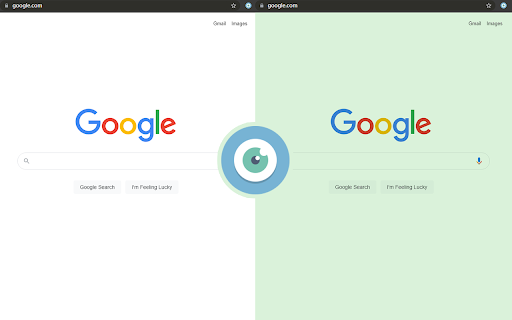
Protect your eyes and reduce eye fatigue by modifying the background color and adjusting the screen brightness. * It supports replacing the dazzling white in the web page background with olive green, local yellow, bean paste green and light gray, or any color you customize. * Support to adjust screen brightness. * Prevent eye discomfort caused by focusing on Web pages for a long time and protect eyesight.

eyeCare - Protect your vision
Notifies you in multiple ways to take breaks and helps you with eye exercises based on 20-20-20 rule and with lower back exercises. If you are spending too much time in front of computers, your eyes are the ones that gets strained to the maximum. Taking breaks at regular intervals will help to ease this strain and to protect your vision. A good rule here is to follow 20-20-20 rule to keep your vision intact for a healthy future. As per this rule, every 20 minutes, take your eyes off your computer and look at something 20 feet away for at least 20 seconds. eyeCare will remind you to take this break in multiple ways. Features: 1. 20-20-20 rule based break reminder setup. 2. Ability to customize the duration of the reminder. 3. Ability to run in the system tray from system startup, even when your browser is not running. 3. Provides you instructions on how to spend your break time. 4. Ability to customize and configure the break alert using desktop notification, sound notification etc. 5. Ability to disable and enable quickly when needed, with a single click. 6. The extension icon can flash/blink as break reminder for 20 seconds 7. Countdown display of the time remaining for the break (can be used as a standalone countdown timer too). You can reset the countdown as required. 8. Automatic synchronization of settings across your devices on the same browser. 9. Ability to automatically resume eyeCare protection after a preset duration. This is a must-have extension for computer professionals with lower back (spine) related problems, neck pain, eye-strain related headaches and red-eye. Repetitive stress injury (RSI) and eye strain are the common ailments among computer users. Taking a break every few minutes is going to save your health and vision. Have a great health! - “The greatest wealth is Health.” Facebook: https://www.facebook.com/care.for.your.eyes Website: http://eyecare.apps4u.net/

购物党自动比价工具-AI看差评和商品对比
浏览更多:https://www.gwdang.com/v2/app/extension/

划词翻译
一站式划词 / 截图 / 网页全文 / 音视频 AI 翻译扩展,支持谷歌、DeepL、ChatGPT、百度、有道等 22 个国内外主流翻译服务,且均可用于全文翻译。能在 PDF 里使用。 划词翻译最初发布于 2013 年,距今已有 11 年历史,且仍在持续更新当中。 - 内置高准确度的谷歌翻译,能确保翻译结果跟 translate.google.com 是一致的。 - 鼠标划词功能,支持丰富的设置项,比如黑 / 白名单、关闭鼠标划词后通过快捷键来触发翻译等。 - 鼠标悬浮取词。 - 语音朗读。 - 内置独立翻译窗口,用于翻译浏览器外的文本。可以勾选持续监听剪切板,在任意程序复制文本即可自动弹出并翻译。 - 网页全文翻译,可以切换原文 / 译文 / 双语对照、自动开启等。 - 截图 / 图片翻译。 - 内置 PDF 阅读器,用于在 PDF 文件上实现鼠标划词、鼠标悬浮取词、截图翻译等功能。对 PDF 进行全文翻译的功能正在加紧开发中。 - 麦克风翻译。 - 音视频翻译(内测中),翻译网页中的音频 / 视频。 - 支持历史记录和收藏夹。收藏夹内容可以导出成多种文件,例如 json 和 csv。 完整功能介绍请查看 https://hcfy.ai/docs/guides/summary/ 英文单词会提供音标、详细释义、美音 / 英音朗读和词根,词根可以被点击,点击后即可查看词根的翻译结果。如果你需要,划词翻译也可以在划词后自动朗读被划选的单词。 默认使用弹窗在文本附近显示翻译结果,也可以固定在一处显示。 支持在任意程序里复制文本后,按下 Ctrl + Shfit + 1(macOS 将 Ctrl 改为 Command)查看翻译结果,无需切换回浏览器。这个快捷键是可以修改的。 支持历史记录和收藏夹,这两个功能也可以关闭。 如果你遇到了问题或者想要新的功能,可以在评论区留言,我基本上都会答复。官网(https://hcfy.ai)里也有其它反馈渠道。

Lingocloud - AI Translate Web, PDF & Subtitles
Web bilingual, PDF link, YouTube ; Lingocloud V4 + multi-model with glossary for fluent, accurate translation 1. Personalization: Customize translation styles to better match your linguistic habits. 2. Floating Ball Upgrade: Redesigned floating interactions and menu for a lighter, more intuitive experience. 3. Seamless Experience: Switch models, glossaries, or styles without refreshing the page—translations update dynamically. 4. Glossary Enhancement: No need to set translation directions; multi-language entries can now be used together. 5. Performance Improvements and Bug Fixes. More than just a translator—it's your all-in-one AI reading assistant. Lingocloud integrates a matrix of world-class AI models to provide an intelligent bilingual experience for web pages, documents, videos, and social media. V4 Model: Our proprietary model optimized for nuanced context, delivering natural and fluent translations. AI Aggregation: One-click toggle between DeepSeek V3, GPT, Qwen, GLM4, and more for multi-perspective references. 🧠 AI Bilingual Web Translation: Automatically recognizes web content for side-by-side reading. Supports AI bilingual subtitles on YouTube, Netflix, and more. 📂 AI Document Parsing: Smartly translate PDF, Word, PPT, and arXiv papers while perfectly preserving the original layout. ⚡ Real-time AI Lookup: Select text on Reddit, Discord, or X (Twitter) for instant AI-powered explanations and translations. 🌟 Core Features 1. Bilingual Webpage Translation 🌐 Click the “Lingocloud icon,” and the webpage instantly displays in bilingual parallel view! Source and translation are aligned top-to-bottom for easy comparison. The innovative layout makes reading smoother and more natural. 2. Text Selection Translation 🖱️ Highlight any text to get accurate translations instantly—no page switching needed. Stay immersed in your reading while exploring foreign content effortlessly. 3. Professional Terminology Library 📚 Built-in database of 100,000+ professional terms across multiple fields, with support for custom glossaries. Ensures precise domain-specific translations while meeting personalized expression needs. 4. PDF Translation 📄 Translate PDF documents with one click while perfectly preserving formatting and layout. Supports recognition of complex formulas—ideal for research papers and technical documents. 5. Video Subtitle Translation 🎬 Supports bilingual subtitle translation on YouTube and other major platforms. Learn while watching, enhance your language skills, and easily understand foreign-language videos. 6.Image and Manga Translation Supports one-click translation of images or comics on web pages. 👥 Who It’s For • 🔬 Researchers: Accurate translations of journals and reports • 📖 Novel Lovers: Immersive reading of AO3 and foreign fiction • 📚 Students Abroad: Easily access textbooks, papers, and academic resources • 💻 Programmers: Quick access to technical documentation and developer communities • 🌐 Trade Professionals: Accurate translation of contracts, emails, and business files • 🎓 Language Learners: Improve comprehension with bilingual parallel texts • 🧳 Global Travelers: Real-time multilingual communication and information access ℹ️ Usage Notes • 🔒 Permissions: To enable text selection, auto-translation, and video subtitle features, please allow the extension to read and modify webpage data. Video translation requires access to the current tab’s audio. • 🎁 Free vs. Paid: Register to enjoy free daily usage with a quota limit. The quota refreshes automatically each day. Upgrade to membership for unlimited access. • 💌 Feedback: For questions or suggestions, visit our website at https://fanyi.caiyunapp.com and click “Feedback” to share your thoughts! 🌈 Break down language barriers with Lingocloud and explore a bigger world! 🚀🌟
