
mjllncbijgeccmolnikpkbkpbjggcgij
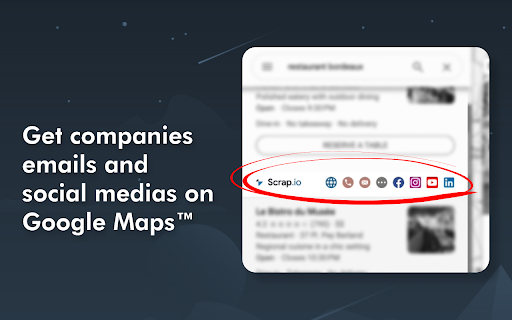
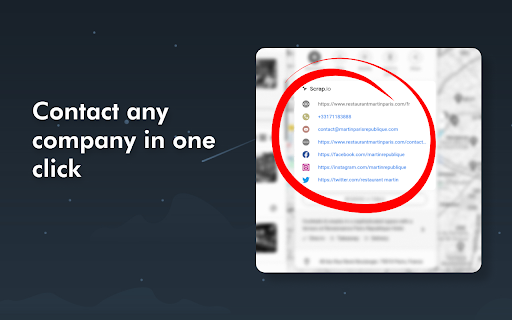

Scrap.io Maps Connect adds business emails and social networks to Google Maps, and allows you to contact them in one click. The Scrap.io Maps Connect extension adds social networks and emails to Google Maps. 👉 Turn every Google Maps search into a B2B lead goldmine, and contact companies with just one click. Access a complete list of business emails directly from your search on Google Maps. 👉 Automatic information retrieval: as you navigate on Google Maps, the Scrap.io extension extracts emails and social media profiles of listed companies in real-time. 👉 Prospect with one click: every link, phone number, or email address is clickable. With one click, you can make a call, send an email, or send a private message on social media. 👉 Simplicity and Speed: The Scrap.io extension is specifically designed to integrate with Google Maps. Information is instantly available in all your Google Maps searches. 👉 Turn Google Maps into a Lead Generator: every search becomes a business opportunity and lets you tap into a vast B2B database. 👉 Optimize your time: With the Scrap.io extension, you'll significantly reduce your lead search and prospecting time, so you can focus on building business relationships and sales. 👉 Here are the data that will enrich your searches: website, email(s), phone(s), contact page(s), Facebook, Instagram, LinkedIn, YouTube... Various ways to contact your prospects with one click. 📍 Turn your Google Maps lead search into a simple, fast, and intuitive experience. Install the Scrap.io Maps Connect extension today and discover how it can revolutionize your approach to prospecting and business development. This Chrome extension is offered by Scrap.io, an online application that allows scraping Google Maps and extracting emails from company websites. If you're looking for a Google Maps scraping solution, the Scrap.io platform is the ideal solution for creating lists of local business prospects: restaurants, shops, contractors and other small and medium-sized enterprises on Google Maps. Generating leads has never been easier! Visit 👉 Scrap.io 👈 to test our service for free.

Maps Scraper & Map data extractor
A scraping tool for map business leads, one click to extract data from Bing Maps, includes phone number, email, social media. The Maps Scraper is a tool that instantly generates a large number of leads from any location around the world. This leads finder extracts crucial information such as names, addresses, phone numbers, email addresses, websites, and social media profiles, and provides all of the data in a convenient Excel (.xlsx/.csv) sheet. With the tool, you can easily and quickly find the leads you need to grow your business. Here’s how we help tens of thousands of users like you each day scale up their sales: 🔹 B2B Marketers — Get quality email addresses and other critical features to help you land your next big client. 🔹 SaaS Companies — Make your outreach teams more savvy with ways to increase your customer base and keep them coming back for more. 🔹 Growth Hackers — Grow your user base accurately and efficiently without spending 24/7 on outreach. 🔹 Sales Teams — Take advantage of our suite of tools to reach more customers and close more deals. More Leads ➔ More Engagements ➔ More Revenue

Add to Sheets - Save to Google Sheets in 1 click
Right-click to add any content to Google Sheets. Quick Row Entry & No-code Automations for finding data, emails and links on sites. ➤ Add to Sheets lets you save text, links, page URLs, and images directly to Google Sheets without switching tabs or opening the spreadsheet. Just right-click and save. Or, use keyboard shortcuts to save even faster. Work the way you browse: ★ Right-click capture – Send selected text, links, or images straight to a specific spreadsheet and column. ★ No-code Automations – Build automations that pull data from any page into Google Sheets when you use on a website—no code. Start with a template, map columns, and run. ★ Email Address and Link Finder – Instantly collect every email address, link, or image URL from a page and add them to your sheet. ★ Quick entry for full rows – Add complete rows of data with automatic form generation. Creates input fields based on column headers with keyboard shortcuts for fast bulk data entry into spreadsheets and templates. ★ Fast keyboard shortcuts – Save without breaking your flow using custom key commands. ★ Flexible column setups – Create and organize multiple column configurations into groups to match different projects or workflows. ★ Save unlimited rows to your spreadsheets. Add to Sheets works for everyone, everywhere. Here’s a few examples: -- Saving Notes from Emails -- Quickly save important information from emails, such as contact details, addresses, and meeting notes, directly to your Google Sheets. This works well with web-based email clients like Gmail. -- Find All Email Addresses, Links, and Images -- Easily find all email addresses, links, and image URLs on websites and save all matches directly to Google spreadsheets in seconds. -- Wedding Planning -- Easily manage guest details, track RSVPs, and save vendor contacts. Save inspiration images and links from social media and wedding websites. -- Budget Tracking -- Monitor your spending by quickly adding prices and details from online shopping into a budget spreadsheet. Use the quick row entry to update rows in templates. -- Travel Planning -- Organize your trip details, including flights, accommodations, and activities, by saving the information directly from travel websites like Google Flights and Airbnb. -- Track Your Fitness Progress -- Save workout routines, nutrition plans, and progress photos from fitness websites to for easy tracking. -- Recipe Collection -- Create your digital cookbook by saving recipes from cooking sites directly into your Google Sheets. -- Personal Shopping -- Compare products and prices by adding information from different online stores to a single spreadsheet for easy access. -- Marketing, Social Media & Event Organization -- Keep track of all event-related information, social media post ideas, venue options, catering menus, and guest lists, in one organized sheet. -- Saving Content -- Save useful articles, ChatGPT conversations, PDF content, interesting quotes, and web content that you want to read later or reference. -- CRM for Sales Professionals -- Quickly save LinkedIn and Salesforce profiles, emails, leads, and key contact details directly to your CRM spreadsheets. Add to Sheets is privacy-focused and does not store any of your Google Sheets data on our servers. All of your data is stored locally in your browser and is not shared with any third parties. We purposely don't have any analytics or tracking in the extension to ensure your privacy. The extension uses an embedded Google File picker to allow you to select what Sheets to allow access to. Until you do that, the extension doesn't have any access to your files. The Sign In integration with Google has been verified and gone through their review process to only request/use minimal permissions for the extension to function as expected. The extension only has access to the files that you allow it to have access to. 1. Open Google Sheets: Start by opening Google Sheets in your browser. 2. Access the Extension: Click on the Side Panel icon on the right side of the screen within Google Chrome. If the icon is not visible, go to "Extensions" at the top-right corner of your browser and select "Add to Sheets." 3. Sign In: Log in using your Google account. This step is necessary for the extension to interact with your Google Sheets. 4. Grant Permissions: When prompted, allow the extension permission to access the Google Sheets you want to use. This ensures the extension can modify and add data to your sheets as needed. 5. Configure the Column: Choose the spreadsheet and sheet where you want to add data. Set up a specific column and label it for easy identification in the context menu. 6. Save Content: Highlight or select the content you want to add on any webpage, right-click, and select "Add to Sheets." Then, choose the appropriate destination. Currently, Add to Sheets is available for Google Chrome, Brave, and Microsoft Edge. We would like to support other Chromium-based browsers (like Arc and Vivaldi) in the future. If you have any questions about this, please let us know. Questions or feedback? Reach out to us on X at @addtosheets (https://x.com/addtosheets) and be a part of our community. You can always leave a review if you have any thoughts or suggestions. Or, reach out to us at contact@addtosheets.com. Read the blog to learn more: https://www.addtosheets.com/blog/ Find out what's changed in the official subreddit: https://www.reddit.com/r/addtosheets/ Add to Sheet's use and transfer of information received from Google APIs to any other app will adhere to Google API Services User Data Policy (https://developers.google.com/terms/api-services-user-data-policy#additional_requirements_for_specific_api_scopes), including the Limited Use requirements.

Leads Generator on Google Maps & Email Scraper
Get business emails and social media on Google Maps. The Leads Generator on Google Maps is an indispensable tool for anyone looking to supercharge their business growth by tapping into a vast pool of potential leads worldwide. With just a few clicks, this powerful Chrome extension allows you to uncover valuable contact information and social media profiles from Google Maps search results, making lead generation easier than ever. 🔍 Local Sales Leads Mining: Effortlessly query information on local businesses to identify new sales leads in your area. Whether you're targeting restaurants, retail stores, or service providers, our tool delivers accurate and up-to-date contact details. 📞 Comprehensive Contact Information: Extract crucial contact details such as phone numbers, emails, and social media profiles (Facebook, LinkedIn, Instagram, Twitter) directly from search results, ensuring you have all the information you need to make meaningful connections. 🤝 Sales Prospecting: Use the gathered data to reach out to potential clients and offer your products or services. Tailor your approach with personalized outreach, increasing your chances of closing deals. 📈 Marketing Campaigns: Leverage the queried data to create highly targeted marketing campaigns. Reach potential customers in specific geographic locations with customized messages, boosting your marketing ROI. 🏢 B2B Lead Generation: Perfect for businesses targeting other businesses, the Leads Generator on Google Maps helps you identify potential business leads for your products or services, streamlining your B2B sales efforts. 🔴 Ease of Use: Designed with user-friendliness in mind, our Chrome extension is easy to install and use, requiring no technical expertise. 🔴 Accurate Data: Benefit from precise and reliable data directly sourced from Google Maps, ensuring you have the most current information at your fingertips. 🔴 Time-Saving: Automate the tedious task of manual lead generation, freeing up your time to focus on closing deals and growing your business. 🔴 Versatile Applications: Suitable for a wide range of industries and business sizes, from local small businesses to large enterprises looking to expand their reach. This Chrome extension is offered by map-scraper.com.

Email GIFs by cloudHQ
Insert GIFs and stickers directly into your Gmail emails with a simple click. Email GIFs by cloudHQ lets you search and insert GIFs and stickers directly into your Gmail compose window. Powered by KLIPY, you get instant access to thousands of trending, categorized, and searchable GIFs and stickers — all without leaving your inbox. HOW IT WORKS 1. Install the extension and open Gmail 2. Click "Compose" to start a new email 3. Click the GIF button in the compose toolbar 4. Search or browse trending GIFs and stickers 5. Click any GIF or sticker to insert it directly into your email FEATURES ★ Search thousands of GIFs and stickers powered by KLIPY ★ Browse trending and categorized content ★ One-click insertion directly into your Gmail compose window ★ Remembers your last search so you can pick up where you left off ★ Supports both animated GIFs and stickers ★ Enable or disable per Gmail account ★ Works seamlessly inside Gmail — no separate app needed WHY USE EMAIL GIFS? Plain text emails can feel flat and impersonal. A well-chosen GIF can convey tone, humor, and emotion that words alone cannot. Emails with visual content get more attention and are more likely to be remembered. Whether you are celebrating a team win, following up with a prospect, or catching up with a friend, the right GIF makes your message stand out. cloudHQ. Helping your productivity one click at a time. Visit our Website: https://www.email-gifs.com/ Explore Pricing: https://www.email-gifs.com/pricing Need Help? Support Page: https://support.cloudhq.net/category/browser-extensions/email-gifs/ Discover Insights. Blog: https://blog.cloudhq.net/ Google Workspace, Google Sheets, Google Drive, Google Alerts and Gmail are trademarks of Google LLC. Use of this trademark is subject to Google Permissions.
