
mjecfchojcnmeaeifeikdikkmopjjjla
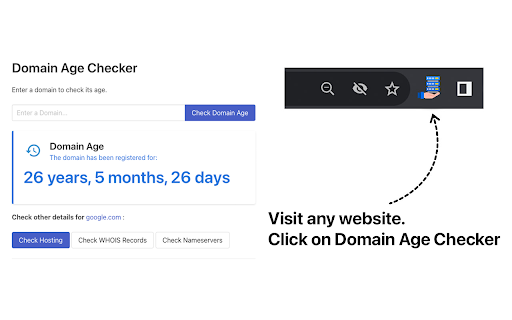
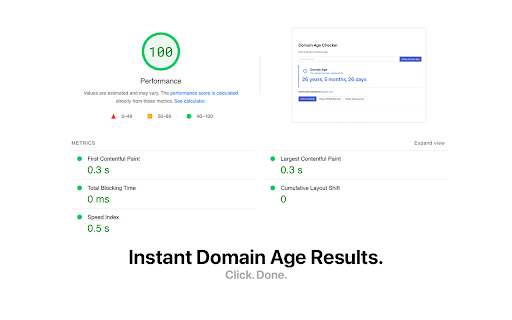
Check age of website online with our easy-to-use Domain Age Checker. See website history and registration date in just one click. Transform the way you gather domain insights with our Domain Age Checker Chrome Extension, the ultimate tool for swift and effortless domain age discovery. This one-click solution is designed for anyone looking to obtain rapid results without the hassle of navigating through multiple websites or tools. Experience the pinnacle of convenience and efficiency directly from your browser. - One-Click Convenience: Instantly check any website's age without leaving your current page. Our extension integrates seamlessly into your browsing experience, offering information at your fingertips. - Rapid Results: Engineered for speed, our Domain Age Checker delivers the fastest domain age retrieval in the market. No waiting, no delays - just instant data to keep your workflow uninterrupted. - Comprehensive Insights: Beyond just the age, get a snapshot of a website's historical footprint. Understand a site's longevity and its potential impact on SEO and credibility with ease (using our suite of free online tools). - User-Friendly Interface: Designed with simplicity in mind, our tool is accessible to everyone - from SEO experts to casual internet surfers. No complex setups, just straightforward functionality. - Ideal for Professionals: A must-have for digital marketers, SEO specialists, web developers, and anyone in the digital domain. Leverage quick data for competitive analysis, strategic planning, or mere curiosity. - Free and Efficient: Access top-tier domain age checking capabilities at no cost. Our Chrome extension is the perfect blend of functionality and efficiency, all without a price tag. Elevate your digital toolkit with the Domain Age Checker Chrome Extension - your go-to resource for fast, accurate, and accessible domain age verification. Whether you're conducting in-depth SEO analysis, evaluating potential web acquisitions, or simply exploring the web, our extension is engineered to provide you with rapid insights to inform your digital strategies. Install now for free and join countless professionals who've streamlined their workflow with this essential tool.

DA PA Checker
Check Domain Authority, Page Authority, Spam Score & Domain Rating with history tracking using FREE DA PA Checker SEO toolbar. Instantly view Domain Authority (DA), Page Authority (PA), Spam Score (SS), and Domain Rating (DR) while browsing — no login, no copy-paste, no tab switching. DA PA Checker is a free Chrome SEO toolbar that shows essential SEO metrics for any website in one click. It’s built for speed, simplicity, and accuracy, making it ideal for quick domain evaluation during research, outreach, or browsing. • Instantly check Domain Authority (DA) and Page Authority (PA) • View Spam Score (SS) to assess link and backlink risk • See Domain Rating (DR) for quick trust and strength insights • Bulk DA PA checking via web tool for faster analysis • Automatic history tracking — revisit previously checked domains anytime • One-click SEO metrics — no sign-up, no setup, no copy-paste • Fast in-browser results with smart caching from WPBlogging101.com • Free alternative to paid SEO tools like Ahrefs, SEMrush, and MozBar • All checked domains are saved automatically in History • View DA, PA, SS, DR, and traffic data anytime • Clear daily usage visibility with automatic resets • No hidden tracking or background monitoring 🎯 Who Is This For? Perfect for: • SEO professionals • Digital marketers • Bloggers & affiliate marketers • Link builders & outreach teams • Agencies needing quick domain validation If you regularly evaluate websites, backlinks, or SERPs, this tool saves time on every check. • Add the extension to Chrome • Visit any website • Click the DA PA Checker icon • Instantly view DA, PA, Spam Score & Domain Rating • No forms. No redirects. Just instant SEO insights. • No account or login required • Zero user tracking • No personal data stored or shared • Lightweight, fast, and secure • Regular updates for performance and reliability • A powerful yet lightweight SEO toolbar designed for real-time insights, not heavy dashboards. • An excellent free alternative to expensive SEO tools — built for everyday use.

Domain Age Checker
Instant domain age checker extension. Need to know: When was the website created? Also, get domain expiry checker data quickly. The Domain Age Checker App is your crucial utility for instantly gauging the reliability and authority of any website. Whether you are an SEO strategist, an investor, or simply checking a source, this utility delivers accurate data right in your browser. With one click, you can check domain age and gather critical insights into a resource's history, enabling smarter decisions. This extension is engineered for both speed and precision. 🚀 Check Any Site Instantly: • Install this App from the Chrome Web Store. • Navigate to any website. The site check starts automatically. • Click the extension icon for instant age, domain expiry checker status, and registration details. Our checker utility is highly efficient. It’s the simplest way to check the age of a website to determine a site’s historical reliability, which naturally signals greater trust and authority in search results. 💡 Key Benefits and Features: • The age domain checker offers detailed historical data. This is the definitive website age checker you need. • Trust and Verification: Before you engage with any site, check the domain name age. Older resources are generally more trustworthy. • SEO Authority: Use this service to run a quick domain age lookup and accurately evaluate the strength of competitors. • Competitor Analysis: Run an age domain check to quickly check competitors’ trust level. • Spam Protection: Our tool provides an immediate warning against newly registered sites used for phishing. • Valuation: A reliable domain name age checker is crucial for market valuation. • Zero Lag: The extension is lightweight and does not interfere with your browser's speed. It is among the most effective checker tools. • Universal Checking: Effortlessly check age of domain for any website. 📅 Advanced Expiry and Registration Checks: Our age of domain checker provides verified historical data and registration records for any website. Therefore understanding the full site lifecycle is vital. Our system includes an advanced domain age and expiry checker. ➤ The built‑in WHOIS domain age checker ensures complete transparency with real‑time registry data. ➤ Full WHOIS Integration: Instantly check domain expiry date whois details to verify authenticity and plan renewals. ➤ Registration History: Precisely find out when a domain was registered with all the relevant details. Our tool also allows you to check the age of a domain alongside its expiration and registry details. ➤ Expiry Lookup: Use our domain expiration lookup feature for necessary due diligence and future planning. ➤ Renewal Planning: The website age and expiry checker helps you proactively avoid losing valuable assets. 🔎 Real-World Use Cases: 1️⃣ For SEO Audits: Use our age checker feature to quickly filter out suspicious sites under a year old. 2️⃣ For Investing: Use the extension to confirm that you are truly paying for an asset with established history and see when was a domain registered for additional assurance. 3️⃣ For Digital Safety: Use the web site age checker to screen unfamiliar, new sites. It can also tell you how old is domain, helping you quickly decide whether to trust a site or not. If you need to know how old a website is, this solution gives you instant clarity. 🔸 SEO Specialists: Use this extension feature to quickly gauge competitor strength. 🔸 Affiliate Marketers: Check the age of a website to confirm its stability. 🔸 Investors: Utilize the domain age checker tool to accurately price and source valuable sites. 🔸 Everyday Users: If your goal is simply to know how old a website is, this tool provides the definitive answer. 📌 How do I start using the tool? 💡 Simply install the extension. It’s the easiest way to see a domain's registration date. 📌 Does it only display the age? 💡 No! It is a comprehensive age and expiration analysis tool. The extension provides complete domain history lookup and all associated details. 📌 How reliable are your checks? 💡 Our site history analyzer pulls data directly from official WHOIS records to verify the age of the domain, guaranteeing high accuracy and credibility. 📌 Can I check the domain's expiration date? 💡 Yes. We integrated a specific function to check domain expiration. You can also perform a quick website name expiry analysis.

Website page speed test
One-click website page speed test — instantly view page load time details and understand overall website performance. 🚀 Test website page speed easily Do you want to know how fast your webpage is? The Website page speed test is the perfect tool for testing your site’s page load speed. With just one click, you can get detailed insights of your website performance. This easy-to-use tool helps you improve the web page performance test and make your site faster. A fast-loading webpage is essential to keep visitors engaged and satisfied. A fast webpage is crucial for a better user experience. Here’s why website speed test is important: ➡️ Faster webpages improve user satisfaction ➡️ Page load speed affects SEO rankings ➡️ Slow webpages lead to higher bounce rates ➡️ Faster sites result in more conversions ➡️ Search engines prioritize fast-loading sites in their rankings 🧩 Core features of the website page speed test extension 1️⃣ Instant load time in the Chrome toolbar Quickly check the current page timing analytics of any site via the extension icon in the toolbar. 2️⃣ Full load time breakdown Analyze key stages with this site speed test: ➤ DNS ➤ Connect ➤ Request & Response ➤ Content loading ➤ External resources ➤ Execute scripts 3️⃣ One-click data copy Easily export your web page speed test results into docs or spreadsheets. 📈 A simple and effective way to understand and improve your website loading speed. By using this tool, you can identify problem areas on your site and make adjustments that enhance the overall performance of your site. Whether you're running a blog, an e-commerce platform, or a corporate website, this tool is essential. 📊 How the tool works If you want to check speed of a website, then: 1️⃣ Install the extension in one click and pin it to your Chrome toolbar 2️⃣ Open the webpage you want to test 3️⃣ After the site displays completely, check the webpage load data on the extension icon 4️⃣ Click the icon to view a detailed website performance breakdown 5️⃣ Copy all data instantly to your document or Excel file 6️⃣ Use these insights to fix specific issues and improve site performance 7️⃣ Run the website speed test regularly to track changes and optimize further 🛠️ This step-by-step flow helps you stay in control of your page speed and overall website efficiency. 📍 Benefits of using the website efficiency test tool The tool provides many benefits: 🔹 Easy one-click performance checks 🔹 Helps identify slow loading elements 🔹 Boosts and check website speed and SEO 🔹 Improves user experience and reduces bounce rates 🔹 Tracks site performance test results over time 🔹 Provides clear recommendations for improvement 🔧 How to improve page load speed Once you’ve run the test, here’s how to improve page load speed: 🔸 Optimize images 🔸 Minimize JavaScript and CSS files 🔸 Enable browser caching 🔸 Use a Content Delivery Network (CDN) 🔸 Reduce server response time 🔸 Compress resources like images and videos 🔸 Switch to a faster hosting provider Each of these steps helps to reduce the page performance, improving both user experience and SEO. ⚡ Why page performance affects conversions A slow site can negatively impact your business: 📍 A page load time delay of just 1 second can reduce page views by 11% 📍 A delay of 2 seconds can increase bounce rates by 32% 📍 A 4-second delay can lead to a 75% drop in conversions 📊 Who benefits from the website page speed test? Anyone can benefit from the site speed test tool: 💡 Web developers optimizing site performance 💡 Business owners ensuring fast loading times 💡 SEO experts looking to boost rankings 💡 Marketers aiming to improve conversions 💡 Content creators ensuring media loads fast 💡 E-commerce platforms improving customer experience 💡 Bloggers who want fast loading times to attract more readers Q: How often should I check page speed? A: Test your site regularly, especially after major updates or changes to ensure optimal performance. Q: Does this tool suggest improvements for page load time? A: Yes! The website speed test helps you quickly identify the exact reasons behind slow website performance. By breaking down key metrics like page load time, DNS, and content load stages, this website performance test reveals where delays occur. This allows you to fix issues fast and improve your site speed with targeted optimizations. Q: Is this tool free to use? A: Yes! The website tester is available for free with no hidden costs. The website page speed test is an essential tool for anyone who wants to improve their website’s speed. Regular testing ensures that your webpage remains fast and optimized for both users and search engines. Start using the tool today to improve site performance and get better results!

Domain Authority Checker
Check domain and page authority metrics for any website Domain Authority Checker: Your Essential SEO Metrics Tool Instantly analyze the SEO strength of any website with our powerful Domain Authority Checker extension. Get real-time access to crucial domain metrics right from your browser! 🚀 KEY FEATURES: • Instant Domain Authority (DA) Score • Page Authority (PA) Metrics • Clean, Modern Interface • One-Click Analysis • Real-Time Results • User-Friendly Design 💡 WHY YOU NEED THIS: • Make informed decisions about link building • Evaluate website credibility instantly • Compare competitor websites • Assess potential partnership opportunities • Monitor your website's SEO progress • Save time with instant metric access 🎯 PERFECT FOR: • SEO Professionals • Digital Marketers • Content Creators • Website Owners • Bloggers • Online Researchers • Digital Entrepreneurs ✨ HOW IT WORKS: 1. Install the extension 2. Visit any website 3. Click the extension icon 4. Get instant DA and PA metrics 💪 BENEFITS: • Save time with instant metric access • Make data-driven SEO decisions • Track competitor websites easily • Improve your link building strategy • Monitor your SEO progress Powered by Semantic Pen, this extension provides reliable and accurate domain metrics to help you make informed decisions about your SEO strategy. Download now and transform your browser into a powerful SEO analysis tool! Keywords: Domain Authority, Page Authority, SEO Tools, Website Metrics, Domain Analysis, SEO Score, Website Authority, Domain Rating, SEO Checker, Website Analysis, Domain Metrics, SEO Analytics, Website Authority Checker, Domain Authority Tool, SEO Extension
