
mifjkjljbbnepicdbbemkaafcjmplkaj
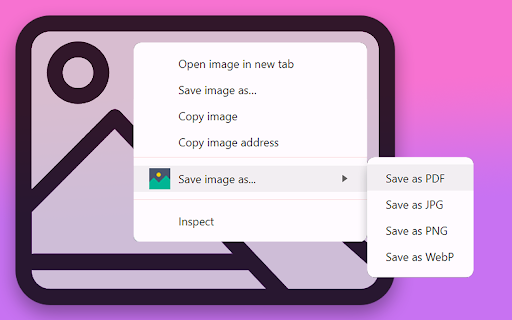
Save image as PDF using the context menu on the image for download photo. An easy way to save picture as PDF, JPG, PNG, or WebP. 💯 Save Image as PDF is a chrome extension that lets you save any picture on the web page in the format you want: PDF, JPG, PNG or WebP. Image converter is fast, simple, and convenient. You don’t need to use any external tools or websites to convert images. You can save image as PDF and other formats with just a few clicks. 1️⃣ Installation: click on "Add to Chrome" and follow the on-screen instructions for installation. 2️⃣ Activation: navigate to any web page containing images. 3️⃣ Right-click on the picture you wish to save. 4️⃣ A new option will now be part of your context menu. 5️⃣ Hover option "Save image as..." will reveal the following sub-options: - Save as PDF - convert your image to PDF and initiate the download process. - Save as PNG - if required, the image will be converted to PNG format before being uploaded. - Save as JPG - if required, convert to JPG format before being uploaded. - Save as WebP - if necessary, the image will be converted to WebP format before being uploaded. 6️⃣ To convert and save the image in a specific format, simply click on the corresponding sub-option. Your picture will be downloaded. 💾Effortlessly streamline your image-saving routine with these intuitive steps. Elevate your browsing experience and enjoy the flexibility of converting images in your preferred formats! Save Image as PDF also has some useful settings that you can customize according to your preferences. You can access the settings page by clicking on the extension icon in the toolbar. There are two settings available: ➤ Ask where to save image before downloading: if you enable this option, you will be prompted to choose the location and name of the image before downloading. This way, you can organize your images better and avoid overwriting existing files. ➤ Enable a floating element on every page: if you enable this option, you will see a small icon in the center of the right edge of every web page: - clicking on this icon will highlight all the images on the page, providing a visual indication, - second click on the icon removes the highlighting effect from the images, - hovering over the "x" (cross) icon to the right of the main icon will disable the floating element on all pages. 📍 Our tool harnesses the power of the latest Manifest V3 integration, ensuring optimal performance in every operation. 📍 Extension provides a clean and streamlined experience, free from unnecessary third-party scripts that could weigh you down. 📍 Tool comes with automatic updates, guaranteeing you a consistently reliable experience with the latest enhancements. 📍 Swift and responsive image downloading is our priority. 👥 This extension will be useful for: 1. Ideal for professionals in the SEO field, this extension streamlines the process of saving and analyzing images, contributing to a more efficient workflow. 2. Graphic designers and other creators can benefit from the extension's ability to quickly save and download images in various formats. 3. Individuals conducting online research can use the extension to organize and save images for reference or analysis. 4. For those who frequently convert images to PDF for document management, this extension provides a quick and easy solution. 5. Web developers can use the extension to streamline the process of saving and managing images during the development phase. 6. Anyone who frequently downloads pictures from the web can enhance their browsing experience with the extension's user-friendly features. Save picture as extension is designed to cater to a broad audience, offering a range of features that can benefit professionals and casual users alike. 🛠️ Seamless integration with chrome: Save image as PDF effortlessly integrates into your Chrome browser, becoming a valuable addition to your extension toolkit. With just a click, this extension discreetly enhances your browser's capabilities, striking a perfect balance between functionality and simplicity. 🔐 No login or registration: No need to create accounts or go through registration hassles. Save time and skip the login process – our extension is ready to serve you without any extra steps. 🌐 Multiple languages supported: We believe in inclusivity. That's why Save image as PDF supports multiple languages, ensuring users from around the world can seamlessly utilize our tool in their preferred language. Accessibility is key!

Save image as jpg, png, webp, pdf
Save images directly from the context menu in JPG, PNG, WEBP or PDF format Save Image As lets you convert and download any web image directly from the right-click context menu - no popup, no extra steps. HOW TO USE: 1. Right-click on any image on any webpage 2. Hover over "Save image as..." 3. Choose your format: JPG, PNG, WEBP, or PDF 4. Pick where to save... done! SUPPORTED FORMATS: • JPG - Smaller file size, ideal for photos. Transparent backgrounds are automatically converted to white. • PNG - Lossless quality, supports transparency. Best for logos, screenshots, and graphics. • WEBP - Modern format with excellent compression and quality. • PDF - Save any image as a single-page PDF document. PRIVACY & PERMISSIONS: This extension does NOT collect, store, or transmit any data. All image processing happens entirely on your device, in your browser's memory. Nothing is sent to any server. Permissions used: • contextMenus - to show the "Save image as..." menu on right-click • downloads - to save the converted file to your device • scripting - to run the local image conversion • all_urls - to work on any website where you want to save images 100% open source. You can review the full source code on GitHub.

Save As Image Converter
All -In-One download & convert images to and from any format, including Background Images! The extension offers a variety of conversion methods based on your specific needs: ✅ Now supports background images! ✅ Right-Click Convenience: Adds "Save image as..." to the right-click context menu. ✅ Enhanced compatibility: ensure your images work efficiently across all browsers and editors. ✅ Reverse Conversion. ✅ Quality Control: Set target quality for JPG files to create images with high quality or reduced file sizes. ✅ Boosted Productivity: Simplify png image conversion to enhance your workflow and improve the image quality. ✅ Right-Click Conversion: Right-click on any image. Select "Save image as..." from the context menu. The extension will help you convert and download the image to PNG, JPG or WebP ✅ Ensure Convert Images by Preserving Privacy: Privacy matters, and we take it seriously! You will notice that all conversions happen locally on your computer when you upload the image ( without sending them to external servers). ✅ Broad Utility: The extension isn't limited to one conversion type. You can use it to convert: ✓ webp to png ✓ jpg to png ✓ png to jpg ✓ jpeg to png ✓ png to jpeg Make your pictures compatible with all browsers and image editors. Since it is universally compatible, you won't face the risk of dealing with unsupported formats. It helps to make your visuals accessible to a broad audience. There are several reasons to make the switch: ☑️ Lack of Wider Usage: PNG image format is a more universally recognized format than webp. ☑️ Upload and download your desired file type including png images, in a second. ☑️ Limited Tool Availability: Limited tools are available for working with webp files. ☑️ Lack of Browser Support: Not every browser is compatible with web images. 🔛 How to Install Here's how to install "Save As Image Converter" extension: 1️⃣ Click the "Add to Chrome" button (located on the right side above the text). 2️⃣ Confirm the installation by clicking "Add extension" in the pop-up. 3️⃣ Wait a few minutes for the extension to download and install. 4️⃣ That's all! Spot the icon in your Chrome toolbar.

Image Downloader - picture and photos saver
Find and download images from any web pages. Filter or select all at once to bulk download. Image Downloader let's make your life easier just in one click. This extension allows you to download all the images from the web pages in simple manner. This Chrome extension does not weigh a lot and simply does its job - download images. Help us to improve our product and leave a comment or request. Image Downloader is simple, fast, reliable and easy to work with. If you want instantly download image then you definitely should install our new and amazing Chrome extension. Don't forget to share this extension with friends. With this Picture Downloader you can find, browse and download all the images present in a web page. In addition you can: ➖ filter based on pixel width and height ➖ multiple formats available including PNG, JPEG, SVG, WEBP ➖ filter based on url ➖ bulk download all images in once ➖ select what images you want to download ➖ check the size of each image ➖ copy the url of the original image ➖ choose between various layout options ➖ supporting all principal websites (Instagram, Facebook, Twitter, ...) Now you can download all the images you might ever need. Every image format can be downloaded by this Photo Downloader extension. Our new application doesn't weigh a lot but simply does the job. Don't wait and install brand new extension and you'll get something special. Bulk Image Downloader (BID) makes it easy to download full sized images from almost any thumbnailed web gallery. Supports most popular image hosts such as imagevenue, imagefap, flickr and too many others to list here. You can right-click on the images you want to download and choose the save option or pull them from your browser cache, which will automatically appear when you view them in your browser. Unlike other Image Downloader extensions in the Chrome Store that charge you for different image download options. We are complete free and You can download with one click. Thank you for use it, if you like it, please give it 5 stars the extension!

Image Extractor
Use the image extractor extension to download images from websites and capture background pictures with this photo downloader. Elevate your browsing experience with our Google Chrome extension: ▸ Designer-friendly simplifies your digital life with our img extractor. ▸ Effortlessly save file from any website ▸ This tool can download svg from shutterstock. Enhance your web surfing with our development, featuring: 🌟 Seamless background pictures integration, 🌟 Intuitive user interface, 🌟 Fully customizable settings, 🌟 Efficient Image Extractor for easy downloads, 🌟 Swift and dependable performance today! Transform your productivity with: ✅ Instant image extractor, ensuring quick access, ✅ Speedy photo downloading, with boosted efficiency, ✅ Simplified user interface, facilitating speed, ✅ Streamlined workflow for photo downloader purposes, optimizing task completion, ✅ Compatibility with numerous websites, broadening usage scope. 🎨 Effortless navigation with quick website image downloader and extractor in a click. 🎨 Customizable settings tailor your extraction journey. 🎨 Intuitive layout for immediate feature access from your ui. 🎨 Seamless integration with browsing for smooth downloads. 🎨 Advanced options for precise image extractor control. 🌐 You can download image from website 🌐 So extract them from leading resources with ease. 🌐 Enjoy seamless extractor integration with major e-commerce platforms. 🌐 Compatible with a variety of educational and news sites. 🌐 Supports forums and communities for diverse needs. Maximize your performance with Image Extractor 🔗 Seamlessly integrates with key productivity tools. 🔗 Streamlines pic management for better organization. 🔗 Boosts picture grabbing workflow with smart features like extractor. 🔗 Just extracts images - almost any picture in the background. Why to choose: 🔒 Enhanced Privacy: not a usual image ripper for authorized access. 🔒 Secure Copy: Protects your media during copying. 🔒 Encryption: Strengthens security in extractor. 🔒 Updates: Keeps security tight against threats. 🔒 Access Control: only you can copy image. Increase your efficiency: ⏱ With a single click copy photo to clipboard, saving valuable time. ⏱ Elevate productivity with efficient collection. ⏱ Simplify your tasks with quick image extractor. ⏱ Reduce steps needed, enhancing efficiency and output. Tips: 💎 open files quickly for projects with a simple click. 👏 utilize our free image downloader for effortless saving. 👍 save time with fast with this high-quality extractor. 🏅 enjoy image extractor easily from any site with our tool. 🙌 boost productivity using our intuitive, user-friendly extractor. Make better your efficiency with this tool, ideal for downloads by Image Extractor • Organize and extract visuals effortlessly from any site. • Advanced filters for less manual searching in picture downloader. • Integrates smoothly with your workflow. • Continuous improvement with updates. • Instant pic download in a click. Maximize your efficiency with our extension. 1. Committed to excellence, we ensure regular updates to enhance picture extractor reliability. 2. Our dedicated customer support team is always on standby, ready to assist with any png download needs. 3. Thoroughly rip pictures hassle-free. We encourage users to honor copyright when they download pictures: * Experience the benefits firsthand easy navigation and quick access to media across the web. * Start your journey towards efficient picture management. * Experience seamless Image Extractor today. Experience: a. Maximize your online photo collection with ease of Image Extractor! b. Our extension simplifies how you save jpg from the web directly to your device. c. Don't miss out on the opportunity to make better your digital library. d. Click to download web photos now and start building your perfect collection! Advanced Workflow Integration: ➤ download pics directly from web pages and save effortlessly. ➤ share resources easily within teams for improved collaboration. ➤ seamlessly connect with top working platforms. ➤ launch image extractor and organize results with an advanced tool. ➤ accelerate daily tasks and project management. Revolutionize Your Digital Life ➡️ extract images from website effortlessly, providing a stream of wallpaper-worthy visuals. ➡️ unlock a visual feast with each tab, where beauty and productivity flourish together by extractor ➡️ elevate your screen with breathtaking, inspirational wallpaper images for a daily view.
