
midfajedjimafjanghmplhkbjhcoboal
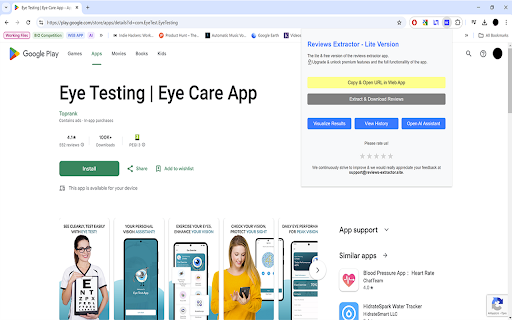
Extracts reviews from the Apple and Google Play Stores. Reviews Extractor Lite is an easy-to-use Chrome extension designed to help you extract customer reviews from various online platforms effortlessly. Whether you're an analyst, marketer, developer, or business owner, this tool provides a streamlined way to collect and download reviews in CSV format, perfect for analyzing customer feedback, perform competition analysis and improving your products or services. The lite version includes essential features, with premium upgrades available for unlocking advanced functionalities. - Extract Customer Reviews: Automatically detect and extract all customer reviews from supported platforms. Ideal for gathering valuable feedback for analysis, reporting, competition analysis or product development. - Download Reviews in CSV Format: Quickly download all extracted reviews in a neatly organized CSV file. Perfect for further analysis using spreadsheet tools like Excel or Google Sheets. - Efficient Data Collection: Save time by automating the review collection process, especially useful for businesses looking to keep track of customer sentiments across multiple platforms. - Upgrade to Premium: Upgrade to the premium version of the web app and unlock additional features, such as extracting reviews from multiple platforms, advanced filtering & visualization options, sharing capabilities, history of extractions, AI assistant to quickly extract knowledge and info from the extracted data. Install the Extension: Add Reviews Extractor Lite to your Chrome browser from the Chrome Web Store. Open the Extension: Click on the Reviews Extractor icon in the Chrome toolbar to open the extension popup. Extract Reviews: Click the "Extract & Download Reviews" button to start the extraction process. The extension will collect customer reviews from the current web page and download them to your computer as a CSV file. Visit the Web App: For enhanced functionality, including advanced review analysis tools, visit the Reviews Extractor web app and upgrade to unlock premium features. Initial release with review extraction and CSV download functionality. Lite version includes basic features with the option to upgrade for premium features. ActiveTab: Allows the extension to access the current tab to extract customer reviews. Downloads: Enables the extension to download extracted reviews as CSV files directly to your computer. Your privacy is important to us. Reviews Extractor Lite does not collect or store any personal data. The extension only accesses and processes customer reviews on the current web page for extraction and download purposes. For any questions, issues, or feedback, please contact us at support@reviews-extractor.site. We are always here to help and continuously improve our extension based on your suggestions.

G-Play Reviews Scraper and Exporter | Ecomstal
Easily extract and export the G-Play Reviews Scraper & Exporter. Get ratings, comments, and timestamps in CSV/Excel. 📲 Extract apps Store review in Seconds — Analyze, Export, and Improve with Ease! Boost your product research and apps analysis with Apps review Scraper by EcomStal — the all-in-one Chrome Extension that allows you to scrape, export, and analyze thousands of apps review from apps Store platforms. Whether you're a developer, marketer, researcher, or competitor analyst, this tool makes review data extraction fast, simple, and efficient. Perfect for tracking user sentiment, identifying feature requests, or gathering competitive insights — no coding required. Clean Export Formats Download review in CSV or Excel format for easy filtering, charting, and reporting. Keyword and Rating Filters Filter review by star ratings, keywords, or date range before scraping. Easy to Use Beginner-friendly UI — simply install and click "Start Scraping" on any apps page. Free Version Available Get started with basic features for free and upgrade anytime for premium features. Automatic Review Collection Save time with smart auto-scroll and batch scraping technology. Multi-Language Support Scrape review written in various languages for global insights. 👥 Who Should Use It? apps Developers Get real feedback to improve apps features, fix bugs, and plan updates. apps Store Optimization (ASO) Experts Use review insights to improve apps titles, keywords, and user experience. Competitor Analysts Understand how users feel about competing apps and identify gaps in the market. UX/UI Researchers Discover pain points and feature requests directly from user review. ⚙️ How It Works Install the Extension: Add apps Review Scraper | EcomStal to your Chrome browser. Go to an apps Page: Visit any Android apps Store. Click “Start Scraping”: The tool will collect and display the review. Export Your Data: Download review as CSV or Excel for further use. ❓ Frequently Asked Questions (FAQs) What does this extension do? It scrapes review from Android apps Store, allowing you to export them as CSV/Excel for research or analysis. Is it beginner-friendly? Yes, absolutely no coding or tech skills are required. Can I use it for bulk scraping? Yes, you can collect thousands of review in just a few clicks. What formats can I download review in? CSV and Excel formats are supported. Is the extension free to use? You can try the free version and upgrade for advanced features like filters and unlimited scraping. Is my data secure? Yes, your data and privacy are protected at all times. Does it support international stores? Yes, it supports apps review from multiple regions and languages. 💼 Built for marketers, developers, analysts, and entrepreneurs who want to gain a competitive edge in the apps marketplace. 🔗 Try Apps review Scraper | EcomStal today and extract apps insights like never before!

Ultimate Web Scraper
Extract data instantly: Grab text, images, emails & links from any website with a single click. Fast, simple & powerful web scraper Your all-in-one tool for effortless web scraping, lead generation, and data extraction. No code, no setup — just instant results. + AI Assisted extraction for better results 😲 👇 One-Click Scraping Point the web scraper at any page with lists, tables, or directories and extract structured data instantly. Pagination and infinite scroll are handled automatically. 📄 Bulk Page Scraping Feed the data scraper a list of URLs and pull emails, business details, contact info, or custom fields from every page at once. 🖼️ Image Downloader Grab every image from a page in one click. 📬 Email Extractor Run the email scraper on one page or thousands — it finds and collects every address. 📊 Data Export Send your scraped data to CSV, Excel, or Google Sheets. 📧 Email Scraper — Pull email addresses for outreach and lead gen 📞 Phone Scraper — Collect phone numbers for sales follow-up 🏢 Business Scraper — Grab company names, addresses, and details 👤 People Scraper — Extract names, job titles, and work history 🌐 Social Scraper — Collect website URLs and social media profiles 💼 B2B Scraper — Get company size, industry, and revenue data 💬 Review Scraper — Scrape reviews and comments from any site 📄 Page Text Scraper - Scrape pages for clean text 📈 Sales & Marketing — Build lead lists with verified contact data 🎯 Recruiters — Scrape candidate info from job boards and LinkedIn 🛒 E-commerce — Monitor competitor pricing, products, and stock 🔬 Researchers & Data Scientists — Collect datasets for analysis and ML ✍️ Content & SEO — Gather data from blogs, news sites, and forums 📉 Brand & BI Teams — Track reviews, sentiment, and competitor moves ✅ AI‑powered extraction improves accuracy on messy, unstructured pages. ✅ No coding required, so anyone can start in seconds. ✅ Runs entirely in your browser, keeping your data private. ✅ Works on login‑protected pages and complex layouts. ✅ Handles pagination and infinite scroll for complete results. ✅ Fast exports to CSV, Excel, or Google Sheets. ☁️ Cloud Web Scraping — Run this web scraper in the cloud with cloud browsers for large‑scale data scraping. ⏱️ Scheduling — Automate web scraping and data extraction on a schedule. 🔗 Integrations — Connect your data scraper to n8n, Google Sheets, and Make.com. 1️⃣ Install the web scraper from the Chrome Web Store 2️⃣ Go to your target site 3️⃣ Click to scrape 4️⃣ Export your data

Product review export
Export Product review in csv file with images. In short its Product review scraber This chrome extension is useful to download all the product reviews from top ecoomerce Etsy and Amazon with images. In short, product review scraper or product exporter So, Sellers can store and review them easily. Step 1: Install the extension. Go to any product page having have all the reviews. Step: 2 Extension traverse the page one by one automatically. Once all the reviews scrapped. It save the file to your computer. Step 3: You can also press the stop button at any time to download the partially stored reviews. NOTE: EXENTION WAIT 2-3 SECONDS FOR EACH PAGE TO READ THE REVIEWS. Update: Now user can also export the cart items Thanks. Please contact us if you have any query on amazonreviewexport@gmail.com

Shopify App Reviews Exporter
Extract reviews from Shopify App Store listings and export to CSV, XLSX, or JSON. Export Shopify App Store reviews to CSV or Excel with one click. Extract star ratings, review dates, merchant names, merchant locations, review titles, full review text, developer replies, time spent using the app, and helpful votes - ready for analysis in Excel, Google Sheets, or any research tool. Built for Shopify app developers, SaaS founders, Shopify Partners, and agencies who need structured review data from the Shopify App Store without manual copy-pasting. HOW IT WORKS 1. Go to any app page on apps.shopify.com 2. Open the Reviews tab 3. Click the extension icon and hit Extract 4. Export your file - CSV or Excel (.xlsx) The extension handles "Load More" pagination automatically and respects any filters you set on the page. Want only 1-star reviews? Filter on Shopify first, then extract - you get exactly the subset you need. DATA FIELDS INCLUDED IN EVERY EXPORT - Star rating (1-5) - Review date - Merchant name - Merchant location (country) - Review title - Full review text - Developer reply (if available) - Time spent using the app (if displayed) - Helpful vote count The merchant location field is especially valuable for identifying which geographic markets your competitors serve - and where they have the weakest satisfaction scores. USE CASES - Validate app ideas before building: Export reviews from established apps in your target category to see what merchants complain about most, then build the solution they are asking for - Competitor feature gap analysis: Open your export in Excel and search for keywords like "missing," "wish," or "please add" to find the features merchants request repeatedly but no app delivers - Shopify app store keyword research: Find the exact words merchants use to describe their problems, then use those phrases in your own app listing to rank higher in Shopify App Store search - Lead generation for agencies: Merchant names and locations from review exports give you a list of active Shopify store owners who use apps in your niche - useful for targeted outreach - Monitor your own app reputation: Export your reviews weekly to track rating trends, catch recurring support complaints early, and measure the impact of updates on merchant satisfaction - Developer response benchmarking: See how competing developers handle negative reviews - response time, tone, and resolution patterns - to improve your own support strategy AI-POWERED ANALYSIS (OPTIONAL) Upload your exported file to our AI dashboard at reviewsextractor.com to automatically detect: - Recurring merchant pain points and complaint clusters - Feature requests ranked by frequency - Sentiment trends across app versions and time periods - Competitive gaps where merchants are underserved PRIVACY AND SECURITY - Runs 100% locally in your browser - no data is sent to any server during extraction - No account or login required to start exporting - All exported files save directly to your device - No tracking or analytics collected from your browsing Part of the Reviews Extractor suite at reviewsextractor.com. Free to try. No credit card required.
