
mibangdgfbpmglmiclciibbmflpkgmfl
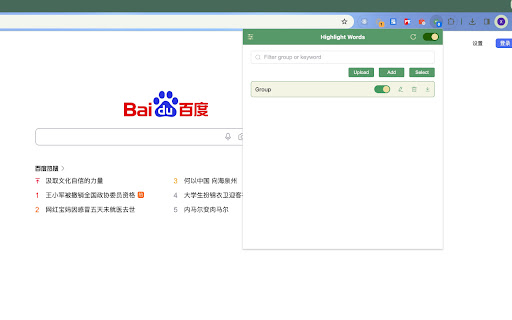
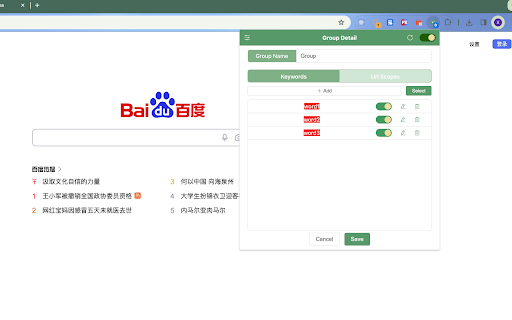
Highlight Words, abbreviated HL, Custom highlighting the text you specify. A highlight text plugin (Highlight Words:HL, abbreviated HL) that allows you to customize the text you want to highlight, including the color of the text and the background color of the highlight. It also supports highlight range configuration, and import/export of configurations.

Zooma - Image Zoomer
A simple Chrome extension to zoom images and pictures on a webpage Zooma - Image Zoomer: Effortless Image Zooming for a Clearer View Are you tired of squinting at images or struggling to view the finer details of pictures on websites? Look no further! Introducing Zooma - Image Zoomer, the simple yet powerful Chrome extension designed to enhance your browsing experience by enabling seamless image zooming on any webpage. Effortless Image Zooming with Zooma With Zooma - Image Zoomer, you can easily zoom in on images and pictures without any hassle. Whether you're browsing through social media, shopping online, or conducting research, our extension ensures you never miss a single detail. Simply hover over an image to view an enhanced version effortlessly. No more opening images in new tabs or downloading them for a closer look. Zooma is the ultimate online zoomer that brings convenience and clarity to your browsing experience. Simple and Intuitive Interface Zooma - Image Zoomer boasts a user-friendly interface that is easy to navigate. With just a few clicks, you can install the extension and start zooming images instantly. No complicated settings or configurations are needed. Smooth Zooming Experience Experience smooth and responsive zooming with Zooma. Our extension is optimized to provide a seamless zooming experience, allowing you to focus on the details without any lag or interruption. It’s the perfect photo zoomer for all your online viewing needs. Fixed Zoom Level Zooma automatically zooms images to 50% larger than their original size, ensuring a detailed view without overwhelming your screen. Works on All Websites Zooma - Image Zoomer is designed to work on all websites. Whether you're viewing images on e-commerce sites, social media platforms, or news articles, Zooma ensures you can zoom in on any picture with ease. Lightweight and Fast Zooma is a lightweight extension that won’t slow down your browser. It runs efficiently in the background, ready to provide you with instant zooming capabilities whenever you need them. Enhance Your Browsing Experience Zooma - Image Zoomer transforms your browsing experience by allowing you to zoom in on images effortlessly. No more straining your eyes or struggling with small details. Zooma makes it easy to view images clearly and comfortably. Perfect for Various Use Cases Whether you're an online shopper wanting to inspect product details, a researcher analyzing images, or simply someone who enjoys viewing pictures online, Zooma is the perfect tool for you. It’s an essential online zoomer for anyone who values clarity and detail. Easy Installation and Setup Installing Zooma - Image Zoomer is a breeze. Simply add the extension to your Chrome browser, and you’re ready to go. There’s no need for complicated setups or technical know-how. Reliable and Secure Zooma is a reliable and secure extension, designed with your privacy in mind. We prioritize your safety and ensure that our extension operates without compromising your personal data. How to Get Started with Zooma - Image Zoomer Install the Extension Visit the Chrome Web Store and search for Zooma - Image Zoomer. Click on the “Add to Chrome” button to install the extension. Activate Zooma Once installed, Zooma will be activated automatically. You’ll see the Zooma icon in your Chrome toolbar, indicating that the extension is ready to use. Start Zooming Hover over any image on a webpage and enjoy an enhanced view. Experience seamless and effortless zooming with Zooma - Image Zoomer. Zooma - Image Zoomer is the ultimate solution for anyone looking to enhance their image viewing experience online. With its simple interface and smooth performance, Zooma is the perfect photo zoomer for all your needs. Don’t miss out on the details – install Zooma - Image Zoomer today and take your browsing experience to the next level.

The Big Gift List
Easily add items to your 'The Big Gift List' lists Help friends and family take the guesswork out of buying you gifts with The Big Gift List. When it comes to a birthday, Christmas, wedding or any other special occasion, with your gift list you can show your friends and family what you really want, so they don't need to guess. Use the official browser extension to add items to your gift lists directly from any website.

Word Highlighter 2.0
Automatically highlights your custom keywords on every webpage. Automatically highlights your custom keywords on every webpage. Stay focused and never miss important terms again. Word Highlighter 2.0 is a simple yet powerful tool that helps you stay alert to specific keywords while browsing. Whether it's your name, a project code, or key topics — just enter the words you want to track, and they’ll be automatically highlighted across every page you visit. 🟡 Features: • Highlight any words you choose — customizable in one click • Automatically applies to all websites you visit • Fast, lightweight and easy to use • Works locally — no internet connection required • Great for researchers, journalists, and productivity geeks Perfect for anyone who wants to visually track specific terms while reading, researching, or scanning large volumes of content online.

Tolon Browser Extension
Find webpage discussions on the web. (e.g. Hacker News, Reddit) Tolon (토론) is a browser extension that helps you find discussions around the pages you're looking at on the web. It works by searching available sources for URL submissions. While viewing a webpage, opening the extension will search available sources for URL submissions (discussion threads) and present a list of results. Tolon is mostly JavaScript plus a little CSS. There are no trackers. No data is sent (aside from the page URL query) or shared. All of the code is available on GitHub.
