
miagbmahkchfkflgnaonmhfdjlcjiiik
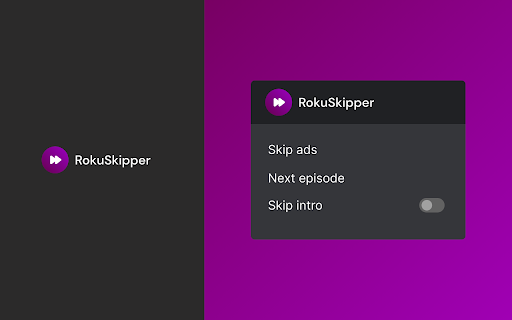
Automatically skip ads, intros and click next episode button on Roku Channel. Extension to skip all intros and ads when watching Roku Channel series. Save your time, muscles and keyboard buttons! One click to play all series episodes in a row without a single move from the couch. Add Roku Channel Skipper to your browser to automatically: ➡️ Skip all intros ➡️ Fast-forward through ads ➡️ Go to the next episode One extension to play all episodes of your favorite series in a row smoothly. All you need to do is to add the extension to your browser, switch on skipping options using toggles and log into your Roku Channel account. You are ready to binge series all night. It is as simple as that! How does it work? Skipper automatically clicks ""skip"" buttons which appear while watching. Please note that this extension was developed and tested for the English version only. It may not work for other languages or if the ""skip"" button is not available by default. ❗**Disclaimer: All product and company names are trademarks or registered trademarks of their respective holders. This extension holds no association or affiliation with them or any third-party companies.**❗

Roku Channel Speeder: adjust playback speed
Extension allows to adjust the playback speed on Roku Channel according to your preferences. Get your skates on and be in control of the playback speed on Roku Channel. This extension will allow you to either speed up or slow down shows and movies to enjoy watching your favorite content at your own pace. Didn't catch that fast-talking dialogue? Want to experience your favorite scenes in slow-motion? Or maybe you'd like to fast forward the less interesting part to enjoy the series finale? You're in the right place! Here's the solution for changing the video speed. All you need to do is to add the extension to your browser and run the control panel which enables you to choose from 0.25x up to 16x speed rates. You can also use hotkeys on your keyboard to control it. It is as simple as that! How to find Speeder's control panel: 1. After installation, click the small puzzle piece icon next to your Chrome profile avatar (top right corner of the browser window)🧩 2. You'll see all your installed and enabled extensions.:✅ 3. You can pin Speeder to have it always on top in your browser.📌 4. Click the Speeder icon and try different speed settings.⚡ ❗**Disclaimer: All product and company names are trademarks or registered trademarks of their respective holders. This extension holds no association or affiliation with them or any third-party companies.**❗

Hulu Ad Skipper | Ad Blocker [QVI]
Fast Forward Through Commercials on Hulu and block ads! Our Ad skipper detects ads then mutes and fast forwards through them. It's essentially an ad blocker for Hulu. Disclaimer: All product and company names are trademarks or registered trademarks of their respective holders. This website & extensions hold no association or affiliation with them or any third-party companies. This extension is part of the Quality Viewership Initiative, a collaborative effort to enhance the understanding of audience engagement. It collects anonymous, aggregated viewing insights to support creators and studios in improving the quality of their content. You can stop sharing your information at any time by switching the toggle on the options page. ⚠❗** Please note: Our team is aware that some users have experienced issues with our product. We are actively working on finding a solution. If you have encountered a bug, please consider providing detailed information about the circumstances and steps leading up to the problem. Your feedback will be of immense help to our QA team. Thanks for understanding! **❗⚠

Audio Booster for Tubi
Struggling with quiet audio? 🚀 Try Audio Booster for Tubi and amplify your experience! 🎧 Have you ever watched a series or movie on Tubi and felt that the sound was too quiet? 😕 You turned up the volume to the maximum and still weren't satisfied? 📉 Here's Audio Booster for Tubi - a solution to the problem of silent soundtrack in online media! 🚀 What is Audio Booster for Tubi? Audio Booster for Tubi is an innovative extension for the Chrome browser 🌐 that allows you to increase the maximum volume of sound played on Tubi. Easily adjust the volume using the 🎚️ slider or predefined buttons in the extension pop-up menu to achieve optimal sound levels. 🔊 Functions 🔹 Volume Boost: Adjust the volume according to your needs. 🔹 Predefined Levels: Choose from preset volume settings for quick adjustments. 🔹 Compatibility: Specially designed for use with Tubi Install the extension from the Chrome Web Store. Open your favorite movie or series on Tubi. 🎬 Click the extension icon in the browser bar. 🖱️ Use the slider or pre-defined buttons in the extension's pop-up menu to increase the volume. 🎧 ❗**Disclaimer: All product and company names are trademarks or registered trademarks of their respective owners. This extension has no affiliation or connection with them or any third party companies.**❗

Audio Booster for Roku
Struggling with quiet audio? Try Audio Booster for Roku and amplify your experience! Have you ever watched video on Roku and felt the sound was too quiet? 😕 Did you have to turn up the volume to the max and still weren't satisfied? 📉 Enter Audio Booster for Roku - your solution to the problem of a quiet audio track in online media! 🚀 What is Audio Booster for Roku? Audio Booster for Roku is an innovative extension for the Chrome browser 🌐, allowing you to increase the maximum volume of audio played on Roku. Easily adjust the volume using a slider 🎚️ or predefined buttons in the extension's pop-up menu to achieve the optimal sound level. 🔊 Features 🔹 Volume Increase: Set the volume according to your needs. 🔹 Predefined levels: Choose from ready-made volume settings for quick adjustment. 🔹 Compatibility: Designed specifically for use with Roku. Install the extension from the Chrome Web Store. Open video on Roku. 🎬 Click the extension icon in the browser bar. 🖱️ Use the slider or predefined buttons in the extension's pop-up menu to increase the volume. 🎧 ❗**Disclaimer: All product and company names are trademarks or registered trademarks of their respective holders. This extension holds no association or affiliation with them or any third-party companies.**❗
