
mhodjlfpodfbojdgnaoiccdnfeffofch
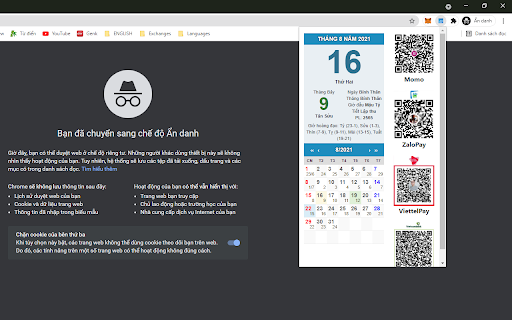
Lunar Calendar Extensions là extension cung cấp thông tin cho người Việt bao gồm: Âm và Dương lịch hiện tại, tiết khí, giờ hoàng đạo, các ngày lễ,... * Đặc điểm: - Là Extensions, nó có thể được cài đặt trên Chrome, Coc Coc, Edge, Opera và Firefox - Cho biết Âm và dương lịch - Cho biết 24 tiết khí - Cho biết Giờ đầu ngày - Cho biết Giờ hòang đạo - Cho biết Các ngày lễ của người Việt, cập nhật theo các ngày nghỉ lễ mới nhất 2021

CÔNG CỤ ĐẶT HÀNG ORDER HÀNG TRUNG 247
Công cụ đặt hàng Nhập Hàng Trung Quốc, hỗ trợ bạn lựa chọn sản phẩm từ 3 trang TMĐT từ Trung Quốc: 1688, taobao, tmall Công cụ hỗ trợ đặt hàng trực tuyến của OrderHangTrung247 trình duyệt Chrome & Cốc Cốc là công cụ hỗ trợ giúp khách hàng có thể đặt hàng trực tuyến hàng triệu sản phẩm phong phú dễ dàng hơn từ những website Thương Mại Điện Tử lớn của TQ Hướng dẫn sử dụng: Công cụ hỗ trợ đặt hàng của OrderHangTrung247 những website Thương Mại Điện Tử lớn của TQ. Bước 1: Tải công cụ Bước 2: Đi tới link bạn cần đặt hàng từ các trang TMĐT Bước 3: sau khi đồng ý thêm hết hàng vào giỏ, bạn click vào chữ "về giỏ hàng" chọn kết đơn các shop cần đặt Screenshots: Hình 1: Hình ảnh chi tiết sản phẩm và công cụ đặt hàng. Hình 2: Hình ảnh cho vào giỏ hàng thành công bằng công cụ đặt hàng. Hình 3: Hình giỏ hàng sau khi đã được cho sản phẩm vào giỏ bằng công cụ đặt hàng.

Lịch âm - Lịch Vạn Niên Việt Nam
Lịch âm - Tiện ích xem lịch âm dương chính xác. Xem lịch âm, ngày tốt xấu, ngày hoàng đạo, ngũ hành... Tiện ích xem lịch âm dương chính xác. Xem lịch âm, ngày tốt xấu, ngày hoàng đạo, ngũ hành. Với nguồn cấp dữ liệu lịch âm chính xác từ licham.net, Lịch Vạn Niên Việt Nam cung cấp các tính năng tra cứu lịch âm phong phú như: - Tra cứu lịch âm hôm nay - Tra cứu lịch âm ngày bất kỳ - Xem ngày tốt, giờ hoàng đạo - Xem ngũ hành và hướng xuất hành - Xem tuổi xung khắc, sao tốt/xấu - Các sự kiện nổi bật theo ngày - Nguồn dữ liệu bảo đạm tại https://licham.net/

FMA - Flashcard Maker for Anki
An AI assisted flashcard generator for Anki - Remember & learn as you browse the web! Generate flashcards seemingly. Be it ChatGPT, Wikipedia or your favorite online resource. FMA is designed to optimize learning from online resources. We put a great emphasis on preventing distractions that could break your concentration while also maintaining compatibility with your current workflows. 1. ✍️ Select any text and choose your preferred flashcard type. 2. 📖 Keep reading, researching, or browsing. FMA generates your flashcards quietly in the background, without interrupting your flow. 3. ✅ Review & approve when ready. Check your generated cards, discard what you don’t need, or approve them all in one click. FMA will take care of syncing the new flashcards directly to the Anki deck of your choosing. FMA further comes with powerful Anki templates designed to help remembering the answers especially in the early stages. Our templates provide hints when needed, detailed explanations to fully understand the answers, quick links to the original source, and even the option to discuss your card with ChatGPT. Your flashcards are automatically synced with Anki, so we recommend having it installed to unlock FMA’s full potential. ⬇️ Download FMA now and build your knowledge 1. Click the **Add to Chrome** button. 2. Click the puzzle 🧩 icon and **pin the FMA icon** 📌 to your toolbar. 3. Your are set! Select text to start generating a flashcard 4. Press the little menu in the lower right corner when you are ready to check the results Found a bug? 🪲 Please report it by clicking on the “Report a bug” button in the settings or menu. Any suggestions? Please get in touch with us at 💌 [help@sokilearn.com](mailto:help@sokilearn.com) or in the Discord community.

Localhost Banner Alert
Add a banner to your browser when you're on a local development site Localhost Banner Alert is your companion for local development! This Chrome extension adds a visible banner to your browser to remind you when you're browsing localhost sites. The banner is displayed if the URL of the current tab contains one of these elements: You can manage several parameters. Simply click on the extension button and then on "Go to settings": * Banner enabled: Yes / No * Banner Text : the text on the banner *(default: Localhost)* * Banner Position : Top Left / Top Right *(default)* / Bottom Left / Bottom Right * Banner Theme : Orange *(default)* / Red / Yellow / Blue / Purple / Green * Exclude URLs : fill in the URLs that should not have the banner. One URL per line without http(s). The extension does not collect any user information or other information. Only extension-related parameters are stored. Source code is available here: https://github.com/shevabam/extension-localhost-banner-alert
