
mhlecapiniomlbllfaochicnafbjmmbg
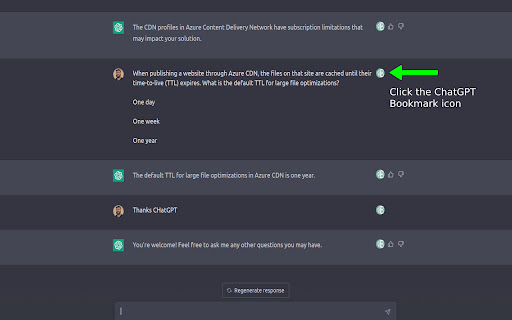
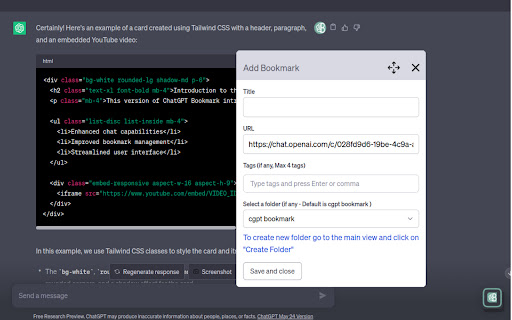

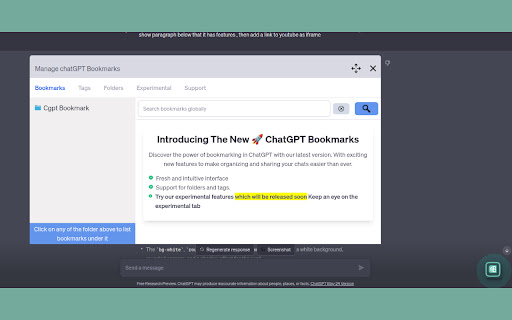

ChatGPT Bookmark is a simple extension that enables users to bookmark and easily access their conversations with ChatGPT About : The all new chatGPT Bookmark v1.0.5 1) Enhanced UI 2) Support for Folders and Tags 3) Improved bookmark management Bug fix 1) Fixed the width issue with devices 2) Resolved a bug preventing the creation of folders and the addition of bookmarks. ChatGPT Bookmark is a simple extension that enables users to bookmark and easily access their conversations with ChatGPT. This application is designed to make it easier for users to quickly bookmark specific conversations with ChatGPT and later access them by simply clicking on the links in the extension which opens the specific conversation in chatGPT and scrolls to the specific message which you bookmarked

Savelore – Save ChatGPT, Claude & Gemini Chats | AI Knowledge Base
Save AI chats & responses from ChatGPT, Claude & Gemini. Export to Notion. Build your AI knowledge base. Save the answers worth keeping from ChatGPT, Claude, and Gemini. Organize them, search them, export them. They are yours, permanently. Savelore is a permanent archive for your AI conversations. You save the responses you want to keep. They stay organized, searchable, and available offline, across every device you choose. ━━━━━━━━ WHY SAVELORE. ━━━━━━━━ You know you solved this before. You just cannot find it. AI conversations scroll away. Temporary sessions vanish. You paste answers into scattered docs, then re-ask questions you already answered once. The thinking you did with AI disappears the moment the tab closes. Savelore keeps it. Save a response in one click, and it becomes a permanent entry in your archive. Find it again in seconds, whenever you need it. ━━━━━━━━ COLLECTION MODE. ━━━━━━━━ Select responses across several ChatGPT, Claude, or Gemini conversations. Savelore combines them into a single document with numbered citations that link back to the exact original message. One archive built from many conversations. Useful when you are researching a topic across sessions and want the answer in one place. ━━━━━━━━ WHAT YOU CAN DO. ━━━━━━━━ - Save any AI response in one click, from ChatGPT, Claude, and Gemini - Save an entire conversation as a single entry, with full context - Collection Mode: combine responses from many chats into one cited document - Jump to source: return to the exact message in the original conversation - Search your full archive instantly, offline - Organize with folders, tags, favorites, and pins - Filter to entries from the conversation open in front of you - Export to Markdown, HTML, PDF, TXT, and JSON - Send entries to Notion, with optional auto-sync on every change - Optional cloud sync across devices through a web dashboard - Works fully offline, no account required - Works with custom GPTs, Claude Projects, Gemini Gems, and temporary chats ━━━━━━━━ WHO IT IS FOR. ━━━━━━━━ If you use ChatGPT, Claude, or Gemini every day and keep losing answers you wanted to keep, Savelore is built for you. - Developers keeping reusable code and solutions - Researchers building citation-ready documents from many sources - Students collecting notes and study material - Writers organizing drafts, ideas, and reference - Anyone who thinks with AI and wants to keep the result The archive gets more useful the more you save. Past thinking stays within reach instead of starting over. - Works fully offline, no account required - Your saved content stays on your device in local mode - Optional cloud sync, enabled only when you want it - Cloud data encrypted at rest - Anonymous analytics only. Your saved content is never read, sold, or used for ads. ━━━━━━━━ EXPORT, ALWAYS ━━━━━━━━ Export your entire archive as Markdown, HTML, PDF, TXT, or JSON at any time. What you save is yours to take with you. If Savelore earns a place in how you work, a review helps others find it.

ThinkGPT:Universal LLM Bookmark Manager-ChatGPT,Gemini & More
Bookmark Manager that integrates with ChatGPT,Grok,Gemini ,Perplexity ,DeepSeek and more Adds a native bookmark button to responses on Major AI LLM platforms: chatgpt.com gemini.google.com perplexity.ai Mistral.ai Grok.com and More , for all supported platforms please visit : https://thinkodeai.com/ Save and organize your most valuable ai results with just one click. Instantly return to any saved message, copy important responses, or export them for later use. Adds a native button for quickly bookmarking AI replies within AI platforms. Features a clean, intuitive interface with both light and dark modes - Clutter free extension (No complications - Adds a native bookmark button within chats) -Doesn't force you to manually type in titles or tags for quick bookmarking -Fliter bookmarks based on platforms -Search via any keyword to retrieve the responses -Extension expands in a full screen for easier navigation -Generate powerful powerpoint presentations from any responses you saved -Weekly updates to add in features and improve the extension Perfect for: Students capturing and retrieving study materials and explanations Researchers saving and searching through valuable insights and data points Professionals organizing and quickly accessing project-related information Software Developers saving code snippets, debugging tips, and architecture discussions Writers collecting and finding ideas and inspirations Anyone who wants to make the most of their ChatGPT conversations! Install ThinkGPT and navigate to Chatgpt , Gemini , Perplexity or other supported platform. As you chat, click the bookmark icon underneath any message response you want to save Access your bookmarks anytime through the ThinkGPT extension popup, which you could also expand in full page Use the smart search feature to quickly find specific bookmarks by keywords or topics Easily jump back to any bookmarked conversation with a single click Click on Generate presentation button to select responses and generate a powerpoint presentation within seconds.

AI Chat Bookmarks
Saving important chats in your ChatGPT and Gemini "Ever lost an important chat with ChatGPT or Gemini? No more worries! Introducing AI Chat Bookmarks, a revolutionary extension that lets you easily save and organize your valuable AI conversations." Simple to use: A convenient button is added to your ChatGPT page, allowing you to instantly bookmark your current chat. Customizable: Change the bookmark's title or add notes for easy reference. Secure and private: All data is stored locally on your device, ensuring your conversations remain confidential. Flexible: Export or import your bookmarks to keep your chats organized across different devices. **Experience the power of AI Chat Bookmarks and never lose another important conversation again**

ChatGPT Bookmark & Prompt Manager
ChatGPT Bookmark & Prompt Manager gives you control so you can find anything instantly, save what matters, reuse and share prompts. ChatGPT is powerful - but managing long conversations, finding past answers, and reusing prompts quickly becomes frustrating. Designed for developers, researchers, writers, and daily ChatGPT users who want speed, organization, and control. 🔍 Instant Search & Navigation ✓ Find any conversation in milliseconds - no scrolling required ✓ Hide or unhide the ChatGPT sidebar for distraction-free navigation ✓ Jump directly to what matters 📌 Smart Bookmarking ✓ Bookmark ChatGPT important answers with one click ✓ Instantly access saved conversations anytime ✓ Optional tagging for clean organization 🧠 Prompt Manager ✓ Save, reuse, and update your favorite prompts ✓ Share your prompt with your team members ✓ Build your personal prompt library ✓ Eliminate repetitive typing 🏷️ Better Organization ✓ Categorize chats using tags ✓ Filter conversations by type or purpose ✓ Show only code-related threads with one click ☁️ Cloud Sync (Multi-Device) ✓ Access ChatGPT bookmark and prompts across devices ✓ Seamless experience wherever you work 🔒 Privacy-First by Design ✓ Only chat titles and reply IDs are stored on the server ✓ Full conversation content stays in your browser ✓ Your private data remains private
