
mhekhlkmjaleehfnfjfpejhegjieaaef



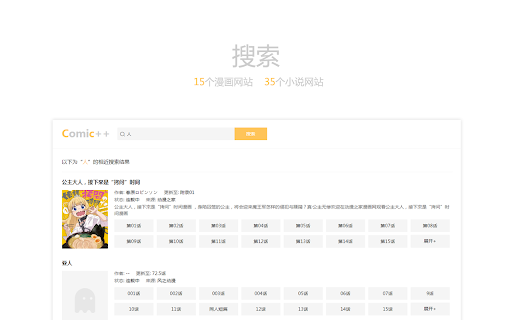
重新定义漫画与小说网站的样式布局,改变你的阅读方式。 为了美好的阅读体验,你需要一个更简约、更舒适的阅读器。Comic++ 将助你摒弃糟糕UI体验,提供更贴心的服务。 漫画阅读模式 - 调整漫画加载方式 - 自由切换黑/白主题皮肤 - 支持缩放漫画显示比例 - 支持调整漫画上下间距 - 支持 4 个漫画网站 小说阅读模式 - 支持切换简体/繁体 - 支持字体选择:雅黑、宋体和楷体 - 支持字体大小修改 - 支持调整页面宽度 - 支持 3 个小说网站 联系我们 - 官网: https://www.didaolan.cn/comic.html - 更新日志:https://www.didaolan.cn/comic_log.html - QQ群: 629358303

Aria2 Explorer
Speed up your downloads with Aria2, manage your download tasks easily. Aria2-Explorer captures browser's download task and exports it to Aria2 via JSON-RPC interfaces to complete download task. Aria2 is a lightweight multi-protocol & open-source command-line download utility. It supports HTTP/HTTPS, FTP, SFTP, BitTorrent and Metalink. 1. For Windows, please install Aria2 Manager: https://apps.microsoft.com/detail/9p5wq68q20wv?cid=cws Other platform, please download Aria2 utility: https://github.com/aria2/aria2/releases/latest. 2. For Windows, please run Aria2 Manager . Other platform, please run Aria2 in the Terminal with typing aria2c --enable-rpc. 3. Install this Chrome extension. 4. Enable auto-capture on the extension options page and configure others as you need. (For Motrix user, please use http://localhost:16800/jsonrpc as the RPC URL) After these steps, you could enjoy the multi-threads and BT download experience inside the Chrome. Warning: Please turn off auto-capture function, when you are using other extension to download network resources. Otherwise, there will be conflict and exception arisen. Features: [ ZERO collection of user data and privacy ] 1. Auto capture browser download tasks - Capture notification - Support magnet links - Toggle auto-capture by shortcut (Default: Alt + A) - Set all Aria2 options manually before download - Filter task by the domain, file extensions or file sizes Filter priority: domain > file-ext > file-size, white-list > black-list 2. Auto-select Aria2 RPC server by matching the preset download URL pattern 4. Synchronize and store all settings on the cloud 5. Support for zh-CN/zh-TW/en/fr/it/ja/ko/ru/uk languages 9. Support shortcuts in the options page (Save: Alt + S Reset: Alt + R Download: Alt + J Upload: Alt + U)

小说阅读器
小说阅读器 功能说明:将本地的txt文件,拖动到 chrome ,将展示为优雅阅读方式 - 阅读可以看浏览滚动条进度保存 - 配置字体/配色 - 可以全局搜索 展示效果图如截图

Powerful Pixiv Downloader
【English】Use this tool, you can: - Batch download all the artist's works, your bookmarks, your following, rankings, search results, etc.; - One-click download of any work you see; - Manually select the work you want to download on the page; - Set filter conditions to filter the works you want to download; - Download illustrations, manga, ugoira(animations), novels; - Save ugoira in GIF, WebM, APNG, ZIP formats; - Save novels in TXT, EPUB format; - Create folders with various data such as artist name, date, title, etc.; - Customize file names and sort them; - Add 0 in front of the serial number, so that the sorting will not be confused; - Save user avatar and cover image; - display larger thumbnails for easier viewing; - Preview the image on the thumbnail, and view the original image; - Save download records to avoid repeated downloads; - Save download progress, resume unfinished downloads; - export work data; - Collect works in batches; - Help you manage your bookmarks; - Timed crawl; - Highlight following users;

iTab New Tab
iTab is a new personalized tab with free customized widgets: Calender, Weather, Breaking News, Wallpapers and so on.
