
mhbflefepokengbccinkmfhokjkphbol
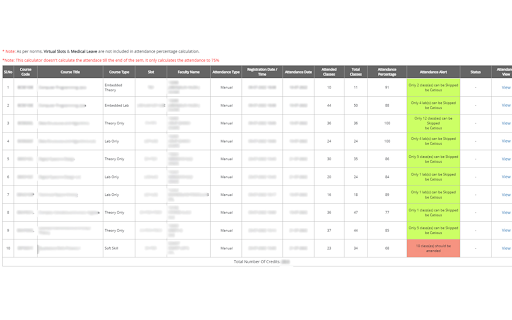

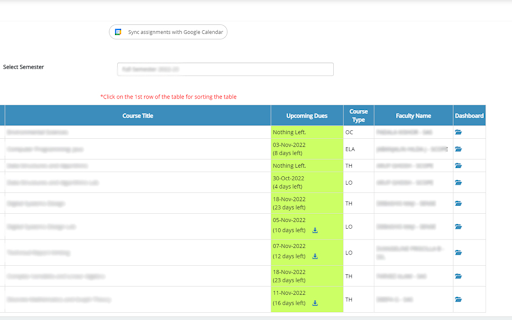
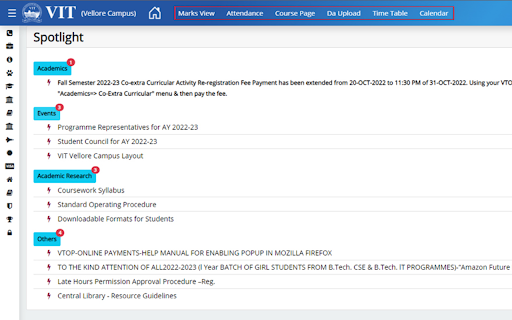
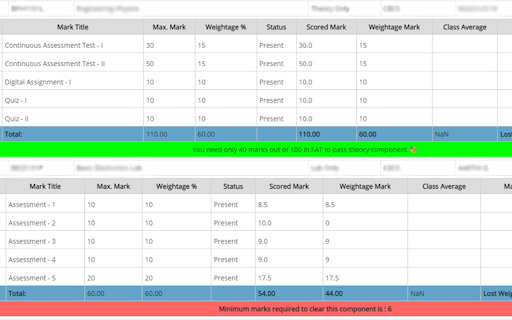
Enhance your VTOP in one click 🚀 Get ready to say goodbye to all your VTOP struggles with ViBoot! 💻 📈 With our powerful web extension, you can enhance your VTOP experience like never before! 💥 📚 Say goodbye to the fear of getting debarred with our attendance calculator that helps you maintain a minimum 75% attendance! 🙌 📊 No more time-consuming calculations! Our extension shows you the marks you need to pass, saving you time and energy! 💡 📅 Don't forget to upload your assignments ever again! Our easy-to-use sync feature that integrates with your Google Calendar. Access it across all your devices! 💼 📆 Keep your exam time table and venue organized with our easy-to-use sync feature that integrates with your Google Calendar. Access it across all your devices! 🗓️ 🧭 Navigation made easy! With our Navbar, you can access the most frequently used VTOP pages right from the home screen, saving you time and effort! 💻 💻 No more invalid captcha errors! Our extension automatically fills the captcha for you, making your experience smoother and stress-free! 🤖

Always active Window - Always Visible
Simulate all whitelisted browser windows as active by spoofing the visibility state event and more! [Breaking Change] Version 0.4.0 and above. The extension must now be enabled for each hostname individually. This adjustment enhances the extension's performance, as the always-active feature can disrupt websites. To activate it, open the page requiring the always-active feature in a browser tab and click the action button once. The page will refresh, and the action button will turn blue. This extension protects against web pages tracking the activity state of the page. Some websites use this track to only offer services when the tab is active. By installing this extension a small script is injected into every webpage which overwrites the "document.visibilityState", and "document.hidden" properties to pretend the tab is always in the active state (document.visibilityState = 'visible' and document.hidden = false). This is useful for the webpages that check your visibility state before loading resources like many music webpages. By installing this extension even if the page is opened in the background page, the player will start immediately like the page is loaded on an active tab. Supported Events: 1. visibilitychange 2. webkitvisibilitychange (only on Chromium browsers) 3. mozvisibilitychange (only on Firefox browser) 4. blur (some websites require the user to keep the tab focused) 5. mouseleave (some websites use this method to make sure the user pointer is inside the window)

NeoExamShield
Prevents malpractice by blocking unauthorized extensions and websites during tests on the Iamneo portal. NeoExamShield is designed to support the integrity and fairness of the IAMNEO assessment platform. This extension helps maintain a secure examination experience by monitoring and restricting the use of unauthorized browser extensions during assessments. In addition to extension monitoring, NeoExamShield also enforces exam-specific access rules by blocking access to certain external websites as defined in its configuration. These restrictions are applied using pre-defined JSON rules included in the extension to ensure a controlled and distraction-free testing environment. NeoExamShield operates solely within the IAMNEO exam platform and does not collect personal data or monitor user activity outside the scope of exam security requirements.

VTop+
An open source browser extension giving superpowers to VTOP. VTop+ is a powerful, lightweight, open-source browser extension built specifically for VIT students. It completely revamps the clunky default VTOP portal, adding highly requested features, fixing annoying layout issues, and providing a clean, modern interface that makes navigating your academic life a breeze. Whether you're tired of being blinded by the white screen during late-night study sessions or you just want faster access to your digital assignments and timetable, VTop+ is the ultimate productivity tool for your browser. 🔥 Why You Should Install VTop+: - Seamless Dark Mode: Late-night studying? One click instantly transforms VTOP into a beautiful, eye-friendly dark theme — powered by DarkReader with fine-tuned VTOP-specific overrides. - Overhauled Dashboard UI: Say goodbye to dashboard clutter! We've removed unnecessary elements, improved the styling, and brought important "Class Messages" right to the front so you never miss a professor's announcement. - Privacy at a Glance (Hide CGPA): Easily toggle your CGPA and credit status on or off from the dashboard to keep your grades private when opening VTOP in public spaces. - Smarter Digital Assignments (DA): No more guessing what you've submitted! Instantly see upcoming due dates with color-coded urgency indicators (red if due within 3 days), and see exactly what's "Uploaded" vs "Not Uploaded" at a glance. Plus, preview your uploaded files directly in the browser without downloading them first. - 75% Attendance Alert: The attendance page now shows exactly how many classes you need to attend to reach 74.01% (VIT's passing threshold), or how many you can safely skip — with color-coded rows for at-risk, borderline, and safe subjects. - Marks & FAT Guidance: The marks page now shows a totals row with your accumulated weightage and lost marks per subject, plus tells you the minimum FAT score needed to pass the theory, lab, or STS component. - Beautiful Timetable View: The raw VTOP timetable grid is replaced with a clean, compact weekly schedule — showing course names, venues, and class types (Theory/Lab/Soft Skill) in a readable format. - Exam Schedule at a Glance: Your exam schedule is rendered as a clean, organized table grouped by exam type (FAT/CAT), with countdown timers showing how many days are left for each exam. - Lightning Fast Navigation: We've replaced the messy default navbar with clean, direct shortcut buttons to the pages you actually care about: Marks View, Attendance, Course Page, DA Upload, Time Table, and Exam Schedule. Includes a "More Pins" dropdown for your pinned quick links. - Course Filters: Easily filter your enrolled courses by "Fall" or "Winter" semester with dedicated quick-sort buttons on the course page. - One-Click Logout: A dedicated, easy-to-reach Sign Out button directly in the main navigation bar.

VIT Updated Auto-Capcha (Free)
Auto Captcha For Vellore VTOP Auto fills the Captcha Input on the VTOP Login page using Image processing and ML model for FREE! No more manual Captchas!
