
mgngmngjioknlgjjaiiamcdbahombpfb

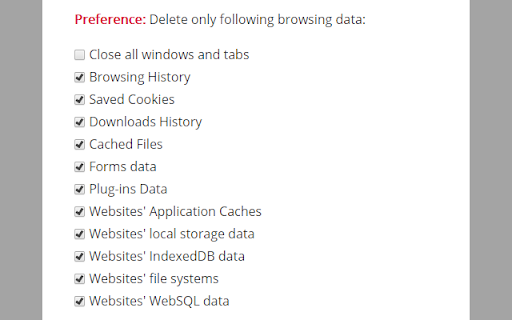


Quickly delete your browsing data - open windows, browsing history, cookies, downloads history, form data, caches etc. One click to delete all your browsing data including all open windows, browsing history and caches, cookies, downloads history, form data, and other stored data. Use Ctrl + Shift + E keyboard shortcut. Created by BrowserNative. Visit https://browsernative.com/click-and-clean-chrome-extension/

Clear Cache Chrome
⚡️Instantly remove browser cache, clear history, downloads and cookies with one click.🛡️ Faster browsing, enhanced privacy. 🚀 Introducing Clear Cache Chrome - the ultimate Chrome extension for effortlessly clearing your browser cache and optimizing your online experience! Say goodbye to cluttered caches and hello to a faster, smoother browsing session with just one click. 🐌 Frustrated with a slow Chrome browser? You're not alone. A cluttered cache and browsing history, including cookies, can significantly impact your browsing experience. Many Chrome users search for ways to "clear cache and cookies Chrome"to regain that speedy performance. Our extension makes it incredibly easy to clear your cache and other data, giving you a faster, smoother, and more enjoyable browsing experience. 🔑 Key Features: 1️⃣ One-click cache clearing 2️⃣ After-Clear Automation actions (close tabs, browser, reload, etc.) 3️⃣ Selective data removal options (control what to remove, whitelist sites, history auto-remove patterns) 4️⃣ Automation: Clear on Startup, After being idle, When you close a tab, Scheduled cleaning, History auto-removing 5️⃣ Specific Domains targeting (clear only selected domains, manual or scheduled every X minutes) 6️⃣ Clear History Log Viewer (control what was cleared and why) Advanced Features: ✨ Automatic Tab Reload: Your active tab will automatically refresh after the clearing process, ensuring a seamless transition. ⏰ Customizable Time Periods: Select the time frame for data cleaning - last hour, 24 hours, 7 days, 4 weeks, or all time. 🌅 Auto clean on browser startup ⏱️ Scheduled Clearing: Automatically clear cache at specified intervals - hourly, daily, weekly, or custom intervals 🗑️ Auto Clear History: Automatically remove history entries for specific sites/domains as soon as they are visited ❌ After-clear tab management (close tabs or browser automatically) ⌨️ Quick keyboard shortcut customization (Ctrl+Q / Cmd+Q) 💫 Toolbar Indicator: The extension's icon will flash while it's hard at work clearing the selected items. 📃 Whitelist Sites - Protect specific sites from cache clearing 🌓 Dark/Light theme toggle 🔔 Completion Notification: Once the cleaning is done, you'll receive a desktop notification detailing what data has been cleared. Can be turned on/off. ©️ Import\Export: Backup your settings or copy acroos browsers. Whether you're looking for how to clear browser cache, perform a chrome clear cache, or clear instagram cache, Clear Cache Chrome has got you covered. Our intuitive interface makes it a breeze to navigate and select the specific data you want to remove. No technical expertise required! 😄 🌟 Benefits of using Clear Cache Chrome: - Reclaim valuable storage space on your device - Enhance browser performance and speed - Protect your online privacy - Eliminate outdated and irrelevant data - Enjoy a clutter-free browsing experience No more sifting through complex settings or dealing with slow-loading pages. With Clear Cache Chrome, you can take control of your browser cache and history with just a few clicks. Our robust cache cleaner and history cleaner work together seamlessly to provide you with a streamlined browsing session. 🙌 Comprehensive Cleaning Options: With Clear Cache Chrome, you have the flexibility to select the specific data you want to remove from your browser. Our cleaning options include: (Note: Password deletion is no longer available in Chrome 144+ due to security changes in the browser) Customize your cleaning preferences to ensure your online activities remain private and your browser runs at its optimal performance. ❓ How to clear cache with our Chrome Extension: 1. Install Clear Cache Chrome from the Chrome Web Store 2. Go to Options and select the data you want to remove (cache, history, or both) 3. (Optional) Set Clear Scope to "Only Specific Domains", add your domain list, and enable Scheduled Clearing with a custom minute interval 4. Click on the Clear Cache Chrome icon in your browser toolbar on any page to clear what you want 5. Enjoy a faster, cleaner browsing experience! 🌍 Don't settle for subpar performance or compromised privacy. Choose Clear Cache Chrome and take control of your online experience today! 🎉 Upgrade your browsing game with out app! * The App may contain advertisements for our other applications. Updates: - 1.4.x - Added site White-list - 1.3.x - Added localization to all languages, added quick keyboard shortcut - 1.10.x - Whitelist Sites, Auto Clear History, Scheduled Clearing - 1.20.x - Added Presets + sessionStorage clearing option - 1.30.x - Added "Only Specific Domains" scope + 2 more auto options (idle, onClose) - 1.31.x - Added "Active Window Only" scope + Option Page UX simplified - 1.32.x - Incognito support

Adobe Photoshop
Easily remove backgrounds, adjust colors and more. Plus, get 6 months free access to Photoshop web. Collecting inspiration for your next project? Skip downloading images and then uploading them again just to edit. The Photoshop extension lets you choose an image and easily edit it right in your browser, no extra software needed. Here’s what you can do: • Collect images – Right-click an image or select the Photoshop badge to add it to your collection • Remove backgrounds – Erase an image’s background in seconds • Make adjustments – Fine-tune brightness, contrast, saturation, and more with precision controls • Crop to social presets – Create custom sizes and instantly crop images to Instagram, Facebook, or YouTube • Download – Export your edited images directly to your device Perfect for: Content creators, designers, marketers, and anyone who needs quick, powerful image edits. We’re just getting started: This extension will continue to grow, bringing new tools and improvements designed to make editing in your browser faster and more powerful. Terms & Conditions: Your use of this application is governed by the Adobe General Terms of Use (http://www.adobe.com/go/terms_en) and the Adobe Privacy Policy (http://www.adobe.com/go/privacy_policy_en) and any successor versions thereto.

Bonjourr · Minimalist Startpage
Improve your web browsing experience with Bonjourr, a beautiful, customizable and lightweight homepage. Every time you open a new window or tab, you'll be greeted by this minimalist looking page that will help your serenity and productivity. Thanks to its gorgeous high quality backgrounds that change according to the mood of the day, your new tabs will always feel fresh. Bonjourr was built as a more modern alternative to homepages like Momentum. We took inspiration from iOS and Apple's design language to create this beautiful homepage that will help you focus on what matters. Here's some key features: 🍏 iOS design language 🏞 Dynamic 4K backgrounds that change according to the mood of the day ⚡️ Fast & lightweight! 🔎 Search bar (compatible with all search engines) 🕰 Analog clock with multiple clock faces 🌤 Weather 🔗 Quick Links 👋 Greets you by your name 🌘 Dark mode 🥖 Emoji as favicon 🧑💻 Custom CSS styling 📝 Custom fonts 🔒 Privacy focused 🌎 Multilingual Bonjourr aims to look and feel minimal, while still bringing you lots of options to customise it to your liking. Set your own backgrounds (or Unsplash collections!), enable the beautiful analog clock, set your own font and Quick Links... You can even check out our documentation where we compiled some style snippets to do even more. The project is entirely open source, developer friendly and actually respects your privacy. We do not collect any data, nor do you need to create an account to use it. 🏞 Dynamic 4K backgrounds We handpicked some of the most beautiful Unsplash photos so that your new tabs will always feel fresh. Discover high quality photos of incredible landscapes, animals and nature. ⚡️ Fast & lightweight! Bonjourr is built with vanilla JavaScript and optimised for the best possible performance. 🔎 Search bar The integrated search bar of Bonjourr is compatible with all search engines. Yes, all of them! If you want, you can even add you own custom search engine. 🕰 Analog clock Bonjourr's default clock is made to resemble what you have on the iPhone and other iOS devices. But if you'd like something more exotic, you can replace it with a very cool analog clock, and customise it as you'd like. 🌤 Weather In a simple sentence, get a summary of you local current weather and forecast. 🔗 Quick Links It wouldn't be a real homepage without bookmarks! Bonjourr allows you to add your own bookmarks, change their icons and import your current bookmarks from your browser. 🔒 Privacy focused Some homepages like Momentum encourage you to create an account, give them some personal info, use more permissions and rely on many third party services. Bonjourr doesn’t collect any data, even for analytics purposes, use minimal permissions, rely on fewer third party services and of course doesn’t have any account system. Bonjourr being open source also means that you can easily check out if our claims are true. 🧑💻 Custom CSS styling Have a specific idea in mind? Bonjourr has you covered with the custom styles section. You can customise and do anything when you add your own CSS. 📝 Custom fonts Want a specific font on your homepage ? You can easily select it thanks to Bonjourr's integration with Google Fonts.

Cache Cleaner
Clear cache with one click and browse fast. Trusted by millions. This extension uses affiliate links for certain websites. Chrome is one of the fastest web browsers available today, but it consumes a lot of system resources and builds up a large amount of cache over time. This can cause lag or slow down your browsing experience. Usually, we know we need to clear the cache, but this tool makes it effortless—just one click. It clears all cache from Chrome, helping it run smoothly and faster. No extra features, no complicated settings, and no risk of accidentally deleting cookies, plugins, or passwords that might log you out of websites. It only clears the cache—nothing else. Just install the extension and click whenever you feel the need to refresh Chrome. It's free forever, lightweight, and contains only the code necessary to get the job done. No ads, no revenue—just a simple tool I built because I got tired of manually clearing the cache through Chrome settings. So, to all my fellow lazy friends, I'm uploading this extension to the Chrome Store. Enjoy! Important: This extension uses affiliate links for certain websites (such as Amazon, Gearbest, HealthKart, etc.). When you visit these sites through this extension, we may earn a small commission at no additional cost to you. By installing and using this extension, you agree to this use of affiliate links. This helps support the development of this free extension.
