
mgkcmbkophlnagckoodcmaeofginaokm
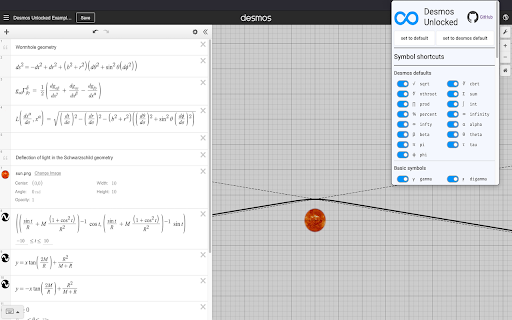


Browser extension for better user control of the Desmos graphing calculator configuration Write beautiful equations in the Desmos graphing calculator by customizing the underlying math formula editor from an easy-to-use control panel. Gain access to more Greek letters + many other symbols. Desmos provides shortcuts for a limited amount of symbols (e.g pi, theta, sqrt) by default and this browser extension expands shortcut functionality to hundreds of new symbols, including Greek letters and more advanced mathematical symbols. Compatible with DesModder!

Desmos Sidebar
Allows for graphing calculator to be launched on any global site This extension is designed to enhance productivity and streamline the user experience by integrating Desmos, a popular and rapidly growing graphing calculator, directly into the sidebar of your browser. As a student, I often find it challenging to juggle multiple windows and tabs when doing homework. This extends from my math classes, to chemistry, physics, and engineering. The constant switching between my textbook, browser, and Desmos slows me down and disrupts my workflow. By having Desmos available in a convenient sidebar, users can seamlessly access all the graphing and calculation tools they need without leaving their current page. Furthermore, with the digital SAT becoming more widespread, Desmos has become an essential tool for test-takers. This extension offers a great opportunity to familiarize yourself with Desmos' features and functionalities in an intuitive, distraction-free environment. It’s an excellent way to prepare for the exam while developing valuable skills that can boost both efficiency and performance during the test. This extension not only makes math homework easier, but it also provides a way to integrate key learning tools for an increasingly digital world, making it more accessible, time-efficient, and effective.

Dark Desmos
Dark mode for Desmos. A simple dark mode for all of Desmos with full support of all calculators and webpages.

Desmos Dashboard Download
Export you Desmos teacher dashboard as a .csv file. To use this extension... 1) Go to teacher.desmos.com, choose an activity, and choose a dashboard (aka Class Code). 2) Once you are looking at the dashboard you can run this extension to take the information from the dashboard and download it as a .csv file that you can then open using any spreadsheet application (Excel, Google Sheets, etc.)

Desmos Sketches Gallery Download
Download the gallery of Desmos sketches (unofficial) This extension will download student sketches from the Desmos Dashboard. This allows you to show off student work anonymously in other contexts. See screenshots for details on how to use.
