
mgfhlobphekamclnocchccjickjiolab
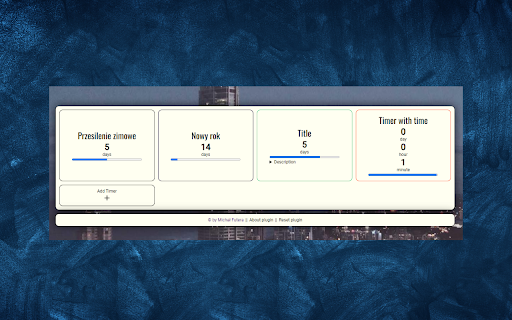

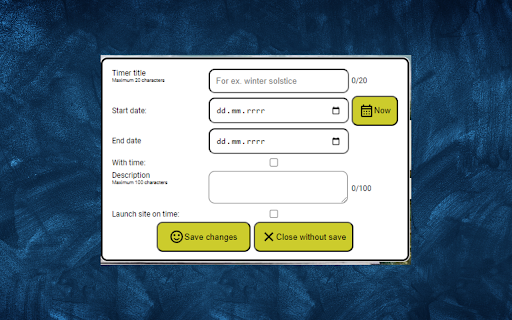
Create, manage, and be notified for important events. Timer for Chrome: Never Miss a Thing Create custom timers Set any time for each timer, from 1 minute to 365 days Choose whether you want the timer to repeat Add a title and description to each timer Start and stop timers The timer starts automatically when saved and stops when the time runs out Receive notifications Receive a notification in the clock notification bar and play a bell sound Additionally, the timer can open a specific website when the time runs out Benefits Never miss important events Timer for Chrome will help you remember meetings, deadlines, and other important events. Be more productive Timer for Chrome will help you focus on one thing at a time by setting a timer for a specific amount of time. Relax and unwind Timer for Chrome will help you find time to relax and unwind by setting a timer for a specific amount of time. Examples Set a timer for 25 minutes to practice yoga. Set a timer for 30 minutes to cook dinner. Set a timer for 15 minutes to take a break from work. Set a timer for 365 days to remember a loved one's birthday. Install Timer for Chrome today and start remembering the important things!

Orbitt Pro AI
Orbitt PROs uniquely combines AI prowess and a convenient Chrome Extension, redefining the cryptocurrency trading experience. Orbitt Pro: Your AI-Infused Trading Companion Welcome to Orbitt Pro, the premier AI-infused Chrome extension designed to revolutionize your trading experience. Whether you're delving into the dynamic world of cryptocurrencies or exploring traditional trading avenues, Orbitt Pro is your ultimate companion, empowering you with cutting-edge technology and intuitive design to navigate the markets with confidence. AI-Driven Market Analysis: Harness the power of artificial intelligence to delve deep into market dynamics. Orbitt Pro utilizes state-of-the-art algorithms to identify significant chart patterns and trends, offering invaluable insights even in the most volatile trading environments. Educational Content: Elevate your trading prowess with Orbitt Pro's extensive educational resources. Whether you're a novice trader or a seasoned expert, each interaction with Orbitt Pro serves as a stepping stone towards mastering the intricacies of trading, enriching your knowledge base with every query. Support for Informed Decisions: Empower your trading strategy with comprehensive market analytics provided by Orbitt Pro. From data-driven insights to real-time updates, Orbitt Pro equips you with the tools necessary to make informed decisions, ensuring a strategic approach to your trading endeavors. Insightful Market Analysis: Unlock unparalleled insights into market trends and chart patterns with Orbitt Pro's AI-generated analyses. By distilling complex data into actionable insights, Orbitt Pro empowers traders of all levels to navigate the markets with clarity and confidence. Knowledge Expansion: Dive deep into the world of trading with Orbitt Pro's educational resources. Whether you're looking to broaden your understanding of technical analysis or delve into fundamental concepts, Orbitt Pro serves as your gateway to continuous learning and improvement. Strategic Trading Support: Trust in Orbitt Pro as your analytical ally, guiding you through the complexities of the trading landscape. With Orbitt Pro by your side, you can approach every trade with confidence, knowing that you have the support you need to make strategic decisions.

Timey - Countdown timer
A simple timer that requires no fiddling with controls, enter your desired duration and go! Timey is a simple and easy-to-use countdown timer extension. No need to fiddle with controls – with Timey, all you need to do is type in the desired time or duration and press enter. Once the timer reaches zero, Timey will emit a chime to let know your timer is complete. 1. Install the extension. 2. Click on the extension icon located in your browser toolbar or use the Command/Ctrl+Shift+Y shortcut to open the extension popup. 3. To set a timer, type a time or duration into the input and press "Start timer" or hit the Enter key. 4. Once your timer is complete, Timey will emit a chime or send an optional notification.

New Countdown Timer
**New Countdown Timer - A Browser Extension for Enhanced Time Management** New Countdown Timer is a versatile browser countdown tool designed to help you manage your time with precision and flexibility. Beyond simple countdowns, this extension lets you create, save, and manage multiple custom timers for various tasks, from focused work sessions to cooking or exercise intervals. - **Custom Timers**: Create, edit, and save multiple personalized timers with specific durations, sounds, and color identifiers. - **Organized List**: Access all your saved timers in a clean list, with drag-and-drop support for easy reordering. - **Quick Start**: Launch any saved timer with a single click directly from the list view. - **Cloud Sync**: Seamlessly synchronize your custom timers across multiple devices using browser sync. - **Real-Time Toolbar Display**: See the remaining time dynamically updated directly on the browser toolbar icon while a timer is active. - **Instant Notifications**: Receive desktop notifications and customizable sound alerts when a countdown finishes. - **Flexible Control**: Start, pause, or cancel any countdown at any time. - **Intuitive Interface**: Easily set hours, minutes, and seconds using keyboard input or intuitive controls, featuring a modern interface based on Material Design principles. - **Focused View**: When a countdown is running, the extension popup provides a dedicated view of the active timer. - **Memory Recall**: Automatically saves your last used manual timer settings for quick access. - **🍵 Perfect Tea Brewing**: Set precise steeping times for different types of tea. - **🎯 Boost Productivity**: Set custom timers for Pomodoro sessions or task blocks. - **⏱️ Manage Meetings**: Ensure meetings stay on track and end on time. - **🍳 Kitchen Aid**: Perfect for timing cooking, baking, or brewing. - **💻 Digital Wellbeing**: Set limits for screen time or specific online activities. - **🏋️ Fitness Partner**: Time workout intervals or rest periods. Your privacy is paramount. New Countdown Timer operates entirely locally and does not collect or transmit any personal data. Your custom timer settings are securely stored and synchronized using browser's built-in storage and sync APIs. Optimized for minimal resource usage, New Countdown Timer runs smoothly without slowing down your browser.

Timer Countdown
An easy-to-use interface for the Countdown clock Timer—to manage time! After all, you'll be redirected to the last active tab. Online Timer Countdown Clock—This is a Chrome extension timer that simplifies time management and boosts productivity. Our online timer is designed to be easy to use, eliminating the need for a keyboard and providing an intuitive interface that anyone can navigate. Its versatile features make this timer good for personal use, whether managing work projects, timing meetings, or tracking other essential tasks. Why Choose Our Extension? ✅ Efficiency growth ✅ Popular sounds collection. If you need more - write in the comments ✅ Nice to view ✅ Simplicity ✓ Ease of Use: Set up your countdown in just a few clicks. ✓ No Keyboard Needed: Navigate with your mouse, making it perfect for quick setups. ✓ Anchors: 10s, 30s, 5m, 10m, 15m, 30m, 45m, and 1h to set an alarm clock in a single click. ✓ Visual Clarity: The countdown is prominently displayed, ensuring you always know how much time is left. ✓ Productivity Boost: Helps maintain focus and manage time effectively during work or study sessions. Because the clock is ticking! The countdown clock is prominently displayed on your screen, clearly indicating the time left. This is particularly useful during meetings or timed work sessions, where keeping an eye on the clock is crucial. The alarm timer feature allows you to select predefined alarm sounds, ensuring you never miss a deadline or forget an important task. The countdown app is designed with versatility in mind. You can use it for various activities, from tracking the time spent on work projects to setting timers for breaks and personal tasks. The online countdown function means you can access your timer from any device with a Chrome browser, giving you flexibility and convenience no matter where you are. Use Cases and Benefits: ☑️ For Professionals: Manage project deadlines, time meetings, and improve productivity by completing tasks within the set time. ☑️ For Students: Perfect for timing study sessions, exams, and breaks, helping to create an effective study routine. ☑️ For Fitness Enthusiasts: Track workout sessions and rest intervals, and ensure you follow your fitness regimen accurately. ☑️ For Home Use: Set timers for cooking, household chores, and other daily activities to stay organized. 🔸 Increased Productivity: Users report a 30% increase in productivity when using our timer for managing work tasks. 🔸 Enhanced Focus: 75% of users feel more focused and less distracted when they use the timer to segment their work into manageable intervals. 🔸 Better Time Management: Over 80% of users find it easier to manage their time effectively and meet deadlines consistently. - Style: Set and manage multiple timers simultaneously for different tasks. - Predefined Alarms: Choose from various alarm sounds and customize them to your liking. - Timer Presets: Save frequently used countdowns for quick and easy setup. - Tab safe: The alarm sound opens in a new tab. When it closes, you will automatically go to the tab where you worked. 👉🏻 "The online timer has completely changed how I manage my workday. It's incredibly easy to use, and the countdown clock keeps me on track during meetings and projects." – Sarah T., Marketing Manager. 👉🏻 "I use the countdown app for all my study sessions. It helps me stay focused and ensures I take regular breaks. Highly recommend it!" – John D., University Student. 👉🏻 "As a coach, the digital timer is perfect for timing brainstorms and rest periods. The customizable alarms are a great feature." – Emily R., The Personal Productivity Coach. Our Chrome extension timer is more than just a simple countdown tool: it's a comprehensive time management solution designed to enhance productivity and organization. With features like the timer countdown, digits display, and sound countdown clock alarm, it offers everything you need to stay on top of your tasks. Whether working on a critical project, studying for exams, or managing daily activities, this timer is the perfect tool to help you achieve your goals. Don't wait to take control of your time. Set up our Chrome extension timer today and experience the benefits of efficient time management. Join thousands of users who have transformed their productivity with our easy-to-use and versatile timer. With our feature-rich Chrome extension timer, enhance your workflow, stay organized, and never miss a deadline again.
