
mgfdapnedjhfmhcaglenpnjaocjpfplj
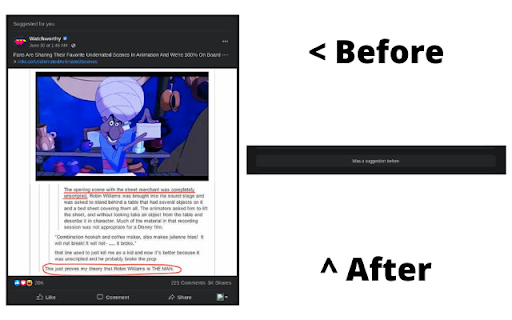

This extension hides Reels and recommendations on facebook *** NO AFFILIATION WITH FACEBOOK/META Previous published extension was removed from the chrome store due to a trademark violation. This is the new extension published with relevent changes. ---- This extension looks for certain keys in Facebooks feed and hides elements that contain 'Reels and short videos' and 'Suggested for you'. It places a small banner in the items place to let you know what was hidden. This extensions primary purpose it to clean up your feed from reels and suggestions so you're not bombarded with irrelevant 'fluff' in your feed. For people that use Facebook for business purposes, this will minimize the amount of fluff you see and just clean things up a bit more so you can get back to what you need to do rather than all the distractions. ********************** If your language is not English, the extension will most likely not work, log an issue with your language and we can look at adding it - https://github.com/mrinc/F-B-Hide-Recommendations-and-Reels/issues

F.Block Sponsored
Block Facebook™ sponsored and suggested posts in any language F.Block Sponsored is a lightweight and straightforward ad blocker designed specifically for Facebook™, targeting sponsored posts, suggested posts, and video banner ads. This extension works across all languages available on Facebook™, including its mobile website. IMPORTANT NOTE: Facebook™ consistently attempts to counteract ad blockers, causing this extension to occasionally stop functioning. In such cases, please await an update from F.Block Sponsored. Typically, updates are released within 1 to 2 days. This project began as a personal hobby to eliminate irritating ads; however, I found myself committed to maintaining it for everyone who uses it, regardless of the effort and time I invest. Therefore, if you find this extension useful, you can show your appreciation by rating it 5 stars and/or making a donation through the URL below, if you're able to do so: https://www.paypal.com/donate/?hosted_button_id=HFTDZ39U8A5ZQ Thank you :)

Youtube-shorts block
Play the Youtube shorts video as if it were a normal video. A extension allows youtube shorts videos to play on a regular page. Features - Redirect shorts - Hide "shorts" tab - Hide shorts - Extended GUI for shorts player *** "Hide shorts video" is now enabled by default!!!! If you don't want to do that, please disable in option page! *** The UI of Youtube-shorts is not very well optimized for PCs and has poor functionality. This extension aims to improve the user experience by displaying short videos in the regular video player. ...utube.com/shorts/"video-id" ↓↓ ...utube.com/watch?v="video-id" Change the URL to something like. v1.5.5 features - Fix: Extension Breaks YouTube's New Replies UI #64 v1.5.2 features # Changed - Fix block the entire News(and other) page v1.5.1 features # Changed - Fix where opening in a new tab redirected to the wrong video v1.5.0 features # Changed - refactoring codebase - Fixed an issue where the hide shorts feature might not work depending on the environment (specifications). - Fixed the "open in new tab" feature on the shorts screen. - Updated to comply with YouTube's latest specifications (blocking ytd-rich-shelf-renderer). v1.4.2 features # Added - Russian translation from @jooblex # Changed - Support for Youtube specification changes v1.4.1 features # Added - German translation from @golgorath # Changed - Support new subscription page(Hide shorts video) v1.3.1 features # Changed - Fixed a bug that redirected links that were not short videos containing the string "shorts" v1.3.0 features # Added - Added "Open in regular player" button in the Shorts player - Block Shorts-related feeds (if Hide shorts video is enabled) - Add a Release notes # Changed - Fixed the problem that the load spinner does not disappear when "Hide Shorts video" is selected - Optimize "hide shorts video" v1.5.4 features - Additional selector for Shorts shelf elements by @HardyHeron2008 in #62 - Fix timing issue for richShelfFilter by @seporterfield in #63

Facebook Reels Control
Hide Reels and Short Videos from Facebook Feed and redirect Reels URLs. Take back control of your Face-book experience! Face-book Reels Control is a simple and effective Chrome extension designed to enhance your browsing experience on Facebook. With this extension, you can: ✅ Hide Facebook Reels: Instantly remove Reels and Short Videos from your Facebook feed to declutter your timeline and focus on the content that matters to you. ✅ Redirect Reels URLs: Automatically redirect Reels URLs to Facebook's main page, preventing you from accidentally landing on distracting content. - Toggle Reels hiding on and off with ease. - Enable or disable automatic URL redirection. - Lightweight and user-friendly design with seamless integration into your browser. - Completely customizable settings saved locally for your convenience. Who is it for? Users looking to declutter their Facebook feed. Anyone wanting to avoid distractions and improve productivity. People who want a cleaner, more focused Facebook experience. Privacy Note: This extension does not collect or share any personal data. All settings are stored locally in your browser. Get started today and enjoy a distraction-free Facebook experience with Facebook Reels Control!

Fluff Busting Purity
Fluff Busting Purity cleans up & customises Facebook, letting you filter out the junk you dont want to see Fluff Busting Purity hides all the ads, game spam, sponsored posts and other annoying stuff on Facebook and generally makes Facebook less annoying to use If you like Fluff Busting Purity, please be sure to: ★ Give it a 5 Star review and share with your friends! :) ★ Donate to the project: https://donate.fbpurity.com to support all the hard work that goes into producing Fluff Busting Purity. For the latest news and info such as updates and bug fixes, please make sure you like the Fluff Busting Purity Fan Page on Facebook via the following shortcut: https://fans.fbpurity.com Fluff Busting Purity is in no way affiliated with or endorsed by Meta or Facebook Fluff Busting Purity cleans the application spam and other annoying messages off your Facebook homepage. It adds a small information bar at the top of your news feed. It tells you how many game/application posts its hidden and also how many other "Extra" (extraneous) post types (which you can specify in the options screen) it has hidden. The options screen is accessible by clicking the FBP link in the top Navigation Bar. Fluff Busting Purity has multiple options to lets you block a huge range of Facebook post types, that you are not interested in. You can also filter out any subject on Facebook that doesn't interest you, using the "Text Filter" function, for example say you were not interested in Politics, you could put the relevant keywords/phrases that get mentioned in Political posts, such as the names of the Political party members, the party names, etc into the Text Filter box, and FBP will filter out any posts from the Newsfeed including that text. You can also use the Text Filter to filter out any mention of celebrities you are not interested in hearing about, such as Kanye, The Kardashians, etc. There is now also an "Auto Hide" filter, that works the same way as the "Text Filter" but it completely hides the post from your feed, if it detects any of your chosen keywords or phrases. Fluff Busting Purity now also has an image content filter that lets you filter out images of cats, dogs, selfies, babies, memes, food, smoking and also lets you set your own custom image content filters. You can also hide any of the links in the right hand column, such as: Events, Games and App Requests, Recommended Pages, Suggested Groups, People You May Know / Find More Friends, Friend Requests, Birthdays, Chat, Businesses For You, Stories, Watchlist More Features ----------------------- * Hide the Sponsored Posts (aka Hide all adverts ) * Hide the Suggested Posts (aka the Join / Follow posts) * Hide the ads. (Fluff Busting Purity is the best adblocker for Facebook) * An option to Force Facebook to permanently keep your Newsfeed on "Most Recent" (aka the Feeds Page), you can also set it permanently to Friends Feed, or the Favorites Feed. * Hide all game and application posts, including "Games your friends are playing" and "Games you may like". * Choose friends to add to your Friend Allow List (so their posts don't get filtered out by FBP's Filters) * Add words or phrases to your Allow List, which if featured in a post will stop the post from being filtered out by FBP's Newsfeed filters. * Hide Upcoming Events and other Event related posts * Change Facebook's colours (font and background / theme) (Choose what color font and background you want, to customize the site to your liking) * Hide links in left column, including App Center, Meta AI, Meta Quest, Reels, Ray-Ban Meta, Fundraisers, Like Pages, Pages Feed, Games Feed, Events, Pokes, Music, Marketplace, Places Editor, Sale Groups, etc * Remove colored backgrounds and large fonts from statuses * View Your list of Deactivated Friends * Tell you who deleted or unfriended or blocked you * Set the default comment sorting mode to either "Newest" or "All Comments" To learn how to use Fluff Busting Purity, please read the User Guide Page at https://user-guide.fbpurity.com If you have any problems or questions about Fluff Busting Purity, please first read the FAQ: ( Frequently Asked Questions) at: https://faq.fbpurity.com Please check https://news.fbpurity.com for the release notes for the latest versions of Fluff Busting Purity. If you appreciate the extension, please donate to help fund development and support costs. A huge amount of work has gone into this: https://donate.fbpurity.com ----- N.B "Facebook" and "FB" are registered trademarks of Meta / Facebook Inc. This extension is neither endorsed by nor affiliated with Facebook or Meta
