
mgdcgklkeoniadkkohlfbjnddpapiinl
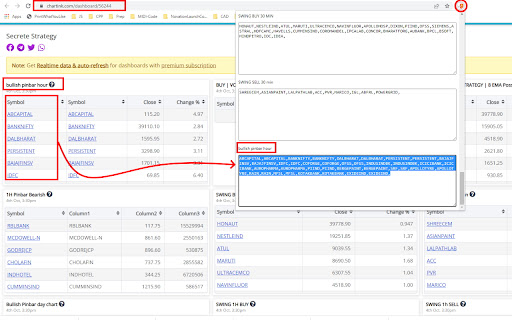
Extract stock symbols as CSV output and load it into TradingView Extract the symbols from the Chartlink dashboard as CSV text and load it into TradingView for further analysis. In a single click, you can get the CSV text for every table displayed on the dashboard.

Screener Layout Modifier
Modifies Screener grid layout and company profile width Customize your Screener experience with this lightweight extension that gives you control over the grid layout and company profile width. FEATURES: • Adjust the number of columns in the grid display (1-8 columns) • Modify the company profile width percentage (5-30%) • See changes instantly with live preview • Settings automatically save and persist between sessions Perfect for traders and investors who want to optimize their Screener layout for different screen sizes and viewing preferences. The extension maintains proper alternating row colors regardless of your column configuration. Simple, lightweight, and focused on enhancing your Screener experience without unnecessary features or permissions.

Magic Watchlist
Keep your screened stock picks front and center, and get to your trades quickly with our powerful Chrome extension. ▶ BENEFITS • Quickly go to a trade screen from the TradingView screener page • Quickly create a TradingView Watchlist from your filtered TradingView Screener list • Access your Watchlist in multiple ways, so you can navigate AND keep your TradingView Screener list • Keep your other saved TradingView Screener watchlists front and center • NEW: Use with TradingView's additional new screener pages - ETFs, Crypto, and more... ▶ FEATURES • Create Screener-based Watchlists • Multiple Watchlist Types • Direct link to Charts • NEW: Export comma-delimited lists of all symbols (with or without $)

8sapience - Smart Quant Analyser with Screener.in
Smart Quant Analyzer shows quantitative fundamentals with decision indicators 8sapience Smart Analyzer provides quick summary of quantitative fundamentals and color coded indicators to make quick decisions. Note that this is for educational purpose only.

Stock Scraper & Export 🔦 - Screener, TradingView, Chartink, StockEdge
*Description:* 🚀 A powerful browser extension for investors, analysts, and traders to export stock symbols and build custom indices — without needing premium subscriptions!📝📊 *Purpose:* 🎯 To create custom indices by copying symbols from sectors and industries of screener.in, tradingview, chartink, stockedge. Company data is highlighted 🔦 among peers to compare and also data can be exported in screener.in ⚡ Sector & Industry pages in screener.in contains 6 buttons for quick access: 🌍 https://www.screener.in/market/IN01/IN0101/IN010102/ Company pages — 🖍✨🔦 Highlights QoQ & YoY results for quick peer comparison: 🌍 https://www.screener.in/company/* ✅ Supports multi-page results fetching, ensuring complete symbol lists. Symbols are formatted consistently: NSE: BSE: Top 10 symbols joined with "+" In above 2 pages, Sectors and Industries can be exported to excel 📊 Exports detailed Excel sheets with: ✔S.No, ✔Sector / Industry Name, ✔Count of companies, ✔Top 10 (Custom Index), ✔NSE symbols, ✔Scrips column contains All symbols (NSE + BSE) 👉 Bse scrips are name and are marked in red 🔴 for clarity. 🎯 TradingView provides a built-in export option for bulk symbol data only for premium users. Hence, this tool was created. 🌍 https://www.tradingview.com/screener/ The screener page gets 2 floating buttons: 📊 Export All NSE Sectors, Industries → Excel: Exports all NSE symbols with full Sector and Industry etc breakdown to Excel ❤ Donate: Copies developer UPI ID ✅ Supports multi-sweep fetching with overlap and retry logic, ensuring no symbols are missed. 📊 Exports a detailed Excel file with 3 sheets: 👉 Top 10 symbols are joined with "+" for direct use as a TradingView custom index 💾 File saved as: TradingView_NSE_YYYY-MM-DD_hh-mm-ss.xlsx ✅ After export, a summary modal shows: Total Symbols, Sectors count, Industries count and exact filename downloaded 🌍 https://chartink.com/screener/chartink-stock-universe The options screener table gets 2 floating buttons: 📊 Export All NSE Sectors, Industries → Excel: Exports all NSE symbols with full Sector and Industry etc breakdown to Excel ❤ Donate: Copies developer UPI ID 📊 Exports a detailed Excel file with 3 sheets: 👉 Top 10 symbols joined with "+" for direct use as TradingView custom index 💾 File saved as: Chartink_NSE_2026-04-02_02-48-02 ✅ After export, a summary modal shows: Total Symbols, Sectors count, Industries count and exact filename downloaded 🌍 https://web.stockedge.com/app/markets The options screener table gets 2 floating buttons: 📊 Export All NSE Sectors, Industries → Excel: Exports all NSE symbols with full Sector and Industry etc breakdown to Excel ❤ Donate: Copies developer UPI ID ⏳ On clicking Export, a 5-second countdown appears: "Consider making a Donation to support the Developer" ✅ Supports multi-sweep fetching with overlap and retry logic, ensuring no symbols are missed. 📊 Exports detailed Excel file with 3 sheets: Sheet 1 — NSE Stocks: ✔ S.No ✔ Symbol ✔ Company Name ✔ Sector ✔ Industry ✔ Market Cap etc etc 👉 Sorted by Sector → Industry → Market Cap Sheet 2 — Sectors: ✔ Sector Name ✔ Count ✔ Top 10 Custom Index ✔ All NSE Scrips Sheet 3 — Industries: ✔ Sector Name ✔ Industry Name ✔ Count ✔ Top 10 Custom Index ✔ All NSE Scrips 👉 Top 10 symbols joined with "+" for direct use as TradingView custom index 💾 File saved as: StockEdge_NSE_2026-04-06_01-03-11.xlsx ✅ After export, a summary modal shows: Total Symbols, Sectors count, Industries count and exact filename downloaded 🌍 https://web.sensibull.com/options-screener The Options Screener table gets 2 floating buttons so symbols can be copied instantly without scrolling. 📋 SYMBOLS: Copies all stock symbols from the screener table, formatted for direct use in TradingView ❤ Donate: Copies developer UPI ID Symbols are formatted as: SAIL1!,SUNPHARMA1! — comma-separated, no spaces Expiry suffix is auto-detected based on the selected Expiry filter:
