
mgamelhnfokapndfdodnmfiningckjia
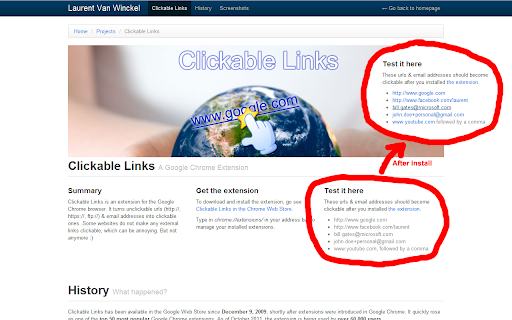
Clickable Links is a Chrome extension that solves the common problem of unclickable URLs on certain websites by automatically converting them into clickable links. The extension supports various URI schemes such as http://, https://, ftp://, file://, magnet: and email addresses, making them accessible with a single click. This eliminates the need to copy and paste links, thus saving you time. Also works with incomplete urls where the "http://"-part isn't included. To try out the extension, visit this page for some examples: https://www.laurentvw.com/project/clickable-links New since v2.7: - Several bug fixes related to url matching - Added support for file:// and magnet: uri schemes - Options: An option to allow links to be opened in a new tab

DetailedTime
YouTube動画の公開時刻を表示するやつ ◆どんな機能? YouTube動画の公開時刻を表示します。 ◆使い方 動画タイトルの横に「詳細」の文字が出るのでそれをクリックしてください。 ◆注意事項 ※ライブ配信の場合は配信開始時刻になります。 ※完璧な動作保証はできません。ご利用は自己責任で。 ※ブラウザの横幅が狭い場合・動画タイトルが長すぎる場合には「詳細」の文字が出ないことがあります。 ◆他の機能 YouTube用の自作拡張まとめ https://null.style/app ◆不具合を見つけたら 作者Twitter(@nulltypo)までご連絡お願いします。レビューには回答できません。 ◆免責事項 このChrome拡張によりいかなる損失や損害などが発生しても責任を負いかねます。ご了承ください。

2chRevival
2ちゃんねる、5ちゃんねる、BBSPINKのDAT落ちしたスレを簡単復活! 2.3.15 ManifestV3に暫定対応 2.3.14 5chに対応 2.3.13 2chの仕様変更に対応 2.3.11 2chの仕様変更に対応、dat落ちしたスレッドの復活に対応 2.3.10 人大杉時の復活に対応しました。 2.3.9 スレッド以外でも動作してしまうバグを修正しました。 2.3.7-2.3.8 おまたせしました、仕様変更に完全対応しました 2.2.5 仕様変更に対応、DAT落ちや表示されないスレッドがある場合、過去ログを検索します。 2.2.4 今後の仕様変更に対応するため一時的に機能を停止しました。 2.2.3 細かいバグを修正しました。 2.2.2 拡張機能の仕様変更に対応しました。細かいバグを修正しました。 2.2.1 シークレットモードに対応しました。細かいバグを修正しました。 2.0.0 より快適にご使用いただくため、プログラムをフルスクラッチしました。バグの報告はコメント欄よりどうぞ 1.8.17 検索の高速化、ページアイコンクリック時の動作を変更しました 1.8.15 様々な仕様変更、機能追加を行いました。復活できる確率が上がりました 1.6.16 ボタンが表示されないスレッドがあるバグを修正しました ★動作に問題がある場合や要望がある場合はコメント欄にてお願いします。 改善点がある場合なるべく対応したいと思います。 2ちゃんねる(2ch)やBBSPINKでDAT落ち(過去ログ化)してしまったスレッドを復活させます。 ワンクリックで自動的に過去ログを検索するので難しい操作は一切必要ありません。 また、無駄なアイコンなどは一切表示されず、DAT落ちした時のみ復元ボタンが表示されるのでとても快適に使用することが出来ます。 >403になる方 Chrome以外で使用すると403を返す仕様になっています ユーザーエージェントを切り替えている場合も403を返しますので一度ご確認下さい

5CH STYLE FORMAT
5ちゃんねる(旧2ちゃんねる)のスレッド(記事)ページをすっきり整形&URL直リンク化、画像・レスのPOP表示等、いろいろ機能を付加します。 ▼基本機能 ・5ch.netのスレッドでのみ動作 ・CSSの書き換えによる見栄えの整形 ・リンクURLの直リンク化 ・書き込みボックスの自動フィット ・コメント番号をクリックでレス番号として書き込みボックスへ引用(引用符付き) ・右クリックから選択文字を書き込みボックスへ引用(引用符付き) ▼オプション選択できる機能(ON/OFF可) ・新着コメの読み込みボタン「▼」を設置 ・新着コメのオートリロード&スクロール ・新着コメを色分け ・記事内の画像URL下にサムネイルを表示 ・コメント内の画像URLにマウスオーバーで画像をPOP表示 ・コメント内の「h抜きURL」を補完してリンクを設置 ・コメント内にAAが含まれる時はフォントの最適化を試みる ・ユーザーIDにマウスオーバーでレス履歴をPOP表示 ・ユーザーID右横にユーザーのコメント数を表示 ・ユーザーIDをクリックで「必死チェッカーもどき」検索 ・書き込みボックスをフロートさせる(ドラッグ可) ・全件表示に自動リダイレクト ・ページ最上部、最下部へのジャンプボタンを設置 自分でニュース系スレを見るために作ったということもあってニュース以外の板はあまり検証してませんが、今後ブラッシュアップしていく予定ですのでよかったら使ってみてください。

Selection Search
Search for the selected text in search engines With this extension you can easily search for text you have selected. When some text is selected you can left click the selected text to get a popup where you can choose a search engine to search with. In the options page you can customize the look of the menu, which mouse button that should activate the menu, which search engines to show, and a lot of other things. When you install this extension you will get a warning that this extension can: "Access your data on all websites." This is needed because the code for the popup-menu needs to be added to every website for it to work. If you want to report a bug/issue, please use the following site: https://github.com/Pitmairen/selection-search/issues Alternatively you can use the support section on this site (chrome web store), but I get no notifications about new posts, so I may not notice the message. Some people have asked for ways to make donations to the project. If you want to make a donation you can do so by buying me a coffee: https://www.buymeacoffee.com/pitmairen 0.9.7 - Improve support for IME input in toolbar popup (See issue #173) - Change to use a html class to shown/hidden the popup menu to make it easier to override the display property of the popup with custom CSS. 0.9.6 - Fix issue where icons in some cases could fail to load because the fallback icon loading did not work. This may improve the icon loading for some users. 0.9.5 - Add option to trigger "open all" feature on submenus with middle click only. - Make back button in toolbar button go back only one level at the time - Fix issue where "open all" on sub menus could crash if the submenu contained separators - Change default search engines on new installs to use https 0.9.4 - Add ability to customize the toolbar popup with css - Include separators in the toolbar popup. Hidden by default, but can be made visible with custom css. 0.9.3 - Fix issue where some icons failing to load could trigger a loop in the image loading, which could cause high CPU usage and pages failing to load. 0.9.2 - Improvements to icon loading. The icons are now loaded in the background worker, similar to how it was done in the 0.8.* versions of the extensions. This should make the icons load faster and with less chance of icons failing to load. Note: The icons are cached in the sessions store provided by the browser. This storage has limited capacity. If you have a lot of search engines or have many large custom icons, you can hit the limit. This will cause some icons to fail to load. If this happens try to use smaller icons if you have custom icons. If that does not help report the issue as it may be possible to make the usage of the storage more efficient if necessary. You can also hit the limit if you make a lot of changes to your search engines in one go, but this should be fixable by just restarting the browser as this will cleanup old entries in the storage. 0.9.1 - Fix issue with context menu items requiring two clicks to work - Fix issue where the context menu items was not added properly - Fix issue where hitting enter in the toolbar search box would not open the first search engine - Changed icon loading to use the icon urls directly, instead of loading the icons in the background, as the background loading does not work properly with manifest v3. This will probably also fix some issues where custom svg images would not load. 0.9.0 - Major rewrite of internals to migrate the extension to manifest V3, as required by Chrome for the extension to continue to work. - No new features or bug fixes in this release. 0.8.63 - Added new buttons to allow adding new search engines/separators/submenus at specific positions in the search engine list 0.8.61 - Added option to enable the search engine popup blacklist/whitelist to also affect the search engine hotkeys. The options is located under Popup menu -> Advanced -> Blacklist/whitelist. 0.5.58 - Fix issue where the popup could be partially positioned outside the top of the browser window and become unreachable. Mostly an issue for very large popup menus with many search engines. 0.8.57 - Fix mycroft integration. - Add an additional source for search engine icons that is used if the default source does not have an icon. 0.8.56 - Added special search engine marker for sites requiring encodings other than UTF-8. Simply append {SPECIALENCODING} to the end of the search engine url. This enables the feature and the browser should be able to auto detect the correct encoding. 0.8.55: - Possible fix for freezing tabs for searches opened in new foreground tab 0.8.53: - Added option to open search in new window - Make it possible to add search url to the submenu root item. If a search url is added it will open when clicking the submenu root item, unless the openall on click option is checked. - Improved replacement of bracket placeholders ({%s}). If "}" must be used inside the placeholder it can now be escaped using "}". - Improved regexp placeholder replace converter. The old "re:" converter still works for backwards compatibility. The new improved converter is called "replace:", and is documented under "More Variables" at the top of the options page. 0.8.51: - Fix issue with saving changed settings on options page For full changelog see:
