
mgajhngbdmahgfgnkomdphmjcgaahfka
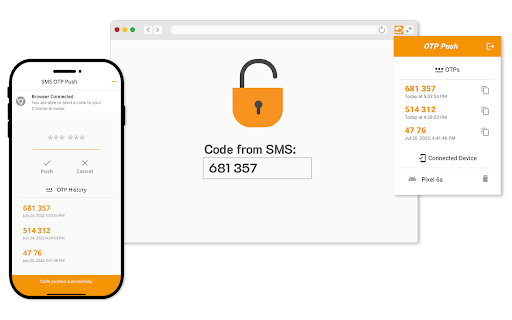


Nowadays, businesses are commonly using phone numbers for Two-Factor authentication for their services. There are a variety of ways to verify phone numbers, but a randomly generated one-time password (OTP) sent by SMS is one of the most common. Sending this code back to the service server demonstrates control of the phone number. The current process disappoints users. Finding an OTP within an SMS message, then copying and pasting it to the form is bulky. The OTP Push lets receive code from a message and transfer it to the connected desktop browser. Chrome extension pastes received code to the input field. The OTP Push helps you to transfer code from SMS to your desktop Chrome browser in an easy way. Just install the mobile app and Chrome extension from the official app stores. Scan the browser extension's QR code by the mobile app to connect your phone to desktop Chrome. Push the code from SMS to the connected browser. It works with a lot of services supporting the SMS Two-Factor Authentication.

Auto OTP Authenticator
Auto OTP Authenticator is a lightweight, privacy-focused TOTP (Time-based One-Time Password) manager for your browser. It generates one-time codes, helps you organize accounts, and can fill them into common 2FA / verification forms—so you don’t have to reach for your phone for every login. After setup, TOTP codes are computed entirely on your device using the Web Crypto API. Secrets stay in your browser profile by default. There are no analytics servers, no telemetry, and no tracking from this extension. TOTP codes (RFC 6238) — typically 6 or 8 digits, 30-second (or custom) steps, HMAC-SHA1 or HMAC-SHA-256 Automatic detection & fill — supports single-field and multi-box OTP layouts Domain-aware accounts — matches and prioritizes accounts per website Popup workflow — search, filter, copy, delete, last-used priority Keyboard shortcuts — copy/fill without opening popup QR & otpauth — scan from page (including iframes) or import from image Import & export — JSON backup/restore Appearance — light/dark/system theme Optional Chrome sync — stores data in Google sync (optional) Languages — English, Turkish, German, Spanish, Italian Default: chrome.storage.local Codes generated locally No backend servers Export backups manually Not a replacement for hardware keys (e.g., YubiKey)

Temporary Phone Number Generator
Temporary Phone Number Generator - Receive SMS online for free. With our temporary phone number generator, you simply select your desired country, press the generate button. It will automatically take you to the next available phone number where you can receive sms online for free. 🛡️ Bypass SMS & OTP (One Time Passcode) verification using one of our disposable numbers. 🔒 Stop SMS spam by never having to reveal your real number. 🔹Protect yourself from fraudulent websites that ask for your phone number. > FAQ - What is a temporary phone number? A temporary (or disposable) phone number is one which you do not own but can use it to receive SMS/text messages. Some providers will let you send messages but this usually incurs a cost. - Why use a temporary/disposable phone number? They protect your identity, it means you do not have to provide your real phone number when signing up to apps or services. They also prevent SMS spam. - What is a phone number generator? quackr offers a variety of free phone numbers that you can use to receive sms online. Our phone number generator allows you to select a country and it will randomly pick an online sms number. - Is this a fake phone number generator? No, this tool allows you to generate real temp phone numbers. They are free VOIP numbers. No signup is required and nothing is logged. Check out our entire phone number range by clicking here. - Are temporary phone numbers free? Yes, there are a number of free providers such as Quackr.io that allow you to use a temporary phone number to receive SMS. - I used a temporary phone number but didnt receive any SMS, why? Many temporary phone number providers use VOIP numbers - companies are catching onto this and are actively blocking users from using VOIP numbers when signing up to services. To get around this, we offer non-voip phone numbers available for rental. As they are non-voip, they cannot be blocked so therefore will work on any platform.

Easy OTP Extension
Generate OTP code based on your 2FA token For people who wants to have quick access to the OTP code without using additional program

ZeeOTP
Generate OTP for a secured access ZeeOTP adds a second authentication method to strengthen your remote accesses security. The extension allows you to generate one-time password (OTP) from your browser which then can be used with your normal credentials.
