
mfogaajkjakkhpidbcbpfbbibgbmjihk

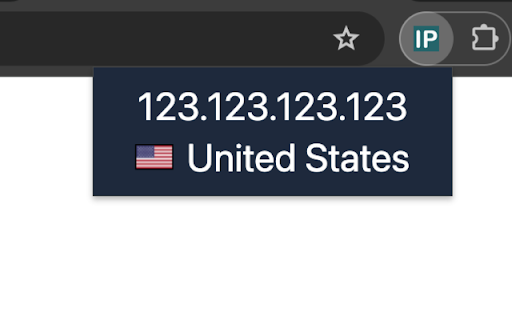
Displays your public IP address and the corresponding country Simply click on the icon to see the information. IP info is retrieved from https://ip-api.com/. Flag images are from http://www.iconbeast.com.

What is My IP - Current IP Location
Find out your current IP address and location instantly with what is my ip extension! What is My IP - Current IP Location is a simple Chrome extension that helps you quickly view your current IP details in one place. If you want to know what is my ip, whats my ip, or need a fast ip address checker, this extension gives you clear and easy-to-read results directly in the popup. The extension can show useful ip information such as your public IP address, approximate ip location, country, city, ISP, and time zone. It is designed for users who want to check my ip, find my ip, or quickly review their current network details without opening multiple websites. Key Features ✓ Instant IP Details: View your current IP address and related location details in seconds. ✓ One-Click Copy Buttons: Quickly copy important information such as IP address, location, city, ISP, and time zone with a single click. ✓ Copy Confirmation Notifications: After copying any value, a small on-screen notification appears to confirm the action. ✓ IP History: The extension can keep a history of detected IP addresses so you can review previously seen IP records later. ✓ Easy History Management: Open the history section from the main screen, copy older entries when needed, or clear the list at any time. Why use it? Your IP address is an important part of how your device connects to the internet. This extension is useful if you want to check my ip, review ip location details, or use a lightweight ip address checker without extra steps. It can also help users searching for answers like what is my static ip or what is my ip country. How to use this? 1. Install the extension from the Chrome Web Store. 2. Click the extension icon in your browser. 3. View your current IP address, location, ISP, and other available details in the popup. 4. Use the copy icons to copy any value instantly. 5. Open the history section to review previously detected IP entries. What is My IP - Current IP Location provides a fast and user-friendly way to access your IP details, location data, and recent IP history directly from Chrome.

My public IP.
An extension that gives you your public IP and you can copy it. When you click on the icon, a popup opens showing the public IP of your computer and a button. Clicking on the button copies the public IP to the clipboard and you can now paste it wherever you need.

Fingerprint Spoofer
Automatically solve reCaptcha using AI and Spoofer browser fingerprint.

Country Flags & IP WhoIs
This add-on is an extension that displays a flag toolbar button indicating the current webserver's physical location. This add-on is an extension that displays a flag toolbar button indicating the current webserver's physical location. This helps to adds an extra layer of awareness to your browsing and can be useful to indicate the native languages and legal jurisdictions that may apply. Additional information about Geolocation or Whois info can be obtained if you are interested in who owns this website. The popup shows more information about the domain. Details which show up are Alexa and Quantcast ranking and the MyWOT reputation. MyWOT allows you to check whether the website is safe to browse or not.
