
mflpplkkbeohfhkdbjfciehbkgmmdapg
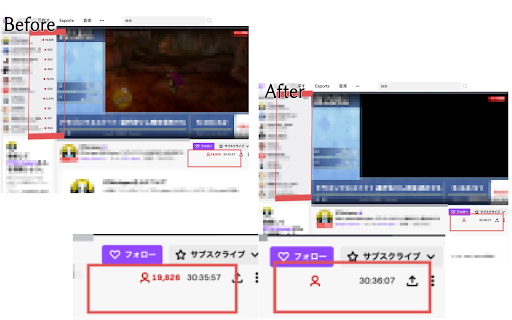
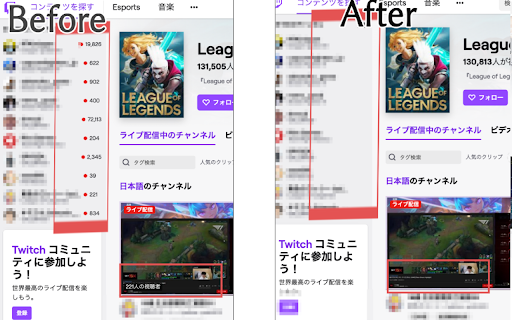

This app hide the number of watching now and viewers on Twitch. What is this? It hides the number of Viewer Count on Twitch. Please use this, If you want to hide the number of viewers and Watching Now on youtube. Hide Youtube Viewers and Ratings - Chrome Store Page https://chrome.google.com/webstore/detail/hide-youtube-viewers-and/ibdkcdjfoahbpcoajafabdokfdgcjijd This chrome extension for myself, so it’s maybe a shoddy app. ---- update: 1.0.3 :This add-on changed for manifest V3. Changed to hide the Viewer Count on Browse tabs as well. 1.0.2 : Add setting On/Off. Configure by clicking on the icon.

Hide Youtube Viewers and Ratings
This app hide the number of watching now, rating, viewers, and subscribers on youtube. INFO: 2025/07/26 The number of viewers for videos in the sidebar cannot be removed at this time. There may be a strange script on the YouTube side. The YouTube UI changes at different times for different people. Therefore, there are cases where it may not be possible for us to respond without UI information. The following settings are possible for youtube. ・Hide the views and WatchingNow ・Hide the rating ・Hide the subscribers ・Hide the comment ・Hide the comment rating YouTube specifications (roughly) ・ Hide the number of views on the Top page ・ Hide the number of Watching Now on the Top page ・ Hide the number of subscribers on the channel page ・ Hide the number of views on the channel page ・ Hide the number of views on the video page ・ Hide the number of Watching Now on the video page ・ Hide the rating of the video page ・ Hide the number of subscribers on the video page ・ Hide the number of views of the video on the side of the video page ・ Hide the comment on the video page ・ Hide the comment rating on the video page -------------------------------------------------------- Please use this,If you want to hide the number of viewers and Watching Now on Twitch. Hide Youtube Viewers and Ratings - Chrome Store Page https://chrome.google.com/webstore/detail/hide-twitch-viewer-count/mflpplkkbeohfhkdbjfciehbkgmmdapg I made this for myself, so I do not customize pages that I do not usually see. If you have any requests, please use the following Twitter or Link Click here for details and requests. ( Note or Twitter ) https://note.com/siroiudon/n/nfcdb37f1bb52 Twitter:@shiroi_udon Donate to the author💸:https://www.paypal.com/paypalme/shiroiudon Ko-fi: https://ko-fi.com/shiroiudon ---------------- Update 1.1.11:update (fix hide comment Rating 1.1.9:Partial update to new UI 1.1.8:Partial update to new UI(rating 1.1.7:Partial update to new UI(rating 1.1.6:Partial update to new UI 1.1.4 : Dealing with youtube UI changes (provisional version) 1.1.3 : This add-on changed for manifest V3. Changed to only hide the number of ratings for comments.(e.g. Reply button for comments, etc. is shown)

Calm Twitter
This extension hides trending information from twitter timelines to make your mind calm. - Hide unnecessary items from navigation - Hide numbers of replies, retweets, likes, bookmarks, and view counts - Hide trends, who to follow, subscribe prompts, and news from sidebar - Hide following and follower counts - Show "Calm" next to the logo This extension requires a permission to save the settings and only toggles hide or show. The source code is available on Github https://github.com/yusukesaitoh/calm-twitter

Twitch Lurker
Always support your favorite streamer by automatically pulling up their stream when they go live. Support your favorite Twitch streamers by automatically lurking in their stream when they go live. Twitch Lurker allows you to build a list of favorites based on who you follow and open up muted tabs of their stream as soon as they go live. IMPORTANT: You must have tabs already open with the Twitch player running in order for you to count as a viewer in their viewer count. If the extension loads a new tab with a stream, it won't count you as a viewer until you open the tab and load the player yourself. How to use the extension: 1) Download/Install from the store or sideload it in your browser 2) Login with OAuth so we can pull your follow list (don't worry, we don't collect any of your info) 3) Click the stars next to channels in your following list to mark them as Favorites 4) Order your Favorites list to your liking (the higher in the list, the higher their priority over other Favorites) 5) Open two tabs with live streams 6) You are now supporting your favorite content creators and gaining free channel points! If you would like to support this extension feel free to hit the "buy me a coffee" button in the extension or drop me Twitch Prime sub @ twitch.tv/ErianasVow . It'd help me a lot and all proceeds go to further development of the extension! If you'd like to view or contribute to the source code: https://github.com/mikeyaworski/Twitch-Lurker

Hide YouTube Numbers
Hide YouTube views, likes, and subscribers. Hide YouTube views, likes, and subscribers.
