
mfhiahbobigkjofkpcbelhaojlcfkiah

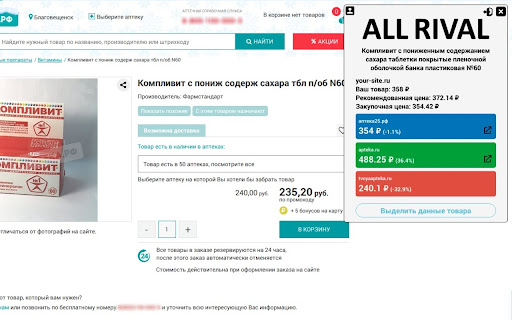
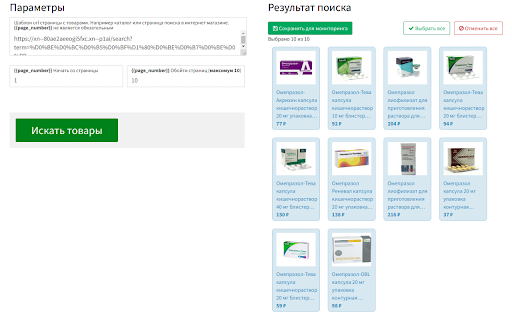
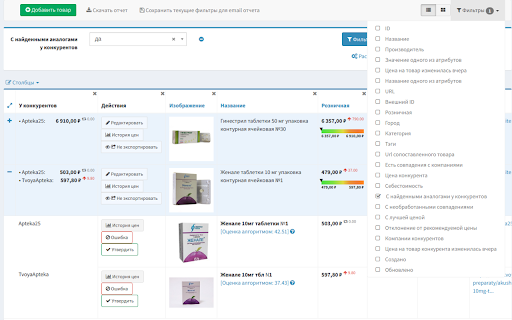

ALLRIVAL - это парсер сайтов и расширение для бесплатного мониторинга цен конкурентов Наконец то вы нашли эффективный инструмент, который позволяет парсить данные со страниц, и использовать их для мониторинга цен конкурентов. Вам необходимо выделить мышкой на странице данные, затем нажать на кнопку сохранить. После этого в личном кабинете вы можете указать какие категории товаров следует обойти парсеру, для сбора данных с аналогичных страниц. Парсинг будет происходить автоматически. Можно настроить частоту сбора данных от 1 раза в 10 минут, до раза в неделю. Вам на почту будут приходить собранные данные в виде отчета XLS. В отличие от других парсеров, нет необходимости каждый раз для получения отчета запускать расширение, производить различные действия, держать компьютер включенным. Парсинг сайтов будет происходить в облаке регулярно и автоматически. ALL RIVAL – это парсер сайтов работающий в связке с одноименным сервисом для мониторинга цен конкурентов. Он подходит для аналитиков, маркетологов, контент менеджеров интернет-магазинов. Используя его вы сможете комфортно присутствовать на рынке, следить за изменениями цен, наличия товаров на конкурирующих сайтах. Используя парсер вы можете быстро скачивать целые каталоги товаров с сайтов с описаниями, картинками и другими атрибутами. Приложение полностью заменит ручной сбор и позволит сохранить больше времени для других важных задач. Что можно парсить используя расширение? • Товары на сайтах конкурентов вместе с ценами, скидками, характеристиками, наличием, городом, категорией, брендом и т.д. • Различные новости, статьи, блоги с интересующих порталов • Доски объявлений, в том числе по продаже или аренде жилья. С фотографиями, описанием, ценой, владельцами и другой информацией • Отзывы на сайтах о товарах или услугах, с выставленной оценкой, датой размещения и текстом • Вакансии и резюме на сайтах для поиска работы • Профили пользователей из социальных сетей, публичные страницы и группы с постами • Различная информация и данные для исследований Кому будет полезен парсер ALL RIVAL? • Категорийный менеджеры и аналитики компании владеющей интернет-магазином • Риелторы, которым нужна база с недвижимостью • HR агенты • Ученые, использующие BIG DATA для своих исследований • Предприниматели, нуждающиеся в данных для своих проектов Собранные и оформленные данные вы сможете легко открыть в Excel либо загрузить их по API в JSON. Вы можете интегрировать парсинг с вашим интернет-магазином. Если вы настроите правила переоценки, что цены на товары в вашем магазине будут следовать за конкурентами и автоматически изменяться. Вы можете отобразить в виде графика ценовую позицию вашего ассортимента относительно конкурентов. Пересечение ассортимента, узнать конкурентов с наибольшим покрытием пересекающегося ассортимента. Колебание цен, процент от общего числа товаров, цены на которые изменились по отслеживаемым сайтам. Отклонение от рекомендованной цены, среднее и максимальное отклонение товаров от рекомендованной цены. Как работает мониторинг цен конкурентов ALL RIVAL? Наш парсер по способу сбора данных похож на Google или Yandex. Сервис делает запрос на интересующий вас сайт, получает содержимое, извлекает из него те данные, которые вы выберете в расширении. При этом автоматизированный сбор будет полностью имитировать поведение реального посетителя сайта, а значит не будет заблокирован при помощи cloudflare или captcha. В сервисе вы можете самостоятельно выбрать какие категории товаров с сайта должны быть собранны, либо настроить отдельные товары внутри категории, если не нужны все для анализа. Далее вы можете настроить фильтры для будущего отчета, после чего он будет отсылаться вам на почту каждый день. Как установить и использовать chrome-расширение? Нажмите «Установить», подтвердите действие во всплывающем окне и дождитесь окончания установки. Нажмите на белый значок с мозаикой в правом верхнем углу окна браузера. В списке расширений найдите ALL RIVAL и нажмите «Закрепить». Теперь расширение появилось на верхней панели. При переходе на какой-либо сайт автоматически появляется окно расширения. Если у вас уже есть аккаунт в нашем сервисе, расширение автоматически выполнит вход. Если у вас ещё нет аккаунта, то вы можете перейти нажать на ссылку «Бесплатный тариф». Теперь у вас есть аккаунт, можно перейти на страницу сайта, информацию с которого вы хотите собрать. Обновите страницу и расширение автоматически подхватит информацию о вашем аккаунте. Если у вас есть аккаунт, но вход в него не выполнен или по какой-то причине расширение не выполнило синхронизацию, вы увидите окно с просьбой ввести токен авторизации. Для этого перейдите в раздел меню «Настройка аккаунта» в вашем личном кабинете и скопируйте апи ключ. Вставьте его в поле окна и нажмите «Сохранить». Вход выполнен. Теперь наше браузерное расширение предложит добавить данный сайт в список компаний. Чтобы добавить сайт, просто нажмите на соответствующую кнопку. Убедитесь, что вы находитесь именно на странице товара, а не на странице каталога или главной. Вы увидите следующее окно с информацией об успешном добавлении и предложением интерактивного выделения элементов для парсинга. Кнопка в левом верхнем углу перенесёт вас на страницу со списком компаний. Если у вас новый аккаунт, данный сайт будет добавлен как «Ваша компания», в противном случае — в список компаний конкурентов. Вы можете удалить компанию или перейти к списку товаров, воспользовавшись кнопками справа. Кнопка в верхнем левом углу вернёт вас на предыдущий экран. Как пользоваться функцией выделения? Нажмите кнопку «выделить». Теперь при перемещении курсора мыши по странице голубым цветом будут выделяться различные элементы. Кликните на тот элемент, который вас интересуют. Название, цена и изображение являются обязательными. При клике правой кнопкой мыши элемент меняет цветовое выделение на зелёный. На всплывающем окне выберите, чем является выбранный элемент и нажмите «Сохранить». Если данный элемент не является названием, ценой, изображением или производителем, выберете пункт «Атрибут» и введите собственное наименование для него. После выбора всех нужных вам элементов, нажмите «Завершить» на экране расширения и подождите. При успешном завершении процесса вы получите соответствующее сообщение, а выбранные вами элементы страницы останутся зелёными. Теперь на экране расширения видны все собранные со страницы данные. Также в меню есть кнопка для удаления товара. Теперь при переходе на страницы других товаров расширение позволит сохранить эти товары, при нажатии на кнопку автоматически произойдёт выделение необходимых элементов. Если вас не устраивает выделение, нажмите на кнопку «Выбрать данные на странице» и измените его. Товары можно посмотреть перейдя к компаниям, а затем к списку товаров. Подобным образом вы можете добавить остальные компании и их товары. Пример использования расширения для одной компании-конкурента. Зайдите на сайт, который ещё не был добавлен в список компаний. Перейдите к нужному товару. Нажмите кнопку «Добавить», затем сделайте выделение. Если вы заходите на сайт компании, которая ещё не отслеживается, но количество компаний-конкурентов уже максимальное для вашего тарифа, расширение покажет экран, на котором будет предложено заменить какую-либо компанию из списка на данную. Для этого нажмите на среднюю кнопку с двумя стрелочками и подтвердите действие. Все данные, собранные расширением, вы можете найти в своём личном кабинете в разделе «Мониторинг». Если в процессе использования у вас возникнут трудности, вы всегда можете обратиться к нам за помощью на сайте https://allrival.com/ в онлайн чате, по телефону или в мессенджерах. Спасибо, что выбрали нас для мониторинга ваших конкурентов.

Price Tracker
Use price tracker to monitor websites for products, flight tickets. Get price drop alerts, check price history, find the lowest one Meet the ultimate solution for skilled shoppers: the Price Tracker extension for Google Chrome is your intelligent assistant for smarter shopping. It automates the tedious work of monitoring costs so you never overpay. Stop refreshing product pages and guessing when to buy. This price tracking tool gives you control and clarity, turning uncertainty into confident purchasing decisions. 👨💻 Here is what our extension helps you avoid: • Wondering if the price will drop tomorrow • Manually checking flight tickets every day • Missing limited-time sales on platforms like Steam • Lacking historical data to know a good deal Imagine knowing the exact moment a product hits your desired value. This Price Tracker makes that a reality. It’s a powerful websites monitoring tool that works silently in your browser. 🚀 Getting started takes less than a minute: 1️⃣ Install the Price Tracker extension from the Chrome Web Store. 2️⃣ Navigate to any product page, like on Amazon or Walmart. 3️⃣ Click the extension icon to activate monitoring with one click. The core of any effective strategy is visibility. Our tool provides exactly that through clear, actionable alerts and comprehensive history. 💎 Key features that set this tracker apart: ➤ Universal Compatibility: Track prices on almost any retail website. ➤ Custom Alerts: Get notified via Telegram bot when values change. ➤ Historical Charts: Visualize trends with an intuitive price history tracker. ➤ Multi-Platform Tracking: Simultaneously monitor products, flights, and game sales from a single dashboard. ➤ Constant Vigilance: Maintain a reliable price watch on your items. Whether you're a casual shopper or a reseller, this tool adapts to your needs. It functions as a reliable Amazon tracking assistant and a vigilant Walmart price tracker. ⚙️ Customizable Tracking Settings Each tracking card comes with a variety of customizable settings to suit your needs: ✅ Tracking Status: Enable or disable tracking based on your preferences. ✅ Check Interval: Set the frequency of checks, ranging from 1 minute to 24 hours. ✅ Notification Preferences: Choose to receive alerts in Telegram when prices change. ✅ Condition-Based Alerts: Configure notifications to trigger only when the cost meets your specific conditions. 🎯 Consider these everyday use cases for the extension: ➤ Monitoring a specific laptop model or a smartphone ➤ Tracking flight costs for your next vacation ➤ Watching seasonal items like air conditioners or heaters ➤ Observing stock price history for investment research For avid gamers, it doubles as a savvy steam sales tracker. For homeowners researching the market, it can signal when home prices drop in listings. It serves as both a retail price monitoring tool and a solution for specialized scenarios. The built-in historical price tracker gives you perspective. You can see if today’s “deal” is truly the lowest price finder has seen, or just a marketing tactic. 💻 User-Friendly Interface Navigating through your tracking list is simple and intuitive. You can filter by tracking status, view the history of value changes, and edit tracking titles for better organization. 🕐 Value History and Alerts Use the price history checker to analyze trends and make informed purchasing decisions. 📈 🔔 How the intelligent alert system works: 🔹 You set a desired value threshold for any item. 🔹 The extension monitors it continuously. 🔹 When the condition is met, you receive a price drop alert in Telegram. 🔹 You click the notification to go directly to the deal. This automation replaces manual checks, letting you track price changes effortlessly. Your privacy is paramount: all your data remains secure on your device. ⚡️ Helpful Tips for Enhanced Experience To make the most of the extension, consider these helpful tips: 🔸 Press Escape to reset filters quickly. 🔸 Double-click on the gray background to expand settings for all cards. 🔸 Use the search field to find specific items and save search strings as tags for easy access. ⁉️ Can I track value on any website? Yes, our price tracking software is designed to work on most major retail and travel sites. ⁉️ How often are values checked? You control the frequency. You can set up automatic checks as often as every few minutes or just once a day. ⁉️ What kind of alerts will I get? You will receive notifications from a Telegram bot about value changes. This way you'll know exactly when the price dropped. ⁉️ Is it difficult to set up? Not at all. The extension simplifies how you monitor website changes. The setup process is guided and straightforward. 🏆 Who benefits most from this website monitoring tool? • Savvy shoppers hunting for the top discounts • Frequent travelers comparing flight price history • Resellers needing to monitor price across competitors • Investors analyzing historical market data • Anyone tired of wondering if they got a good deal By combining the functions of a auto price checker, a change detector, and a historical price tracker, this extension offers unmatched value. It’s more than a simple plugin; it’s a comprehensive price monitoring software suite in one tool. Stop leaving money on the table. Take control of your spending and make informed purchases with reliable data. Install the Price Tracker extension today and transform how you shop online. Your wallet will thank you. Start your journey towards smarter, stress-free shopping now. This Price Tracker is ready to become your most trusted shopping companion.

NoCoding Data Scraper - Easy Web Scraping
Simple web scraper,scrapes any data from web pages and exports it to Google Sheet or Excel freely An easy data scraper and web automation tool with 3-click only! Ready-to-go recipes to scrape popular sites with 1-click. Data scraper with auto recipe generation and visual recipe editing. Auto multiple pages data scraper with no code required. List of URLs scraping, multiple keywords search and result scraping. Auto-fill form, submit form, social connection and automate data entry. Scheduled web scraper to extract web to excel or Google Sheet automatically Surfing assistant to collect Email, generate business leads on any pages visited Data conversation, deduplication, field merge and data filter. Powerful flow control with conditional steps, conditional actions conditional blocks and conditional navigation. More web extraction and data scraping features after registration! Core Features: • Browser automation to automate element clicking, page scrolling, data entry, and web extraction in sequence • Automatic deep web scraping and data collecting • AI powered table scraping recipe generation • Data scraping for URL list in batch • Screen scraper for search engine query and result list • Web scraper with various pagination modes support • Infinite scrolling web page scraping • Flexible data transforming and refining with built-in regular expression • Web scraper with iFrame content extracting support seamlessly • Image extractor to save files to local or cloud • Data scraper for dynamic content scraping (JavaScript + AJAX) • Incremental data scraping and crawling • Integration with Google Sheet, Slack ,WeCom and Cloud storage internally • Webhook integration with recruiter systems, sales leads management or email marketing campaigns freely • Optional zoom live support, remote recipe assistance and custom recipe development Some Common Use Cases: * Public business lead scraping, email collector, or public phone scraping in minutes for 1688 sales, Zillow, RedFin estate agent or broker; * Defining Amazon scraper for price monitoring Amazon retail sellers, eCommerce distributors; * Reviews monitoring for eCommerce product review analysts by defining Lazada scraper or Shopee scraper; * Defining eBay scraper to track potential competition on eBay for SME owner and home business; * Defining Map scraper and Yelp, Yellow Pages scraper to optimize your eCommerce shops; * Contact scraping and new money making chance digging for freelancers on Fiverr; * Data entry, automation form filling and data extraction assistant for working from home or home business; * AliExpress seller scraper for SME owners to collect ratings and reviews automatically; * Website scraping + SEO tools for Shopify sellers; * Monitoring new job positions posting on Indeed or favorite employer websites for job seekers; * Assist recruiters scouring leads sites like Salesforce for potential candidates; * public shop scraper for data analyst to do data mining and business opportunity detection. Who NoCoding Data Scraper(NDS)is for? * Sales looking for leads * Amazon distributers * eBay retail sellers * Recruiters looking for top candidates * Job seekers looking for the best opportunity * Small business owners trying to manage ratings and reviews * Data science / scientists making data collection and cleaning automatically * Marketing professionals analyzing social media sites * Amazon customers * People who using tools like email hunter, Rapportive heavily, to save you a lot of money * Growth hackers looking for ways to collect, analyze and monitor data to do causal analysis * Social media managers organizing friends list and email contacts * Software engineers looking for scraping extension to integrate with Zapier, IFTTT or Workato via webhook HOW does NDS work? NDS is a data extractor and parser which can harvest emails, prices, coupons, new jobs or any other text from web pages. NDS assists you to define rules (recipes) and tasks by using CSS Selectors to identify the element(s) on the HTML pages. Then it scrapes that information as schedule and stores the result in your browser in form of a table which you can export as a CSV or Excel spreadsheet, or save data to Google Sheet directly. NDS supports UTF-8 so it scrapes English,日本語(Japanese),русский(Russian),中文(Chinese),한국어(Korean) with ease. No complicated Python, PHP, JavaScript, JSON, R, or xPath skills is required to use the application. NDS uses CSS selector to locate elements. WHAT NDS can DO and cannot DO? ->Can NDS run as an email crawler? Yes. NDS provides an general scraping way to gather public emails freely. ->Can NDS work as a Business Lead scraper? Yes. NDS can work as a business leads scraper well. You can define recipes to fill in keywords, and then scrape business leads from public sources such as search engine search result, Map search result, Yelp or AliExpress. ->Can NDS act as a RPA? Robotic Process Automation is a popular to enable users to define process to execute a series actions automatically. Different from desktop based RPA tools, NDS is more like a browser automation tool , or web RPA tool such as axiom or iMarcos. Except for scraping, you can define various actions to mock to scroll page, to click elements, or to input fields to make data entry, lead generation, and page monitoring more efficiently. -> Can NDS act as a robot to wander and extract content automatically? No. NDS is not a bot, and cannot make decision on its own. Instead, NDS follows your instructions strictly. Also NDS can only access the content that you allow, and will NOT assist or facilitate you to access unauthorized content. What are the alternatives if NDS does not meet your needs? We appreciate if you are willing to give us feedback before giving up. There are many tools you can refer to if NDS is not the most suitable tool for your task: Grepsr has similar element finder as that of NDS to simplify web extraction; getData.IO enables you to extract web data via similar process; Instant Data Scraper can help you to detect data automatically and start to scrape on the same page easily; Import.io provides data collection service directly; Listly has simple steps to detect fields quickly with mouse clicking; Agenty enable you to define recipe on browser and then execute scarping on server side; Data Miner has a simple UI to enable you to scrape list repeatedly; AnyPicker has simplified process to scrape multiple pages quickly; SimpleScraper enable you to select elements without any HTML skills required, and preview result intuitively; Also there are other applications or automation extensions, such as Octoparse, Axiom and UI.Vision, can be your options if you are familiar with programming. **IMPORTANT INFO**: • NoCoding Data Scraper is a web scraping tool. All scraped data is always *PRIVATE* and visible only to you. Whether you're using our free or paid plans. • NDS uses your own computer(browsers), and runs as an browser extension that lives only in your browser. Nothing scraped leaves your computer without explicit agreement. • DOES NOT scrape any data anonymously. The scraper strictly follows the recipe you defined or imported, and will not execute any action without explicit declaration. • DOES NOT contain any malware or spyware. • Your email address is used for login and notification purposes, and will NEVER be provided to others for any purposes without your explicitly agreement. NoCoding Data Scraper requires you to understand and abide by the terms of use of whatever site you are scraping via local recipes or recipes under Public Recipes. the user generated recipes and recipes downloaded from Public Recipes are there for you to use “as is” without any obligation from NoCoding Data Scraper to modify or fix them or to help you to use them. ADDITIONAL INFO: Following Chrome extension permissions are required to run the NoCoding Data Scraper: tabs: to manage the tabs opened when scraping multiple web pages activeTab: to track active tab for the creating of recipe webNavigation: to track the tabs opened when scraping multiple web pages deeply storage: to store scraped data and configuration unlimitedStorage: to store scraped data on local for exporting later notifications: required to notify you when data scraping tasks done contextMenus: to start assistant data scraping recipes via the right click menu downloads: to download files when click links with file URL alarms: to start data scraping recipes repeatedly or on schedule scripting: to execute actions on the target web pages NoCoding Data Scraper will ask for permission grant via the browser explicitly if any other permissions are required for new features. Please let us know if you have any feedback or feature requests: service@minirpa.net Or contact us via our official website: https://www.minirpa.net Updates + support integration with Free CAPTCHA Solver + configure hCaptcha and reCAPTCHA solving speed, post actions to work with recipes seamlessly . Release triggers with notes formally . Enhanced scroll down - more step options . Enhanced ActivateWin actions - Ensure the recipe can be defined and run within the same size window . Enhanced RunAs Assistant for recipes with batch argument input . Enhanced Field Merge trigger by enabling dynamic field merging . Optimized different click actions with different icons . Optimized recipe workflow when running on incognito mode . Optimized incognito working window creating and closing . Optimized the nodes on the recipe tree by showing the navigation intuitively . Optimized the layout of the recipe tree. Newly added nodes grow downwards . Optimized incognito mode: prompt If the browser has not turned on incognito mode for NDS . Bug Fixed: selecting elements by pressing shift key . Bug Fixed: right-click menu loading issue in some special scenarios . BUG Fixed: AI recipe name duplication issue . BUG Fixed: AI data table saving issue . Some other optimizations . Optimized ConfirmIt action: messages float in the center of the page . Optimized simple refine transformation: Support for using spaces as opening and ending identifiers . Optimized working window: Normal working window and incognito working window are activated by default for notification . Bug fixed: Stop the running instance once continuous duplicated records (Unique field distinction) reaching the threshold . Bug fixed: warning prompt required for input boxes . Bug fixed: issue with the Open Field URL action . Bug fixed: issues with My Recipe filter

WordStater для Wordstat - сбор ключевых слов
WordStater ускоряет сбор ключевых фраз и минус-слов по Яндекс Wordstat, позволяет спрогнозировать кол-во и стоимость кликов Функции: Расширение Wordstater это ваш ассистент в работе с Yandex Wordstat. Вордстатер упрощает сбор ключевых фраз и минус-слов в сервисе Wordstat, так-же он позволяет спрогнозировать стоимость клика и количество посетителей Яндекс Директ по собранным запросам. Работает в Google Chrome и Яндекс Браузер Список инструментов и возможностей o Сбор ключевых фраз из Яндекс вордстат (ручной и полуавтоматический) Ручной Полуавтоматический • Фразы собираются в списки, можно сохранять проекты чтоб потом вернуться и продолжить работу • Фразы и все собранные материалы можно выгрузить в нужном формате o С частотностью и без o С операторами и без o Через запятую o В кавычках и без o Чистый список без минусов и дублей o В общем учтены все возможные варианты для разных случаев жизни o Сбор минус слов видос https://youtu.be/vMTRJK21B9A Любое слово можно добавить в минус список, при этом оно будет подсвечено на всех страницах Собранный список можно вычесть из выдачи для удобства, это очень удобно, когда собираешь ключи o Анализ вложенности запросов видос https://youtu.be/ehFBFTADUCQ Позволяет понять суть запроса и понять, что имеет в виду целевая аудитория o Анализ поисковой выдачи (переход по нужному ключевому запросу сразу из интерфейса вордстат) Дает возможность проанализировать конкурентов и выдачу Яндекс и Google o Кросс-минусовка Позволяет исключить пересечение запросов нужный инструмент для директолога o Комбинатор ключевых запросов Позволяет быстро скомбинировать ключевые запросы и проверить их по частотности, сразу отминусовать ненужное • Нужен в разных случаях например для интернет-магазинов видос https://youtu.be/vFnx6vEI6Vw o Генератор UTM-меток Позволяет генерировать для большого кол-ва ссылок Автоматически подставлять параметры для разных рекламных систем o Прогноз бюджета и калькулятор рентабельности видос https://youtu.be/Jv8dcP2nC9A Пользователь может сразу оценить трафик по собранным запросам, цену клика, и в калькуляторе просчитать свои показатели Калькулятор ROI o Оптимизация Яндекс.Директ видос https://youtu.be/jd_q-9aYCxU Дает возможность по уже запущенным кампаниям провести оптимизацию за счет исключения нецелевых запросов o Быстрое использование и подстановка дополнительных операторов Яндекс вордстат видос https://youtu.be/fynSvN0S4xE Сокращает ручной труд Политика конфиденциальности https://uta-manager.ru/docs/privacy.pdf

iDatica – бесплатный парсинг данных
iDatica – бесплатный парсер сайтов с готовыми шаблонами, вы можете собирать цены, характеристики, контакты, отзывы и многое другое. iDatica – бесплатный парсер сайтов, собирает любые данные с сайтов в автоматизированном режиме и сохраняет в файл. С помощью парсера от компании iDatica вы сможете собирать цены конкурентов, контакты для лидогенерации, отзывы о товарах, ссылки на картинки и многое другое. Возможности: • Использование готовых шаблонов для сбора данных; • Парсинг каталога с пагинацией – автоматический переход на следующую страницу; • Парсинг карточек товаров и отдельных url; • Парсинг определенной области на странице; • Настраиваемый вид столбцов таблицы; • Предпросмотр собираемых данных и их количества; • Возможность работы с xPath и CSS стилями; • Настраиваемая скорость перехода на страницу; • Возможность задать нужный разделитель в csv; • Просмотр лога процесса. Ограничения парсера: Парсер не собирает url адреса (ссылки с тегом ). Подробнее о функциональности парсера: Шаблоны - файлы с готовыми настройками для парсинга. Вы можете загрузить готовую настройку и быстро начать сбор данных с нужного сайта без предварительной настройки. Вы можете сохранять свои настройки в качестве шаблонов. Парсинг каталога с пагинацией – возможность программы самостоятельно переходить на следующую страницу в каталоге, вам нужно только запустить парсинг на первой странице. Парсинг карточек товаров и отдельных url - с помощью этой опции вы сможете отслеживать список нужных вам товаров. Настраиваемый вид столбцов таблицы - программа позволяет добавлять нужное вам количество столбцов и удалять не нужные. Предпросмотр собираемых данных и их количества - инструмент позволяющий быстро оценить правильность настройки парсинга. При нажатии на соответствующую кнопку программа покажет данные которые нашла на странице на которой вы находитесь и их количество. Возможность работы с xPath и CSS - вы можете привязываться к данным на странице с помощью языка запросов xPath и CSS селекторов. Если вы не знакомы с возможностями xPath ищите в разделе информации наши обучающие статьи, за несколько минут вы научитесь основам и сможете настраивать сбор данных даже на сложных сайтах. Настраиваемая скорость перехода на страницу - данная опция позволяет задавать время через которое начинается парсинг после перехода на новую страницу, это позволяет избегать блокировок со стороны сайта из-за частых обращений и дает время загрузиться новой странице. Возможность задать нужный разделитель в csv - удобная опция позволяющая выбрать нужный символ в качестве разделителя. Просмотр лога - информационное поле в котором отображается каждый шаг, на какой странице идет парсинг в настоящий момент, количество собранных элементов и другое. Внимание! Соблюдайте политики целевых сайтов в отношении автоматического сбора данных.
