
mekmindbhhjinkmgdjabpgfkaekhmgkj
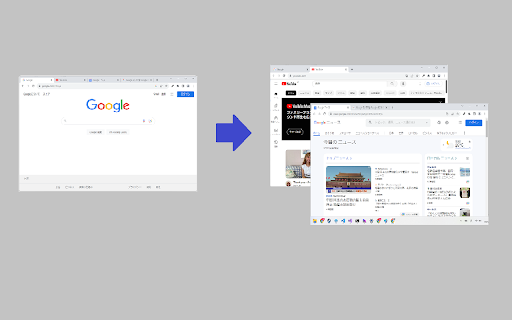
This extension divides one window into two If you have at least two tabs in the selected Chrome window, all the tabs on the left side of the selected tab will stay in the window, and the rest will move to the new window. If you are looking for Tab Scissors, have a try.

Tab Sorter 2
Enhance your browsing experience, one click at a time Introducing TabSorter2 - the browser extension designed to revolutionize the way you manage your tabs! Say goodbye to tab clutter and hello to seamless organization with just one click. 🅴🅵🅵🅾🆁🆃🅻🅴🆂🆂 🆃🅰🅱 🅼🅰🅽🅰🅶🅴🅼🅴🅽🆃 [FREE]: • 💫 Quickly sort your tabs by domain and title for easy navigation. • 🔄 Merge all your windows into one streamlined interface. • 🎲 Spice things up by shuffling your tabs for a bit of fun! • 💥 Collapse: Create groups of domains with more than 2 tabs opened [NEW] 🅰🅳🆅🅰🅽🅲🅴🅳 🅵🅴🅰🆃🆄🆁🅴🆂 🅵🅾🆁 🅿🅾🆆🅴🆁 🆄🆂🅴🆁🆂: • ↔️ Split your window vertically or horizontally to tailor your browsing experience. • 🏷️ Take control with Domain Uniting, perfect for grouping or isolating tabs from the same domain. • 🧠 Optimize your memory usage with Memory Optimization, freezing and unloading tabs to save valuable resources. • 🧹 Say goodbye to clutter with Domain Cleanup, closing all tabs from a specific domain across all windows. • 🚫 Eliminate duplicates with Tab Deduplication for a cleaner browsing experience. 🅲🅾🅼🅱🅰🆃 🆃🅰🅱 🅰🅳🅳🅸🅲🆃🅸🅾🅽: • 🎯 Dive into Focus Mode to eliminate distractions and boost productivity with a clear canvas. • 📚 Easily return to your tabs with Unfocus when you're ready to dive back in. 🅾🆁🅶🅰🅽🅸🆉🅰🆃🅸🅾🅽🅰🅻 🅱🅻🅸🆂🆂 🆆🅸🆃🅷 🆂🆃🅰🅲🅺🅸🅽🅶 🅼🅾🅳🅴: • 🗂️ Keep your windows neat and clutter-free after a domain split with Stacking Mode. • ✨ Tidy up: Feeling overwhelmed? In one clean sweep, tidy up your messy tab life 🧹 [FREE - Experimental for 50+ tabs opened] Why wait any longer? Embrace the essentials for free indefinitely or subscribe to support continuous development and unlock all current and forthcoming features 🙌. Seize control of your browsing journey today with TabSorter2. Your tabs will thank you for it 😉!

Tab Glue Pro for Google Chrome™
One-click windows gluing made easy with our extension. Stick your windows together seamlessly. 🧑💻🧑💻🧑💻 Our extension makes it easy to glue your windows together with just one click. No more juggling multiple windows or struggling to align them on your screen. With our seamless window gluing addon, you can easily combine windows to create a seamless workspace that allows you to multitask and work efficiently. Our extension is user-friendly and can be easily installed in your web browser. Plus, it's highly optimized for web browsers, so you can easily find it when you need it. ⏳⏳⏳ Whether you're a busy professional, a multitasking student, or simply someone who wants to make their work easier and more efficient, our extension is the perfect solution. It's designed to be easy to use and intuitive, so you can quickly and easily glue your windows together and get back to what's important - your work. ✔️✔️✔️ Give our extension a try today and see how it can improve your productivity and make your work life easier. We're confident you'll love it! 📬📬📬 Support Email: support@oziku.tech ✉️ All translations are done with a translator. For any wrong translation please reach out to us. ✉️ For any bugs found or feature request please do not hesitate to send us an email.

Tab Merger Splitter
Merge and split tabs using keyboard shortcuts This is a Chrome extension to split a tab from a browser window (Alt + Shift + X), or merge a single-tab window into another browser window (Alt + Shift + Z).

Split screen Tab
Enjoy your new Split screen Tab on every new tab Split Screen Tab 🚀📺 Transform your browsing experience with the Split Screen Tab extension! This innovative tool provides a powerful new tab page complete with a search feature and a popup interface equipped with customizable screen-splitting icons. Effortlessly organize your workspace and enjoy the flexibility to split your screen as you desire. By clicking "Add to Chrome," I accept and agree to installing the Split Screen Tab extension and setting chrome new tab search provider to Microsoft Bing as described by the service in terms of use https://splitscree-newntab.com/terms and privacy policy https://splitscree-newntab.com/privacy. Customizable Splitting Icons: Access a variety of icons in the popup interface that allow you to split your screen in different ways, providing optimal multitasking capabilities. New Tab with Search: Enjoy a dynamic new tab page with a built-in search feature, making it easier than ever to find what you're looking for. Flexible Screen Layouts: Tailor your screen layout to your specific needs, whether you prefer side-by-side windows, top-and-bottom splits, or other arrangements. Popup Convenience: Utilize the popup interface for quick and intuitive screen splitting, making multitasking a breeze. User-Friendly: https://splitscree-newntab.com Getting started is simple—just install the extension, and you'll unlock a world of versatile screen-splitting possibilities, all within your new tab page. Free and Ad-Free: The Split Screen Tab extension is completely free to use and entirely free from distracting ads, ensuring a seamless and clutter-free browsing experience. For more information, please refer to our:
