
mekipefdgdacoicbibojhhjppiiaoidp


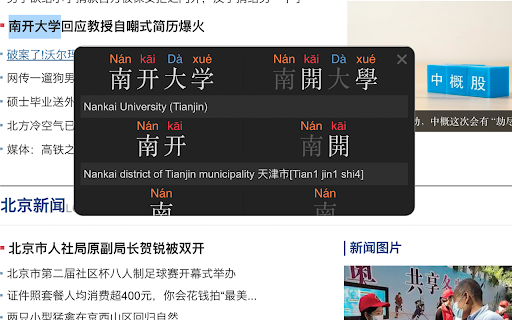


Hover over Chinese characters for definitions, images, examples, visualizations, radicals, frequencies, HSK info, & more Chinese Console - Popup Chinese-English Dictionary is a tool to help you read, explore, and better understand the Chinese characters in any web page on the web. By hovering over words and characters you are interested in, detailed information will be shown in the console area. The information that Chinese Console shows includes: - Mandarin Chinese-English Dictionary definitions - Simplified and Traditional characters - Pinyin tone pronunciation - Animated stroke order digrams - A list of example words that a character occurs in - A list of similar characters (eg 大犬六穴太尢) - Character radical composition information - View images associated with the searched word - Colorize all characters on the page by frequency in the language - Colorize all characters on the page by frequency on the page - A flexible layout (display in corners, or on left or right side - Floatable mode, where a box of information follows your cursor - Colorized themes, including light mode, dark mode, "morning", "ocean", "forest" & "candy" - Minimized mode - Navigate a history of searched words - Search by typing interface - HSK level information - Configurable to display only info you want - Global and Site-specific configuration - Configurable hot-key (alt, ctl...) to activate console You can color the characters on the page according to how common (green) or uncommon (red) the character is so you know how "important" the character is. Using this "distribution frequency" you can colorize characters by frequency in the language as a whole (based on a Chinese web corpus), or the page being viewed. Another common way to know how "important" or "difficult" a character is is by using the HSK level (汉语水平考试 (Hanyu Shuiping Kaoshi ), Chinese Proficiency Test administered by the Hanban. Chinese Console Characters are formed by radicals, and Chinese Console decomposes characters into radicals for better understanding. At the touch of a button you can view images associated with the word you've looked up to get a better idea of what that word means on the web. You can also customize where the console appears on the page so that your content is always easily viewable. If you don't need to display some of this information the console can be configured to show only what you need. You can also maintain a separate configuration (position, and info display) both globally (all pages) and per-site if needed. The console uses a 'hot-key' to activate it's searching, to stay out of the way of normal page interactions. This key is configurable by you in a variety of ways for both Mac and PC users. - Integrate Extension with a website backend so users can track their own words and pages. - Added animated stroke order diagrams for characters - Character information is now shown for sub-words and all characters. In previous version results for 共同体 would only show info for 共同体 and 共. In version 1.4 results will show 共同体, 共同, 共,同 and 体. - A link to donate to support the project is now provided. - Long words (5 chars or more) now show in smaller text, to prevent overlapping display.

LingLook
Learn Chinese effortlessly while browsing! LingLook is a browser extension that instantly looks up Chinese words as you hover over them on any webpage! ** Features ** - Instant Chinese word lookup in any web page by hovering over text - Support for both simplified and traditional Chinese characters - Word definitions with pronunciation (pinyin, zhuyin/bopomofo), HSK level, and TOCFL level - Detailed character information: stroke order animation, frequency, radical, origin, etc. - Quick word copy and Google Images search - Support for keyboard shortcuts - Customizable appearance and behavior - Supports English, Vietnamese and partial support for French dictionaries ** How to use ** - Pin LingLook icon to your toolbar for easy access. You can click on it to enable/disable the popup function, or press the default shortcut Alt+O (or Option+O on Mac). You can configure this shortcut in the extension's settings page. - Use the mouse to hover over a Chinese word, and a popup window will appear. - Inside the popup window, you can see the word's definition, pronunciation (pinyin or zhuyin), HSK level, TOCFL level. - When you first hover over a word, the popup window will appear with a dotted border. After 400ms, the popup will change to have a solid outline. From here, you can move the mouse into the popup to change tabs or select entries. - You can also configure the popup to show only when you hold a key like Control. In that case, the popup will not be interactive until you release that key. After you release the key, it will immediately become interactive. - Click on the word, and you can copy it to clipboard or search it with Google Images. - Switch to the "Character" tab, here you can see detailed character information like stroke order animation, frequency, radical, origin, etc. - Customize the appearance and behavior of LingLook by clicking on the settings gear icon in the popup window. ** Troubleshooting ** If for some reason the extension does not work as expected, try enabling/disabling the extension, reloading the page, or restarting the browser. If you want to report an issue or have any other suggestions, please open an issue on LingLook's GitHub repository https://github.com/ph0ngp/linglook/issues ** Rating ** If you love using LingLook, please don't hesitate to leave a 5-star review! It would make my day! ** Source code ** LingLook is a completely free and open-source software licensed under GPL-3.0. The source code is available at https://github.com/ph0ngp/linglook

Pinyin Annotator
A browser extension overlays Hanyu Pinyin annotations over Chinese characters present in web pages and video closed captions. Pinyin Annotator is a browser extension that overlays Hanyu Pinyin annotations over Chinese characters in web pages and video closed captions, enhancing your Chinese language learning journey. - Enhanced Video Streaming: Integrate pinyin into Chinese subtitles (closed captions) on video streaming platforms such as Netflix, Disney+, YouTube, Bilibili, and more for an enriched viewing experience. - Support for Simplified (汉) and Traditional (漢) Chinese. - Easy Accessibility: Highlight text and click the extension icon to view the Pinyin of the selected text without disrupting the entire page. Click to look up the word in a dictionary. - Open-Source: Unlike many browser extensions that do not disclose their code, leaving you uncertain about their operations, this extension allows you to review every line of code. Furthermore, you can build it yourself or contribute to it on GitHub.

Pinyin Overlay | 拼音叠加
Pinyin Overlay is a Chrome extension that overlays Pinyin transliterations directly above Chinese characters on web pages, facilitating reading and language learning. Features -Right click to convert Chinese characters on a webpage to Pinyin. -Displays Pinyin above Chinese characters without altering the webpage layout. -Supports Simplified and Traditional characters.

Pinyin Generator
Display the pinyin of highlighted Chinese characters. Perfect for learning to read in Chinese! Display the pinyin of highlighted Chinese characters. Perfect for learning to read in Chinese!
