
mehdmffcifbcpipjocnkkaoaofiafdmn

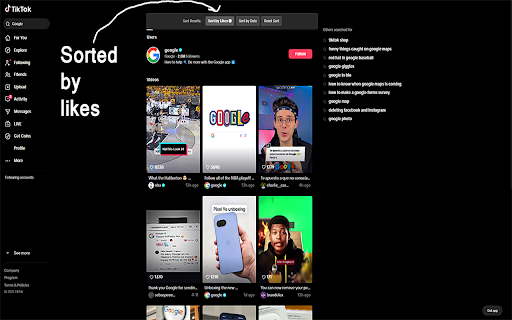


If you ever search for something on the TikTok website using your computer browser, you'll notice you can't sort the results. Unlike the mobile app, the TikTok website doesn't normally offer sorting options for searches, leaving you scrolling endlessly for what you want (something with higher/lower likes, something with a more recent/older publish date). "TikTok Search Sorter" aims to be the solution to that. It adds three buttons into the TikTok web search page: 1. Sort by Likes (reorders results to bring the highest liked videos straight to the top) 2. Sort by Date (reorders results to bring the newest videos to the top) 3. Reset Sort (switch back to TikTok's default search order) ⚠️ PLEASE READ - IMPORTANT NOTES ⚠️ 1a. TikTok Frequently updates its website structure and code; since this extension relies on that structure, this extension will require updates to keep working after a TikTok change to its site. 1b. I will try and release fixes when possible, but please understand there may be delays (your patience is greatly appreciated)! By installing, you acknowledge the extension's functionality depends on TikTok's current website design. 2a. If you choose to sort by likes or date, the extension actively works in the background; as you scroll down and TikTok loads more videos, the extension automatically sorts these new videos into their correct place in the list. It may make the page appear to "jump" or "glitch" as videos shift into proper position. If this happens, don't be worried - it means the extension is working as intended (ensuring all loaded videos adhere to your chosen sorting). 2b. If the dynamic sorting feels disruptive, simply click "Reset Sort" first, scroll down to load all the videos desired, then click "Sort by Likes" or "Sort by Date" to organize the complete list in one go.

TikTok Downloader, Sort & Analytics | KOLSprite
Analyze TikTok as you browse: download no-watermark videos, sort/filter content, view insights, discover creators & export data. 📣 Overview KOLSprite is an in-TikTok analytics workspace built for brands, dropshippers, creators, agencies, and marketers. Instead of switching between multiple tools, KOLSprite embeds a smart dashboard directly into TikTok pages, helping you analyze content, discover creators, sort videos, download assets, and export data while browsing TikTok. With KOLSprite, you can stop scrolling blindly and turn your daily TikTok research into a faster, more data-driven workflow. Browse TikTok as usual. Analyze as you go. --- 🚀 Key Features [ 1 ] In-TikTok Analytics Workspace KOLSprite is deeply embedded into the TikTok browsing experience, allowing you to research and analyze content without leaving TikTok. - Embedded Dashboard: View the KOLSprite panel directly on supported TikTok pages. - Analyze While Browsing: Check video, creator, hashtag, script, and performance data as you scroll. - Faster Content Research: Identify viral videos, trending content, and high-performing creators without manually opening multiple tools. - Workflow-Friendly Design: Built for daily TikTok research, competitor analysis, creator discovery, and content inspiration. [ 2 ] Advanced TikTok Sort & Filter Find valuable content faster with sorting and filtering tools built into your TikTok workflow. - Sort Videos by Metrics: Instantly reorder a creator’s videos by Most Viewed, Most Liked, Most Commented, or Published Date. - Keyword Filtering: Filter videos by specific keywords to quickly locate relevant content. - Profile & Search Page Support: Use sorting and filtering on creator profiles, search results, and supported TikTok pages. - Save Research Time: Stop endless manual scrolling and surface the best-performing content in seconds. [ 3 ] Powerful Downloader Without Watermark Save TikTok content efficiently for research, inspiration, content management, and creative workflows. - One-Click Download: Download HD TikTok videos without watermark. - Bulk Download: Batch download videos from creator profiles, liked lists, or favorites folders. - Audio Extraction: Extract background music as MP3 for creative reference. - Smart File Management: Use custom folder options and standardized file naming for better organization. [ 4 ] Data Insights & Content Analysis Turn TikTok browsing into actionable insights with real-time data and analysis features. - In-Feed Data Insights: View performance metrics directly through the KOLSprite overlay. - Script Analysis: Analyze video scripts and content structure to understand what drives engagement. - Upgraded Script Analysis Model: Paid members can switch to the upgraded model, with better support for less common languages and improved background audio processing. - Hashtag & Content Insights: Review hashtag trends, content patterns, and performance signals. - Enhanced E-commerce Analysis Table: View more data dimensions to better evaluate product content, selling performance, and market opportunities. - Data Export: Export influencer and video data to Excel/CSV for further analysis. [ 5 ] Creator Discovery & Competitor Research Discover creators, compare performance, and find potential collaboration opportunities directly inside TikTok. - Find Similar Creators: Click the "Similar Creator" button on any profile to discover lookalike accounts with matching niches, follower sizes, and performance metrics. - Competitor Tracking: Compare creators and video performance to identify content opportunities. - Collaboration Suggestions: Get AI-driven recommendations for potential influencer partnerships. - Creator Data Export: Save creator and video data for outreach, reporting, and campaign planning. [ 6 ] Global Support KOLSprite supports a multilingual interface for global TikTok research teams. - English - Chinese 中文 - Japanese 日本語 - Korean 한국어 - Vietnamese Tiếng Việt - Indonesian Bahasa Indonesia - Portuguese Português - Spanish Español --- 💡 How to Use Install KOLSprite and open TikTok.com. The KOLSprite dashboard will appear directly inside the TikTok interface on supported pages. 1. To Analyze While Browsing: Open TikTok as usual and use the KOLSprite embedded panel to view creator, video, hashtag, and script insights. 2. To Sort & Filter Content: Go to a creator profile or supported TikTok page, then use the KOLSprite control panel to sort videos by views, likes, comments, or publish time. 3. To Download Videos: Click the download button on a video card or use the bulk download feature inside the KOLSprite panel. 4. To Discover Similar Creators: Open a creator profile and click the "Similar Creator" button to find lookalike influencers. 5. To Analyze E-commerce Content: Use the enhanced analysis table to review expanded product and content performance data. 6. To Export Data: Export creator or video data to Excel/CSV for reporting, research, or campaign planning. --- 🔄 Latest Updates V2.0.7 - Script Analysis Model Upgrade: Improved support for less common languages and better background audio processing. Paid members can switch to the upgraded model. - Enhanced E-commerce Analysis Table: Added more data dimensions to help users evaluate product content, selling performance, and market opportunities. V2.0.4 - Brand New Feature: "Find Similar Creators". Instantly discover lookalike influencers with matching categories, follower counts, and performance metrics directly from any creator's profile. - General UI enhancements and performance optimizations. V2.0.2 - Fixed creator IP identification issues. - Improved video data stability and resolved script analysis playback issues. V2.0.0 - Added data support for TikTok Studio & Music pages. - Standardized download file naming conventions. - Enabled script analysis to remember user settings. V1.5.0 - Fixed major issues with previous download modules. - Adjusted offsets for the new TikTok search page layout. - Resolved web translation errors caused by plugin activation. V1.4.9 - Improved bulk download performance and speed. - Fixed video display issues following TikTok layout updates. - General integration and stability enhancements. --- KOLSprite – Browse TikTok, analyze in real time, and turn every scroll into actionable insights.

Sort Feed - TikTok & Instagram Sorter
Sort feed for TikTok & Instagram. Reorder Reels & Posts by likes, views, comments, date. Find viral & trending content. Export CSV. Sort Feed For TikTok & Instagram Sort TikTok and Instagram feeds instantly. Discover viral posts, top Reels, and best performing videos in seconds. Sort Feed For TikTok & Instagram is a Chrome extension that allows you to sort and reorder TikTok and Instagram feeds by engagement metrics such as likes, views, comments, and date. It is perfect for creators, social media managers, marketers, and researchers who want to quickly identify viral content and performance trends. Sort posts and videos by: Instantly discover the most popular content in any feed. Reorder Instagram Reels, posts, and TikTok videos so that the highest-performing content appears first. Great for spotting viral trends quickly. Quickly see which posts perform best on a profile, hashtag page, or feed. Perfect for content research and competitive analysis. Export all analyzed posts to CSV for deeper analysis. Use the data for: Works Directly in Your Browser The extension works directly on: This tool is widely used for: Install the Sort Feed For TikTok & Instagram extension. Navigate to a feed, profile, or hashtag page. Click the TT & IG Sorter icon in the Chrome toolbar. The extension scans posts and reorders the feed instantly. 💡 Why Users Love This Extension Your privacy matters. This extension: Works only on TikTok and Instagram web pages Processes feed data locally in your browser

TikTok Creator Finder: Search TK Influencers for Free - exporter24
Export TikTok email and detailed information with hashtag search, filter and sort by your needs. Free and unlimited. TikTok Leads Exporter (by exporter24) is a powerful Chrome extension that lets you export emails and detailed profiles from TikTok hashtag and keyword search to CSV files with ease. It supports detailed data scraping and helps you save time when managing large amounts of account information. How to Use: 1. Open the extension and enter search keywords or #hashtag to start search. 2. Confirm the search preview, our exporter will start scraping automatically. 3. Once the scraping process is complete, download your data in CSV format. Features: - Export leads quickly with email. - Supports detailed profile scraping with optional fields. - Handles TikTok rate limit errors automatically. - No TikTok password or sensitive data required for operation. Note: If you need Country, Last Post Days, check out Boost Mode on: https://www.exporter24.net/ Security: The exporter does not ask for your TikTok password or access any sensitive personal data, such as your posts, story views, or social relationships. TikTok's rate limits are automatically handled to ensure safe and efficient scraping. Attention: Using this extension may involve risks of temporary restrictions or blocks on your TikTok account. Please manage your scraping frequency responsibly to reduce these risks. Exporter24 is your ultimate tool for exporting TikTok data securely and efficiently.

Check Engagement Rate Instagram & Tiktok by KOL.ID
Sort and organize content on TikTok and Instagram by likes, comments, and other metrics - Powered by KOL.ID TikTok engagement rate & Instagram engagement rate for Free. TikTok engagement rate calculator is available online for free, accessible anywhere, with the latest data. 🔓 Sign Up as a Brand/Agency on KOL.ID to Unlock KOL Analytics. 🎯 KOL.ID Extension Features: ✅ Check Hook Rate Instagram Reels ✅ Check ER (Engagement Rate) Instagram ✅ Check ER (Engagement Rate) Tiktok ✅ Check Rate Card Instagram & Tiktok ✅ Add List KOL to Campaign on Instagram & Tiktok ✅ Sort TikTok & Instagram reels by likes, views, comments, upload time and more. ✅ Instantly see post statistics (likes, views, comments, save, shares) without opening each post ✅ Download high-quality TikTok & Instagram videos ✅ Save cover images, audio/music, and reels ✅ Download without watermark ✅ Instagram Story Download ✅ Lightweight and Smooth user experience ✅ Works on TikTok and Instagram profiles or search results ✅ Perfect for Creators, Marketers and Researchers Just install the extension, visit any TikTok or Instagram profile, and choose how you want to sort the content. It works automatically and saves you time and effort! ⚠ WARNING: This extension only sorts posts that are loaded in your browser window.
