
mebjcmajkcccdjbonefhlbkledilfnjj


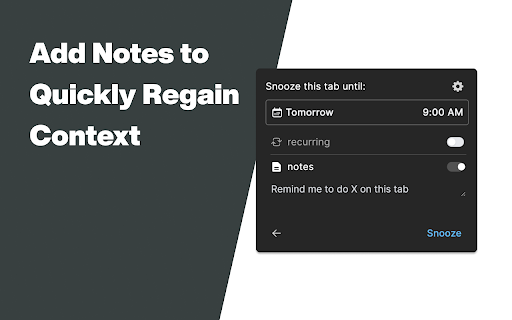
Breeze through snoozing your tabs with plain English AnySnooze lets you snooze tabs naturally - just type when you want them back. NATURAL LANGUAGE INPUT Type like you talk: • "tomorrow at 3pm" • "in 2 hours" • "next Monday morning" • "later today" • "in 30 minutes" No clicking through date pickers. No confusing interfaces. Just type and snooze. SMART SHORTCUTS Even faster with single-letter shortcuts: • l = Later today (6pm) • t = Tomorrow morning • m = Next Monday • f = Friday afternoon • h = In 1 hour • r = Last snooze time KEYBOARD POWER USERS Cmd/Ctrl+J opens AnySnooze Cmd/Ctrl+Shift+1/2/3 for instant snooze presets PRIVACY FIRST All data stays on your device. No cloud sync. No tracking beyond optional anonymous analytics. PERFECT FOR • Inbox zero practitioners • Research hoarders • "I'll read this later" collectors • Tab overload survivors • Anyone who says "remind me about this" WHY ANYSNOOZE? Other snooze extensions make you click through calendars. AnySnooze understands "next tuesday at 2pm" - just like you'd say it. 4.3★ rating from users who love the clean design and natural language parsing.

Tab Snoozer - Snooze tabs in a click
Easily snooze tabs with a click! Set timers to hide distracting tabs and automatically bring them back when you need them again. Extension to Snooze Tabs for later. - Tab Snoozer is a Chrome extension that helps you manage your browser tabs by allowing you to "snooze" them for a set period. Once snoozed, the tab will close and reopen automatically at the specified time. Click the popup and select how long the tab should be snoozed. We only use the following permissions to allow the extension to work. - activeTab: Allows the extension to access the URL of the active tab. Ensures that the extension only interacts with the tab you choose to snooze. - storage: Used to store the snoozed tabs' URLs and their snooze schedules. Data is stored locally in the browser and is not shared or synced externally. - alarms: Used to schedule the reopening of snoozed tabs at the selected time.

The Big Gift List
Easily add items to your 'The Big Gift List' lists Help friends and family take the guesswork out of buying you gifts with The Big Gift List. When it comes to a birthday, Christmas, wedding or any other special occasion, with your gift list you can show your friends and family what you really want, so they don't need to guess. Use the official browser extension to add items to your gift lists directly from any website.

Tab Snooze - Manifest V3
Save articles, videos and todos for later. They'll magically reopen when you need them. Too many tabs and want to get back to them later? Snooze them. Tab Snooze lets you temporarily close tabs and have them automatically reopen at the time you scheduled for them to open. HOW IT WORKS Click the Tab Snooze icon (or press Alt+S) on any tab. Pick when you want it back, and it disappears. When the time comes, it reopens automatically with an optional sound notification. SNOOZE OPTIONS - Later Today - This Evening - Tomorrow - This Weekend - Next Week - In a Month - Someday - Pick a Date - Repeatedly FEATURES - Snoozed Tabs Dashboard — browse, search, and manage all your sleeping tabs in one place - Preview without deleting — peek at a snoozed tab without removing it from your list - Keyboard shortcuts — Alt+S to snooze, Alt+Shift+S to repeat your last snooze, Alt+J to open the snoozed list - Audio notifications — hear a gentle chime when tabs wake up - Built-in todo management - Customizable schedule — configure workday start/end times, weekend days, and snooze durations in settings SUPPORT Tab Snooze is open source: https://github.com/csandapp/tab-snooze-extension-continued Email csandapp@gmail.com if you are having any issues, and if you are feeling generous, feel free to donate on https://ko-fi.com/csandapp

Llama Snooze™
Llama Snooze™ is a simple, beautiful way to snooze browser tabs and bring them back later—exactly when you need them. I originally built Llama Snooze™ for myself because I couldn’t find a tab snoozing extension that was clean, fast, and easy to use. Most of what I saw was clunky, overcomplicated, or felt untrustworthy. So I created Llama Snooze™—a lightweight, intuitive extension that gets out of your way. With Llama Snooze™, you can snooze any tab for later in just one click. Whether you need to return to something in 5 minutes, 5 days, or even 5 months, it’s quick and effortless. Llama Snooze™ is designed with privacy and security at its core. Your snoozed tabs are stored locally or securely through Chrome Sync. No external servers are used. We do not collect, track, or share any of your data. Everything stays on your device, exactly where it belongs. Chrome extensions should be simple, beautiful, and respectful of your privacy. That’s exactly what I’ve built with Llama Snooze™. Coming soon: Llama Snooze™ Pro. I’m working on new features, including Custom Snooze Times, Recurring Snoozes, and a Calendar option that lets you pick an exact date and time to reopen your tabs. These features will be available through an optional Pro plan. Stay focused, stay organized, and let Llama Snooze™ return your tabs when needed. If you would like support or feedback, please email me at russtanner6@gmail.com. I built this to improve my workflow, and I’m excited to hear how it can help you.
