
mdoigaefpjglamcdlailnincbmfomlkj
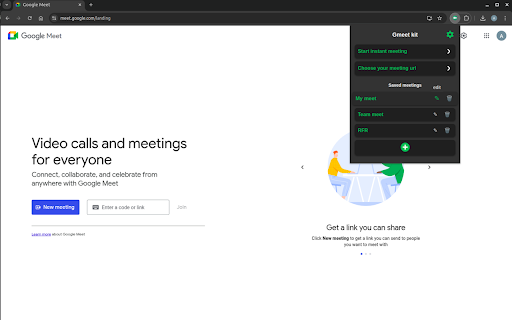


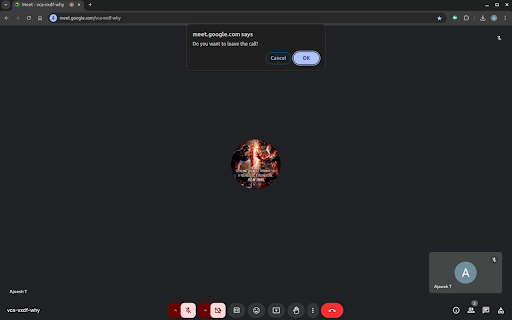
Enhance Your Google Meet Experience Take your Google Meet sessions to the next level with Gmeet Kit, the ultimate Chrome extension designed for smoother, smarter, and more productive video calls. Whether you're attending meetings, teaching classes, or catching up with friends, Gmeet Kit offers a range of powerful tools and features to optimize your experience. Key features Settings: Enhance your meeting experience with options like, auto-mute, auto-camera-off, Leave confirmation and much more. Choose your meeting url: Now you can get fancy meeting urls and surprise your friends, Gmeet kit will generate 10 meeting urls at a single click, you can copy or save any url. Save meeting urls: Save your day to day meeting urls and open it with a single click. Last 10 Meetings: Automaticaly saves your recent meetings, you can view them at any time, planning on adding more features in future. Fit Screen: For an immersive full-screen experience, simply click the Fit Screen icon at the bottom right of the presentation. Why Gmeet Kit? Gmeet Kit simplifies your virtual meetings, improves productivity, and adds convenience to your Google Meet experience—all while keeping things lightweight and user-friendly. Get Started Today Install Gmeet Kit and join hundreds of users transforming their Google Meet sessions! We Value Your Feedback! Kindly let us know if you need any new features or encounter any issues by filling out the Google Form below: https://forms.gle/jeVVhxJfhFCchHRp7

Focus Mode Enhanced
The purpose of this extension is to hide extraneous elements on a web page that distract from reading the actual content of the web page. This makes it much easier to read the web page using a screen reader or an extension such as the Read Aloud: A Text to Speech Voice Reader extension for Google Chrome.

chg-sf-highlighter
Highlights useful salesforce fields for CHG healthcare employees

BTW-Favorites
Extension for favorites and search BTW-Favorites is an extension that enhances the search for subscriptions on the twitch.tv platform. The extension allows you to search for the necessary streamers among your subscriptions and add them to your favorites. Favorite streamers will always appear at the top of the list.

TapToCopee - Copy Text Button for ChatGPT
Adds a copy button for your chatGPT session to copy its response in a click TapToCopee for chatGPT is designed to enhance the user experience on chatgpt.com by showing a 'Copy' button . Users can then easily copy the text content they need with a single click. It operates exclusively on the example.com domain TapToCopee for chatGPT your friendly little helper to make copying text on chatgpt a breeze. Once installed, the extension adds a 'Copy' button to specific sections of text on 'chatgpt.com' webpages. Here's how it makes your life easier: 👉 Click the 'Copy' button and voila! The text in that section is now on your clipboard, ready to be pasted wherever you need it. 💼 Once copied, the button hides itself for a bit, showing a 'Copied' message so you know it's done its job. It'll pop back up in a couple of seconds, ready for the next copy. Give it a try and save yourself some time and effort!
