
mdmbdcmehndobecfdinmioobhbpbkbdo
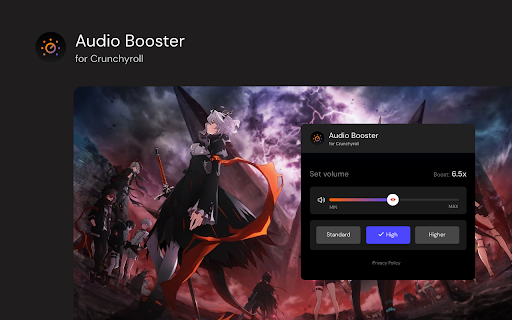
Struggling with quiet streaming audio? 🚀 Try Audio Booster for Chrome and amplify your experience! 🎧 Works on Crunchyroll 🎬 Have you ever watched an anime on Crunchyroll and felt the sound was too quiet? 😕 Did you have to turn up the volume to the max and still weren't satisfied? 📉 Enter Audio Booster for Crunchyroll - your solution to the problem of a quiet audio track in online media! 🚀 What is Audio Booster for Crunchyroll? Audio Booster for Crunchyroll is an innovative extension for the Chrome browser 🌐, allowing you to increase the maximum volume of audio played on Crunchyroll. Easily adjust the volume using a slider 🎚️ or predefined buttons in the extension's pop-up menu to achieve the optimal sound level. 🔊 Features 🔹 Volume Increase: Set the volume according to your needs. 🔹 Predefined levels: Choose from ready-made volume settings for quick adjustment. 🔹 Compatibility: Designed specifically for use with Crunchyroll. Install the extension from the Chrome Web Store. Open an anime on Crunchyroll. 🎬 Click the extension icon in the browser bar. 🖱️ Use the slider or predefined buttons in the extension's pop-up menu to increase the volume. 🎧 ❗**Disclaimer: All product and company names are trademarks or registered trademarks of their respective holders. This extension holds no association or affiliation with them or any third-party companies.**❗

Equalizer for Chrome browser
Equalizer for your Browser. Customize your sound by 10 bands, equalizer presets with collection music genres and a bass booster.. The Audio Equalizer allows you to adjust the balance between frequency components with a 10-band audio equalizer, many different sound settings and excellent control for quality sound. Used correctly, it can help you smooth out the sound, making it nicer and cleaner, whether it be adding volume to the low frequencies, removing some of the high frequencies, or adjusting the middle balance between them. This is a handy tool to help you customize the sound for you. Audio equalizer with 21 preset profiles for different music genres and for your taste. You can always edit them to your liking and save your profiles. Audio Equalizer (Eq) can create a surround sound effect, boost bass and increase the maximum volume on your device. You can use it to adjust the level of various frequencies in the audio stream, or to boost both low frequencies (bass) and high frequencies. You can use it as an equalizer for YouTube and other streaming audio, video sites. In addition, we have many other features that may surprise you. Some of our handy Equalizer features: - Preamplifier volume controls; - 10 ranges for sound adjustment; - 21 ready-to-use presets; - Low CPU usage while running; - Boost / Cut frequency in each band is +/- 12 dB; - Absolutely free equalizer extension. Functionality: Promo page usage within the extension. Opening a site page after updating the extension.

Bass Boost for Google Chrome™
Free! Make Youtube videos sound even better in your browser. Want to have a more enriching experience when you listen to songs on Youtube? Change the amount of bass to your specific needs when you install this software. Its extremely easy to use. Simply click on the extension icon and then you can adjust the bass. We have a preset list of bass which you can choose from. Disclaimer: Please note this extension is NOT made by Google and is made by an independent development team. All copyrights belong to their respective owners. Google doesn’t endorse or sponsor this Chrome extension. Bass Boost for Google Chrome is not owned by, is not licensed by and is not a subsidiary of Google Inc.

Volume Booster - Sound & Bass boost
Volume booster that improve your sound system! Increase volume and bass booster, equalizer. Volume control for Chrome. Volume Booster feature allows you to enhance the audio quality while using the Chrome browser, enabling you to have a more enjoyable experience while listening to music on YouTube or watching videos. This booster can amplify the bass to its fullest and increase the volume by 600%. A Stylish Sound Booster pop-up appears on your screen with a volume switch, displaying a list of tabs currently playing audio content. You can adjust the sound levels in the current web tab using the slider. This extension can significantly enhance the sound quality of your browser, and you can use the volume booster on your preferred websites. Audio volume booster works great on all popular sites: FB, Twitch, Deezer and other sites. Use it as a flexible YouTube equalizer when watching videos, or adjust sound effect levels to bring out your favorite songs to the fullest. Sound Booster is a user-friendly and practical tool for enhancing the audio quality of your favorite songs. By utilizing the equalizer, you can enjoy the benefits of this tool and experience excellent sound quality. Volume Control Take control over all that audio you need a power volume adjust tool with the ability to set individual volume settings for each tab. To solve that task we developed our audio volume control extension. Equalizer Audio Equalizer is a lite extension that let you easily adjust audio settings (the balance between frequency components in an audio file) from a toolbar popup. Equalizer for Youtube. Bass Booster makes videos, songs, movies and more sound awesome by boosting your speakers or headphones. Bass Boost is a simple to use Audio Equalizer that's got several settings to make Videos, Music, Movies, Gameplay, Anime and more sound incredible at the click of a button. It's like having expensive headphones/speakers for completely free, so download it now! We hope you find our tool beneficial, and we eagerly await your feedback and ratings. If you encounter any issues or face any problems while using it, please contact us for assistance.

Equalizer Plus
Unleash the Power of Personalized Audio in Chrome Transform your Chrome audio with Equalizer Plus — a powerful, real‑time sound control tool built for clarity and precision. Customize your listening experience across any tab with flexible presets and advanced controls. 🔥 Key Features 🔥: • High‑quality equalizer with popular presets for quick tuning • Volume dynamics compressor for balanced, punchy sound • Mono/Stereo toggle for a tailored listening experience • Volume booster up to 400% • Custom presets: save and recall your own settings instantly • Themes: light, dark, and random looks • Startup preset: save your current settings and load them automatically when you open the extension • Pan dial for precise stereo balance or true mono • Unlimited instances across tabs • Real‑time audio processing with instant results • Works with all online audio: music, video, calls, and more
