
mdjgbjnbdnhneejmmaabmccfehigbjbe
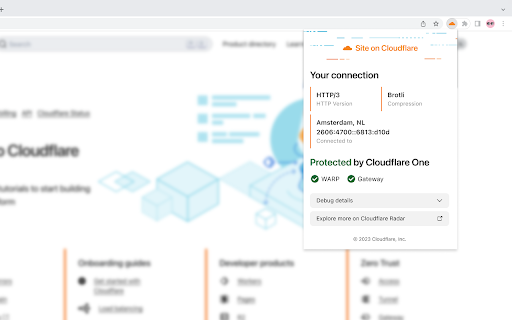
Provides connection and security information when visiting sites, especially sites using Cloudflare. Optics is a browser extension created by Cloudflare, Inc. that provides connection and website information to the user about the website that they are visiting. If the website is also using Cloudflare to proxy its web traffic, Optics may also provide additional information about Cloudflare-specific capabilities being leveraged by the user. For more information, review the section "Optics Behavior Outline" below. By using Optics, you agree to Cloudflare’s Website and Online Services Terms of Use (https://www.cloudflare.com/website-terms/) and acknowledge Cloudflare’s Privacy Policy (https://www.cloudflare.com/privacypolicy/). 1) The Optics browser extension locally inspects the incoming responses from websites visited in your browser and runs a small snippet of code in each webpage you visit solely to establish whether HTTP version 1, 1.1, 2, or 3 was used by the website. 2) The extension determines whether the website is being proxied by Cloudflare by evaluating the website's IP address and "server" response header against known valid Cloudflare configurations. 3a) If the website is not proxied by Cloudflare, the Optics extension will show you information about your connection to the website, such as the HTTP version, data compression format and Server IP that the website is using. 3b) If the website is proxied by Cloudflare, the Optics extension will show you information about your connection to the website, described above, as well as place a background request to a Cloudflare endpoint to determine additional information about your connection. An example of this additional information would be whether you are leveraging Cloudflare’s WARP or Gateway solutions to protect your browsing activity.

Claire
Shows an orange cloud in the omnibar when you are browsing a site that uses Cloudflare Claire adds an unobtrusive icon to your browser that turns orange when you are browsing a website that uses Cloudflare. You can also see if the website is using modern technologies like HTTP/2, IPv6 and Cloudflare's own Railgun.

Captcha Solver: automate CAPTCHA solving
solve hCaptcha, reCAPTCHA and MTCaptcha. Support Playwright, Puppeteer and NoCoding Data Scraper for web scraping. Automatically solve hCaptcha, reCAPTCHA and MTCaptcha using Deep Learning AI Features: . Solve hCaptcha. . Solve reCAPTCHA. . Solve MTCaptcha. . No interruption throughout the surfing. . Work together seamlessly with web scraping add-on, NoCoding Data Scraper Chrome extension ( https://chrome.google.com/webstore/detail/nocoding-data-scraper-eas/ojaffphbffmdaicdkahnmihipclmepok ), automating the scraping process even encountering CAPTCHAs. + Puppeteer / Playwright support + upgraded models to solve some latest challenges + more stable for solving for complex tasks + stop smartly when continuous unsolved tasks + free credits for new trial -> Challenges are constantly evolving, and the solver CANNOT solve all tasks in time. If success rate is critical, please do not buy paid version and try other solving add-ons/services. No refund service is provided after purchase. -> reCAPTCHA and hCaptcha will block you if you're being rate limited. -> the solver does use some DL and AI functions. However the design of many challenges are very tricky, so the solver is not smart enough to learn from your manual selection. How to use it? -> Simply install CAPTCHA Solver extension. -> Fill in your valid email to receive credit key and activate free trial credits. -> CAPTCHA Solver extension detects hCaptcha, reCAPTCHA and MTCaptcha on any web page and automatically solve the challenges. -> Finer controls on the setting to save credits. ADDITIONAL INFO: Following Chrome extension permissions are requested to run the CAPTCHA Solver: storage: to store configuration alarms: to connect partners regularly declarativeNetRequest: to understand the CAPTCHA language activeTab: to solve the challenges on the current active tab page. What are the alternatives if NDS does not meet your needs? We appreciate if you are willing to give us feedback before giving up. There are some other tools you can refer to if CAPTCHA Solver is not the most suitable tool for your task: NopeCHA enables you to solve reCAPTCHA, hCaptcha, FunCAPTCHA, AWS WAF, and text CAPTCHA challenges using AI after activating API key; Captcha Solver enables you to solve many types challenges after adding funds and API key; Captcha Solver (2captcha.com based) enables you to find and bypass CAPTCHAs automatically with 2captcha.com's account key; Buster enables you to solve difficult captchas by completing reCAPTCHA audio challenges using speech recognition; reCAPTCHA Solver enables you automatically solve any type reCAPTCHA after getting your API key from the solving service; hCaptcha Solver enables you solve any type hCaptcha after getting your own API key; hektCaptcha enables you to solve hCaptcha using AI;

reCAPTCHA Solver: auto captcha bypass
An extension to automatically solve any type reCAPTCHA reCAPTCHA Solver: auto captcha bypass extension An extension to automatically solve any type reCAPTCHA. How does it work. To get your API key you need to create an account on the solving service. Without API key extensions do not work. It is not guaranteed that challenges are always solved. The limitations of the technology need to be considered. Motivation The difficulty of captchas can be so out of balance, that sometimes they seem friendlier to bots than they are to humans. The goal of the project is to improve experience with captchas, by giving us easy access to solutions already utilized by automated systems. reCAPTCHA challenges remain a considerable burden on the web, delaying and often blocking access to services and information depending on physical and cognitive abilities, social and cultural background, and the devices or networks connected from.

Captcha Solver: Auto Recognition and Bypass
SolveCaptcha Solver plugin allows you to automatically solve CAPTCHAs found on any webpage. SolveCaptcha is a powerful and fast browser extension that automatically solves captchas, including reCAPTCHA, hCaptcha, FunCaptcha (Arkose Labs), GeeTest, image captchas, and Cloudflare Turnstile. Seamlessly integrated into Chrome, it eliminates manual captcha solving, improving your browsing experience. No coding required – just install and let SolveCaptcha do the work! 🚀 Automatic captcha solving SolveCaptcha runs in the background, instantly solving captchas and ensuring smooth web navigation without interruptions. Designed for both technical and non-technical users, it also assists individuals with disabilities by automating captcha recognition and clicking. 🔹 Supported captcha types SolveCaptcha auto-solves reCAPTCHA, Cloudflare, and other captcha types across the web. SolveCaptcha delivers high-speed, accurate captcha-solving, making it a reliable tool for automation, accessibility, and effortless browsing. 🔥 Who benefits from SolveCaptcha? 🔹 Accessibility support – Helps users with visual impairments and motor disabilities by automating captcha solving. 🔹 Effortless web access – Removes barriers to captcha-protected websites, allowing uninterrupted browsing. 🔹 Faster logins and authentication – Streamlines verification processes and reduces manual input. 🔹 Automation-friendly – Perfect for web scraping, content access, and online workflows without interruptions. SolveCaptcha makes the web more accessible, fostering digital inclusivity for all users. 📌 How to install SolveCaptcha for Chrome 1️⃣ Visit the SolveCaptcha Chrome Web Store page. 2️⃣ Click "Add to Chrome" and confirm the installation. 3️⃣ Pin SolveCaptcha for quick access: Click the puzzle piece icon in the Chrome toolbar. Find SolveCaptcha and click the pin icon. Now you're ready to enjoy seamless captcha-solving! 🔹 For browsing: ✅ Install SolveCaptcha in Chrome. ✅ Sign up and add funds on SolveCaptcha.com. ✅ Enter your API key in the extension settings. 🔹 For automation & Puppeteer scripts: 1️⃣ Download the SolveCaptcha Browser Extension.zip. 2️⃣ Open /assets/config.js and enter your API key. 3️⃣ Enable Developer mode in Chrome Extensions settings. 4️⃣ Remove previous SolveCaptcha versions. 5️⃣ Click "Load unpacked", select the extracted folder, and start using SolveCaptcha! 💡 Why choose SolveCaptcha? ✔ Instant captcha solving – Works in the background for a seamless experience. ✔ Accessibility-friendly – Automates captcha-solving for all users. ✔ Cross-browser support – Chrome now, Firefox, Opera, and Edge coming soon! ✔ Secure & private – SolveCaptcha does not store or track personal data. 💰 Pricing & support 📌 Check our pricing page for cost details. 📩 Need help? Contact us at info@solvecaptcha.com. 📥 Install SolveCaptcha now and bypass captchas effortlessly! 🚀
