
mdinkpgbofjchcgmdbmkpifcecbheeic
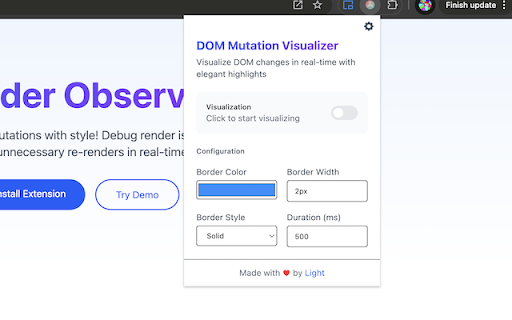

Illuminate your DOM mutations with style! Render Observer is a sleek browser extension that helps you catch unnecessary re-renders in real-time by visualizing DOM changes with elegant highlights. - **Real-time Visualization**: Watch your DOM mutations come to life with customizable highlights - **Smart Detection**: Tracks additions, removals, and attribute changes in the DOM tree - **Performance Friendly**: Intelligent filtering to avoid noise from minor updates - **Fully Customizable**: - Choose your highlight colors 🎨 - Adjust border styles and widths - Set custom highlight durations - Configure ignored selectors ## 🚀 Perfect for - Frontend Developers debugging render issues - Performance optimization wizards - React/Vue/Angular developers hunting for unnecessary re-renders - Anyone curious about how their web apps mutate the DOM 1. Install the extension 2. Click the extension icon to open the control panel 3. Toggle visualization on/off 4. Watch as DOM changes light up your page! - Use URL patterns to auto-enable on specific sites - Customize highlight colors to distinguish between different types of mutations - Adjust duration and style to match your debugging needs - Check the console for additional insights Unlike traditional debugging tools, Render Observer brings a visual dimension to DOM mutations. Instead of digging through console logs or dev tools, see exactly what's changing in real-time. It's like having x-ray vision for your web app!

html-dom-lens extension
extension for checking DOM element information on the screen Extension that helps you get things done in Front-End development!

React Render Tracker
A Chrome extension to track React component renders and performance. Track and highlight React component re-renders visually in real time. This extension helps you debug performance issues by hooking into React DevTools and highlighting only the components that re-render—right inside your app. 🔹 No setup required 🔹 Works with any React project using DevTools 🔹 Supports two modes: track a specific component or all components 🔹 Visual highlights appear instantly on re-render 🔹 Clean and lightweight – no performance impact Whether you're chasing unnecessary renders or fine-tuning performance, React Render Tracker gives you instant visual feedback while coding.

Web Mask
It overrides resources, JS, CSS, Image, and fonts, of a website with the copies from a local web server. It enables you to - Debug a remote web site, for which source map is usually disabled, with your local web server - Test your local changes with actual data from remote servers - integration test before pull request The idea and its implementation are based on HTTP and HTML web standards, independent to the framework of your choice, with the following constraints: - It requires local server to respond with HTTP header, `Access-Control-Allow-Origin: *`. `*` can be replaced with the origin of your remote server. - It doesn't work with `document.write()`. - "Bypass for network" for service workers. See screenshots for instruction. - Web socket is not redirected, i.e. Hot module reload (hmr) or live reload doesn't work unless you can force their origin to localhost It's similar to "Resource Override", but built for Manifest V3, and easy to integration into automated tests. See

GitHub Tweaker
GitHub Tweaker enhance readability of GitHub 'Pull Requests' page by displaying branch sources This extension is for people who tired to hover on Pull Request link each time when need to find out comparing and destination branches New features: • Import/Export branch colors • Choose color on PullRequests page • Dark theme on Options page
