
mdgapjpcpmdiladaelgpdejkclgkjefi
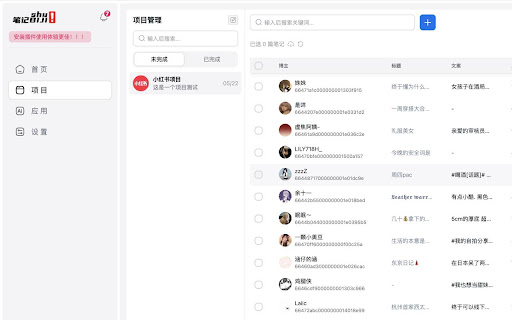
这个一个小红书工具箱是一个方便的浏览器扩展。它可以帮助你快速地收集和分析小红书数据。 这个一个小红书工具箱是一个方便的浏览器扩展。它可以帮助你快速地收集和分析小红书数据。

Web Scraper - Free Web Scraping
Web data extraction tool with an easy point-and-click interface for modern web Free and easy to use web data extraction tool for everyone. With a simple point-and-click interface, the ability to extract thousands of records from a website takes only a few minutes of scraper setup. Web Scraper utilizes a modular structure that is made of selectors, which instruct the scraper on how to traverse the target site and what data to extract. Thanks to this structure, data mining from modern and dynamic websites such as Amazon, Tripadvisor, eBay, as well as from lesser-known sites is effortless. Data extraction is run on your browser and doesn’t require anything to be installed on your computer. You don't need Python, PHP, or JavaScript coding experience to start scraping. Additionally, it is possible to completely automate data extraction in Web Scraper Cloud. Once the data is scraped, download it as a CSV or XLSX file that can be further imported into Excel, Google Sheets, etc. Features Web Scraper is a simple web scraping tool that allows you to use many advanced features to get the exact information you are looking for. It offers features like: * Data scraping from multiple pages; * Multiple data extraction types (text, images, URL’s, and more); * Scraping data from dynamic pages (JavaScript + AJAX, infinite scroll); * Browsing scraped data; * Exporting scraped data from a website to Excel; It is dependent only on the web browser; therefore, no extra software needed for you to start scraping. How to begin scraping? There are only a couple of steps you will need to learn in order to master web scraping: 1. Install the extension and open the Web Scraper tab in developer tools (which has to be placed at the bottom of the screen); 2. Create a new sitemap; 3. Add data extraction selectors to the sitemap; 4. Lastly, launch the scraper and export scraped data. It’s as easy as that! What can Web Scraper be used for? * Lead generation - email, phone number, other contact detail related data mining from various websites; * E-commerce - product data extraction, product price scraping, description, URL extraction, image retrieving, etc; * Website content crawling - extract information from news portals, blogs, forums and so on; * Retail monitoring - monitor product performance, competitor or supplier stock and pricing, etc; * Brand monitoring - product review, social content crawling for sentiment analysis; * Business intelligence - gather data for key business decisions, learn from your competitors; * Big data extraction for machine learning, marketing, business strategy developments, researches; * And much more. Web scraping can be a little bit difficult at first, that's why we have created informational guides that can help you. For video tutorials, documentation, how-to’s, playground web pages and blog, visit our website: https://www.webscraper.io/ If you want to discuss web scraping, request features, ask questions or submit bugs, visit our friendly forum here: https://forum.webscraper.io/ Regarding the privacy policy of our product, see “Browser Extension Privacy Policy” at https://webscraper.io/extension-privacy-policy Thank you for choosing us!

Data Scraper - AI Data Miner
With Data Scraper, you can extract website content in a few clicks. This web scraping tool delivers structured data without coding. 🖥️ Stop wasting time on repetitive tasks. Discover a faster, easier way to collect online content with our data scraper extension. 🌐 This solution is crafted for anyone eager to leverage data scraper tools and master web scraping. With just a few clicks, you can convert any webpage into structured results, automate extraction tasks, and export outcomes in your preferred format. 🧐 Why Choose Our Web Scraping Extension? - No coding required — simply click to access the information you need - Export website content in various formats including Excel, CSV, and Google Sheets - Our Chrome extension data scraper fetches results quickly using advanced technology - Adaptable: built to handle both small tasks and large-scale projects 🌟 Whether you are a beginner searching for how to scrape information from a website, or a professional looking for a robust web scraper, this tool is your all-in-one solution. 💡 Common Uses for This Data Scraper Tool ✅ Market analysis and competitor monitoring ✅ Collecting leads and contact information ✅ Extracting site content for SEO research ✅ Product and price monitoring ✅ Information gathering for academic research ✅ Pulling social media posts, reviews, and more Our data scraper streamlines the collection of complex site content for any project. You can customize your extraction tasks to suit unique business objectives and reporting requirements. Whether you're searching for a web data scraper that fits your workflow or just exploring how to scrape data from a website into Excel, CSV, or Google Sheets, our tool makes the process smooth and straightforward. 💎 Features That Set Our Extension Apart 🎉 Say goodbye to manual copy-paste! With our data scraper tool, you can streamline information collection. No technical background required. 1️⃣ Install Data Scraper from the Chrome Web Store 2️⃣ Navigate to your target website 3️⃣ Use the built-in tool to highlight details 4️⃣ Start the scraping process 5️⃣ Download your results and power up your workflow 🥇 Powerful Web Data Scraping Tools in One Extension Our solution offers an efficient way to extract tables, links, and text from any webpage with minimal effort. Whether you're working with structured formats or messy layouts, the built-in website scraper handles both with ease. Export everything directly into your workflow and turn online content into organized, actionable results. 👥 Who Is This Data Scraper Chrome Extension For? 🟢 Business analysts looking for dependable technology 🟢 Students interested in automating their work with online information 🟢 Marketers and SEO professionals looking for effective web scraping tools 🟢 Anyone who wants to learn how to collect content from a website without hassle ✅ From leads to product prices, market research, and any case when you need to scrape a website for data — experience a new level of efficiency with our extension. 🔝 Why This Data Scraper Extension Is the Right Choice 🔸 User-friendly for beginners and advanced users 🔸 Clear explanations of how to scrap a whole site 🔸 Responsive support for your information collection needs 🔸 Versatile solution for every project size ⁉️ FAQs About the Extension ❓How Can I Install Data Scraper? 💠 Simply find it on the Chrome Web Store, click “Add to Chrome,” and follow the instructions ❓ How Many Pages Can I Retrieve From a Website? 💠 There’s no set limit — it depends on elements such as site structure, access permissions, and content load methods. ❓ In Which Formats Can I Save the Scraped Content? 💠 You can scrape data from a website to Excel, or export it in CSV or Google Sheets formats. Choose the option that best fits your workflow. ❓ Is Data Scraper Secure? 💠 Absolutely! Your privacy matters. We keep your information safe and regularly update the extension for security and compatibility. ❓ I Have Some Ideas and Feedback — Can I Share Them With the Developers? 💠 Of course! We value your thoughts, and every suggestion you send is reviewed by our team. 🌍 Join those who trust our data scraper chrome extension to collect, manage, and analyze information effortlessly. Whether you need to scrape website data for personal or professional use, we provide the flexibility and reliability you’re looking for.

Listly - Web Scraping
Convert any website to Excel in just a few clicks. Speed up your data collection and put your time and effort into what really matters to you. With 200,000+ installs and more than 80M URL downloads globally, Listly is the easiest tool to use and the preferred web scraping service among marketers and real estate agents who want to get their job done faster. • Look for suitable job candidates as a recruiter • Complete prospecting workflows as a sales representative • Collect product and pricing information from eCommerce websites as a marketer • Gather sports data to predict the outcome of sports games as a sports statistician • Generate new leads for companies and freelancers • Analyze social media posts, comments, likes, etc. • Track real estate prices and listing information • Identify potential competitors and monitor markets • Scrape movie reviews and ratings • Crawl various search engine results Listly Free Features • Export data to Excel (XLSX) files • Integrate with Google Sheets • Automatically detect and extract iFrame elements • Extract hyperlinks referring to other web pages • Tabs extraction – Extract data from multiple tabs instantly! • Export multiple pages into an Excel spreadsheet (group extraction at server) • Schedule daily extractions • Receive email notifications • Integrate with an API for developers (Beta) • Export data in CSV/JSON format • Upload .html files via Fileboard • Automate repetitive mouse or keyboard clicks to load more data • Auto-click to load more data • Auto-scroll to load more data • Auto-save while scrolling • Add a custom proxy server to change IP address and avoid getting blocked • Adjust the scraping speed to avoid getting blocked while scraping websites

Easy Web Data Scraper
Free & No-code scraper tool can automatically flip pages to extract or export any data you need Easy Web Data Scraper is a automatic data extraction tool for any website. With this plugin, you can extract or export any data you need Aren't you bored of the manually copying data? All you have to do is install the Easy Web Data Scraper quickly. The advanced data scraper technology handles web data unlike any other extension. If you encounter an issue, please report it via the customer support flag icon on the capture page, so we can improve the extension for you and everyone else who uses it. How to use? On the page where you want to extract data, click the icon in the upper right corner to use. What does the tool do? - Automatic Page Flip Extraction - Customize exported data columns - Support data preview - Support crawl speed adjustment - Support infinite page scrolling WHO LOVES IT? - For E-commerce sellers: Extracting product sales, product prices, descriptions, product reviews, URL extraction, images, etc. from e-commerce sites such as Amazon, Shopify, Ebay, Walmart, Etsy, etc. - For Sales or marketers: Collect leads from various channels such as LinkedIn, Facebook, Instagram, Tiktok, etc., extract customer names, emails, phone numbers, social links, etc. - Whenever there is a need for data export, there is a need for this tool. Completely free & unlimited uses! Best alternative to BigSeller - Product Scraper. No registration, no trial period! For more product research, please check in https://findniche.com Developer promise: This extension does not contain any malware or spyware beyond standard Google Analytics.
