
mcjgidambippeaajehcfimmephgholco
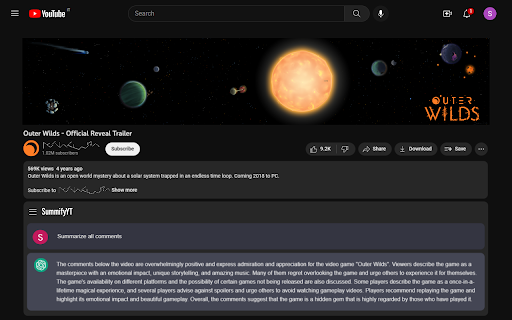
SummifyYT is a browser extension that summarizes comments of YouTube videos. SummifyYT is a browser extension that helps you quickly and easily summarize comments on YouTube videos. It's perfect for users who want to get a quick overview of the comments without reading through all of them. Try SummifyYT now and see the difference it makes! Developer updates: - Bug fixing - Added setting to enable GPT-4 - Added setting to disable auto-start - UI look overhaul (Align extension's UI with YouTube's web page style) - Fixed chat removing from chatGPT history - Added setting for summary language P.S. You need to be logged in ChatGPT.

VideoMind: Quick ChatGPT for Youtube
1-Click summary, translation or qa for Youtube Videos. VideoMind is a powerful Chrome extension powered by ChatGPT. It provides a 1-CLICK video summary, translation, format for social post or anything prompt you would use directly. Access it directly from your homepage or search results for FREE. With this tool, you can easily avoid clickbait and become more productive by making informed decisions on whether a video is worth watching. Whether you’re a content creator or marketer, Quick Insights from Youtube is an essential tool that can help you save time and boost your productivity. Some key questions and possibilities you can ask: 1. What is the main topic of the video? 2. What is the purpose of the video? 3. What are the main points made in the video? 4. What are some next steps or actions that viewers can take based on the information presented in the video? 5. What are some potential counterarguments or alternative perspectives related to the video’s topic? 6. What are some common misconceptions or misunderstandings related to the video’s topic? 7. What are some potential implications or consequences of the ideas presented in the video? 8. What is the speaker’s main argument or thesis? 9. Who is the intended audience for the video? 10. What are some examples or evidence provided in the video? • Researching a topic: Quickly find videos that are relevant to your research and get a sense of what people are saying about them in the comments. • Avoiding clickbait: Get a better understanding of what a video is about before clicking on it, saving you time and frustration. • Improving productivity: Use the extension to quickly scan through search results and find the most relevant videos based on their descriptions and comments. • Learning from others: Use ChatGPT in combination with the extension to receive summarized insights from the comments, allowing you to learn from others’ experiences and opinions. VideoMind: Quick ChatGPT for Youtube is a powerful tool for anyone who wants to make the most of their time on the platform. Start now with a preset or your own prompt. Support: contact us for any questions or feedback? at videomindonline@gmail.com

YouTube Comments Section Analyzer
Find the sentiment of a YouTube video based on it's comments' section This extension gives the complete sentiment analysis of a YouTube Video based on its comment section.

Youtube comment AI powered analyzer
The AI-Powered YouTube Comment Analyzer The AI-Powered YouTube Comment Analyzer From Comments to Content Genius. Elevate your channel with AI. TubeHorizon leverages advanced AI algorithms to sift through your YouTube video comments, revealing the sentiments and topics that matter most to your audience. With TubeHorizon, you're not just seeing comments; you're gaining a partner in content strategy. Unlock the Hidden Insights of Your Audience's Comments Features That Empower You Ideation Engine: Find out what your viewers truly desire with AI-driven content recommendations.Extract trending themes from your comment sections to inspire your next hit video. Sentiment Analysis: Gauge viewer sentiment at a glance – know what resonates positively and what doesn't.Turn the tide of public opinion by addressing concerns and amplifying successes. Engagement Amplifier: Highlight your most engaging comments to understand and boost viewer interaction.Respond strategically to comments with the help of sentiment cues. Interactive Comment Chat: Have a conversation with your data through our AI chat interface.Ask questions, get answers, and interact with your channel's statistics as never before.

Youtube Popup Comments
Ever wanted to read the comments on a YouTube video, without scrolling down to the comments section and missing any of the action? With this extension, you can. Simply click on the button added to the top of the YouTube UI (next to the watch later button), and scroll through the comments using the newly created pop-up window that appears on top of your video. Click on the button again to close the pop-up when you want to focus on your video.
