
mcbdmjomdgjhpefpjocmpfgbabbddlpl

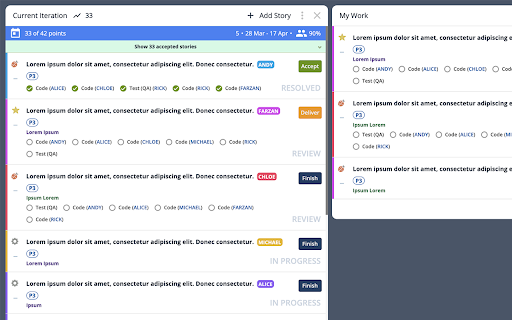
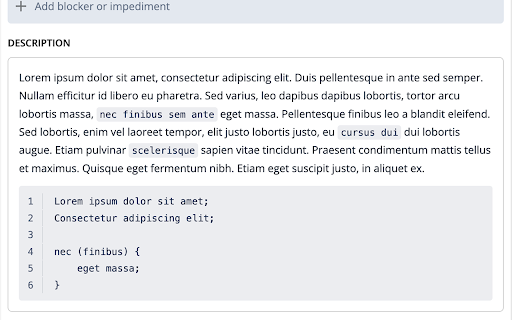
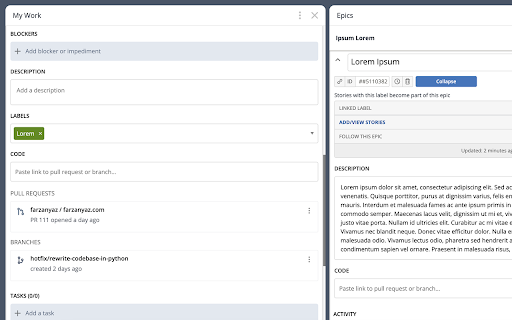
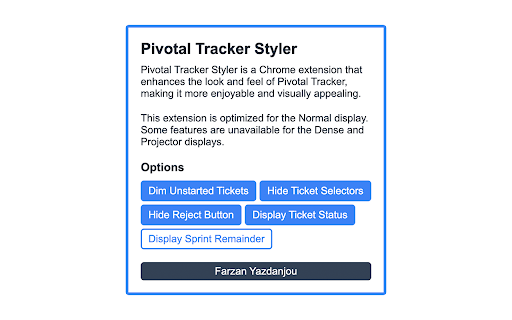
Pivotal Tracker Styler enhances the look and feel of Pivotal Tracker, making it more enjoyable and visually appealing. Pivotal Tracker Styler is a user-friendly Chrome extension designed to transform the appearance of Pivotal Tracker, making it more visually appealing and enjoyable to use. Recognizing that a well-designed dashboard can positively impact productivity and overall user experience, this extension offers an array of customizable features that allow users to tailor the look of their Pivotal Tracker projects (and workspaces). - Enhanced background and text colors for better text readability - Color-coded ticket-owner labels for easy identification - Expanded ticket details and comments section - Better inline code and code block styling with line numbers - Streamlined ticket actions for efficiency - Optional SCRUM ticket status displayed as gray text (excluding unstarted tickets) - Optional removal of REJECT button from ticket preview - still available in the expanded view - Optional removal of ticket selector button for a cleaner interface (re-activatable during ticket organization) - Optional feature to gray out unstarted tickets, promoting the completion of in-progress tasks - Optional feature to discretely display how many days remain until the end of each sprint By installing Pivotal Tracker Styler, users can elevate their project management experience and increase their efficiency while working with Pivotal Tracker. Say goodbye to the monotonous interface and embrace a visually appealing, customized environment that boosts your spirits and improves your workflow.

GoldDust
Ask a question about a company or a person. If the answer is on the internet - our AI agent will locate, synthesize, and display it. Welcome to GoldDust, the Chrome extension that automates the tedious and repetitive research you need to effectively qualify leads, prioritize opportunities, and customize outbound messaging. ⭐ Seamless Integration: Whether you're scrolling through LinkedIn, checking out a company’s website, checking latest news or deep in your CRM, GoldDust is there to enrich your experience without the hassle of switching tabs or tools. ⭐ Rich Info, On Demand: You've got a treasure trove of information, when and where you need it. It’s like magic, but for work. ⭐ Custom Insights: You’re getting the good stuff – customized insights that matter to you. Say goodbye to info overload and hello to insights that make a difference

DIG This Deal
Finding you the best price for the product you're purchasing. Are you tired of switching between multiple tabs to find the best price? Look no further! DIG This Deal – Your Ultimate Price Comparison Tool helps you save time and money by bringing the best deals directly to your browser. Key Features: Seamless Price Comparisons: Compare prices on new and pre-loved products from multiple online retailers in real time. Cashback Rewards: Earn cashback on eligible purchases when shopping through partnered retailers. Terms and conditions apply. Enhanced Shopping Experience: Save time by viewing all available deals and prices in one place without the hassle of manual searches. Support for Pre-Loved Items: Discover refurbished and second-hand options to save even more and shop sustainably. Personalized Recommendations: Receive tailored suggestions based on your browsing and shopping habits. Real-Time Updates: Stay informed with the latest deals, discounts, and price drops across your favorite online stores. Install the DIG This Deal Extension: Add the extension to your browser for a seamless price-checking experience. Browse Your Favorite Retailers: Shop as usual, and the extension will automatically display price comparisons and cashback opportunities. Earn Rewards: Qualify for cashback by completing purchases through our partnered retailers. Access prices for both brand-new and pre-loved products. Join a growing community of savvy shoppers who prioritize smart and sustainable shopping. Download DIG This Deal now and start saving today!

Left Unread
Show only unread conversations on Facebook, Messenger and Twitter Do you find yourself overwhelmed with countless messages and struggling to stay on top of all your unread conversations? Do you wish you could easily find your unread conversations in your inbox? Are you missing on opportunities because a conversation slipped at the bottom of your inbox? If so, then here's the good news: Left Unread is a free Chrome extension that filters your inbox and displays only the conversations that haven't been read, putting them at the top of your inbox. You no longer have to worry about missing out on important messages. As someone who relies on daily Facebook, Messenger, or Twitter conversations to engage with prospects or subscribers that enjoy freebies, you know how overwhelming inbound messages can be. With Left Unread, you'll quickly and effortlessly catch up on important messages without the distractions of old or irrelevant conversations. It's the perfect time-saving extension for entrepreneurs, founders, creators or even sales representatives who rely on DM conversations. With just one click, Left Unread can transform your relationship with inbound messages, giving you a sense of relief knowing that you can easily find unread conversations. Whether you chat with your prospects using DMs or subscribe to lots of freebies, it'll transform your relationship with inbound messages and keep you on top of your inbox. Try Left Unread today and take control of your inbox. It's free and requires no payment.

Open in GPT
Open selected text directly in ChatGPT with a customized prompt. This extension enables you to quickly open selected text in ChatGPT by right-clicking. Customize ChatGPT's behavior by setting a pre-filled prompt to provide contextual information. This ensures ChatGPT behaves like you want it to behave and enables you to make it solve repetitive tasks for you -- Automate the automation 🚀 • Answer questions in a specific manner (e.g. only ever answer with A, B, C, or D) • Give general context for tasks like summarizing a paragraph • Resolve code errors • Get language assistance • Translate text • Generate content in specific ways • Anything that you find yourself always copying into ChatGPT manually ... Click the extension icon to configure your custom prompt. Select text and right-click, then choose "Open selection in ChatGPT!" (Alternatively, press ALT + S). If you're working with other programs, use ALT + C to populate the prompt from your clipboard instead of selecting text. If there is a new version of ChatGPT and this plugin doesn't work with it please send me an email and I will also release an update :) Last Fix: 06.10.2024
