
mcapkakeigpnehoebmbghpchjokbphmg
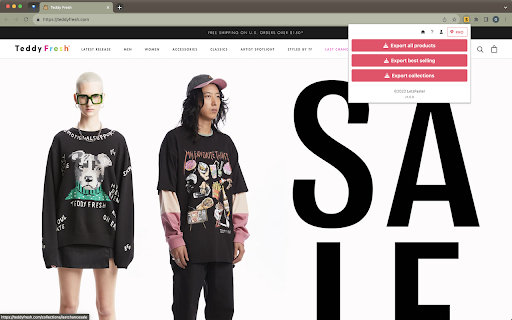
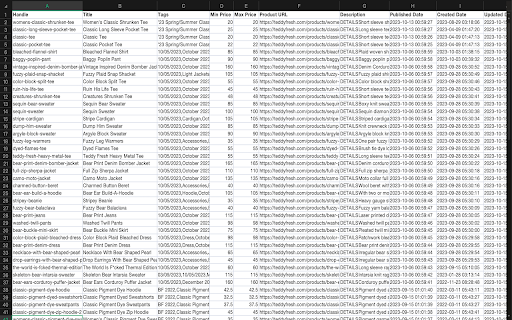
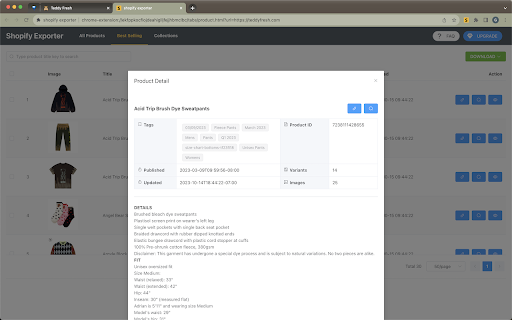
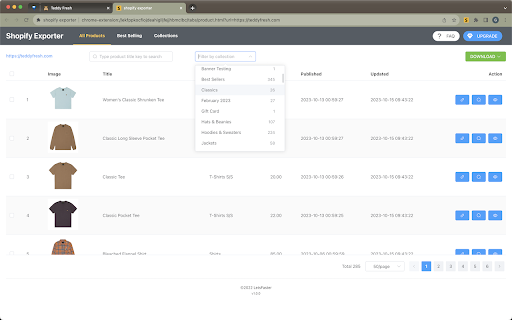
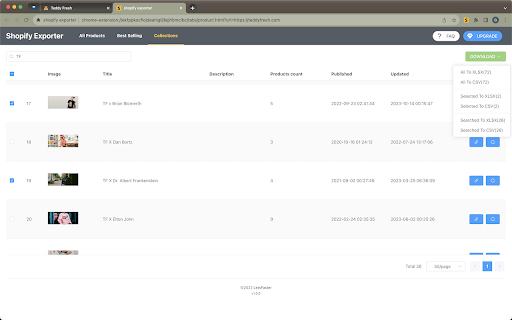
Extracting product、bestselling、collection listings from Shopify stores to CSV/Excel with one click. 🚀 Effortlessly Export Shopify Products with Shopify Exporter! 📦 Simplify your Shopify product management with Shopify Exporter! Export all product details in a single click and streamline your workflow. 🔥 Key Features: 1️⃣ Comprehensive Export: Export titles, categories, tags, descriptions, release dates, price ranges, and 49 other data fields with ease. 2️⃣ Top-Performing Product Analysis: Identify your best-selling products and optimize your strategy for increased sales. 3️⃣ Flexible Data Formats: Export product information as CSV or Excel files for seamless integration with other platforms. 4️⃣ Category-based Export: Analyze and compare products based on categories effortlessly. 🆓 Enjoy a free trial to fully experience the power of Shopify Exporter! Test its compatibility and usefulness for your specific needs. 🎯 Targeted Users: Shopify store owners, data analysts, and competitor researchers alike. 💡 Benefit from our dedicated support team! We're here to assist you at every step and provide prompt, knowledgeable help. 💻 Experience a user-friendly interface that automatically detects your Shopify store. Search for products on AliExpress, jump to product detail pages, and customize data exports effortlessly. The exported data fields align perfectly with Shopify store formats, enabling seamless importing and rapid product listing. 💪 Take control of your Shopify store's data management and make informed decisions with Shopify Exporter today!

TikTok Follower Export Tool
Easily export TikTok followers/following to CSV with one click. 💡 Features ✓ Export followers from TikTok. ✓ Export the following list from TikTok. ✓ Supports CSV format. ✓ Extract user profiles, including: user_id, username, nickname, follower_count, following_count, like_count, video_count, digg_count, friend_count, private_account, secret, ttSeller, verified, biography, avatar_url, and profile_url. ⚙️ Get Started 1. Enter the TikTok user profile link. 2. Select export type: FOLLOWERS or FOLLOWING. 3. Click the 'EXPORT' button. 🔒 Data Privacy Your data privacy is paramount. All data processing occurs on your local machine; it never transits through our servers, ensuring no one else has access to your collected data. ⚠️ Disclaimer TIKTOK is a trademark of TikTok Ltd. TikTok Follower Export Tool is an independent tool and is not affiliated with, endorsed, sponsored, or otherwise connected to TikTok Ltd., ByteDance Ltd., or any of their affiliates or subsidiaries.

Shopify Scraper & Parser - Shopify Spy
Shopify Spy extract product listing from Shopify stores to CSV and Excel Shopify Spy scrapes products from Shopify powered stores and saves as an Excel document or CSV file. 2024 Q2 changes: - Highly requested feature: Downloading images. - Slow mode: Extract more fields but slower: Variant Barcode, Image Alt Text, Variant Tax Code, Variant Weight Unit - Old "Excel" format has been renamed to "Excel (Legacy)" and will be removed in further releases - Option to manually specify a collection handle if the list of collections is too large. - Enhanced error handling with clearer explanations 2024 Q1 changes: - Resolved "Out of memory" error for large stores; now, CSV/Excel files are automatically split for efficient data handling. - Improved status messages for enhanced clarity and precision. 2023 Q3-Q4 changes: - Undock popup: you can use browser while the scraping is in progress and even scrape several store simultaneously - Renewed login flow Shopify Spy features: ✓ Can extract thousands of products within minutes ✓ Filter by a specific collection ✓ All fields from Shopify product listing are included (see below) ✓ All product images are added to the CSV ✓ Download images along with CSV ✓ Export to CSV format compatible with Shopify import format (https://help.shopify.com/en/manual/products/import-export/import-products) ✓ Save as XLSX (Excel document) with proper data types - dates, prices ✓ Does not require excessive permissions For e-commerce store owners, Shopify Spy allows you to keep track of your competitors' products, pricing, and promotions. With this tool, you can quickly and easily extract thousands of products from Shopify-powered stores and filter them by specific collections. For digital marketers, Shopify Spy provides accurate and reliable product data to help you analyze market trends and identify potential opportunities for your clients. For product researchers, Shopify Spy makes it easy to gather data on a large number of products quickly and efficiently. This means you can identify trends and insights in your field of research with ease. For dropshippers, Shopify Spy is an essential tool for finding new products to add to your store, and monitor pricing and product availability for your existing products. For data analysts, Shopify Spy's ability to extract product data from Shopify stores and save it in a CSV or Excel format makes it an attractive tool for processing large amounts of data quickly and efficiently. So, whether you're an e-commerce store owner, digital marketer, product researcher, dropshipper, or data analyst, Shopify Spy has everything you need to stay on top of the latest product trends and insights. Try it out today and take your business to the next level! Supported Fields: - Handle: The unique identifier for the product. - Title: The name of the product. - Body (HTML): The HTML description of the product. - Vendor: The name of the product's vendor. - Product Type: The category or type of the product. - Tags: Keywords associated with the product. - Published: Indicates whether the product is published or unpublished. Variants: - Variant SKU: The stock keeping unit for the variant. - Variant Grams: The weight of the variant in grams. - Variant Price: The price of the variant. - Variant Compare At Price: The original price of the variant, used for comparison. - Variant Inventory Qty: Inventory quantity, where 0 indicates out of stock and 1 indicates in stock. Slow Mode Additional Fields for Variants: - Variant Barcode: The barcode for the variant. - Variant Tax Code: The tax code associated with the variant. - Variant Weight Unit: The unit of weight measurement for the variant. Images: - Image Src: The source URL of the image. Slow Mode Additional Fields for Images: - Image Alt Text: The alternative text for the image.

Linkedin Sales Navigator Email Finder & Lead Scraper – Scrupp
The application extracts, cleans & enriches data by emails in one click to CSV/XLSX. Scrupp is a LinkedIn lead generation tool that helps you find leads, reveal business emails, scrape Sales Navigator and LinkedIn search results, and export clean prospect lists for outreach. Built for sales teams, recruiters, agencies, and founders, Scrupp combines LinkedIn scraping, email finding, lead enrichment, and list export in one workflow. You can extract leads from LinkedIn Sales Navigator, LinkedIn search, posts, jobs, and Apollo, then enrich them with company data and export everything to CSV or XLSX. Scrupp helps you: Scrape leads from LinkedIn Sales Navigator Extract people from LinkedIn search results Find business emails from LinkedIn profiles Collect leads from LinkedIn posts and jobs Import and extract leads from Apollo Enrich contacts with company data Export lead lists to CSV or XLSX Core features LinkedIn Sales Navigator Scraper Extract leads from Sales Navigator searches in bulk and build prospect lists faster. LinkedIn Search Scraper Scrape LinkedIn search results and collect people without manual copy-paste. LinkedIn Email Finder Find verified business emails for leads discovered on LinkedIn. LinkedIn Post and Job Scraper Extract leads from LinkedIn posts, commenters, likers, and job-based workflows. Apollo Lead Extractor Pull leads from Apollo and bring them into the same prospecting workflow. Lead Enrichment and Export Enrich contacts with company data and export clean lead lists for CRM and outreach tools. Why teams use Scrupp Build lead lists faster Reduce manual prospect research Find business emails from LinkedIn Keep prospecting and export in one workflow Prepare outreach-ready data for CRM, cold email, and recruiting workflows Use cases B2B lead generation Sales prospecting Cold outreach Recruiting and talent sourcing Agency list building CRM enrichment Market research Scrupp helps you turn LinkedIn, Sales Navigator, and Apollo into a faster lead generation workflow.

Zillow Data Exporter
Instantly export Zillow property listings into clean CSV or Excel (XLSX) files, right from your browser. Zillow Data Exporter is the ultimate tool for real estate professionals, investors, and data analysts. Capture detailed property data from Zillow in a single click, saving you hours of manual work. You can easily export four types of listings: - Properties For Sale - Properties For Rent - Sold Properties - Your Saved/Favorite Properties A free Property Data Labs account is required to use the extension. Signing up is quick, free, and no credit card is needed. Get started at https://www.propertydatalabs.com. ❓ What do I get with the Free plan? Our free plan is designed to be generous and genuinely useful. It includes: - 50 exports per month. - Up to 40 listings per export, totalling 2,000 listings monthly. - Data saved in CSV format. Note: On the free plan, you export one page of results at a time. Our paid plans unlock powerful automation and data features designed for serious professionals. Basic Plan - Supercharge Your Exports: - 300 exports per month - Multi-Page Exports: Capture up to 800 listings across many pages in a single click. - Custom Columns: Choose exactly what data you want to export. - Time Filters: Automatically avoid exporting duplicate listings you've already seen. - Rich Data: Export over 35 data points per listing and all image URLs. - Building Units: Export all sub-listings for rent (e.g., all units in an apartment building). Pro Plan - The Ultimate Data Toolkit: - Includes all Basic plan features. - Unlimited Exports: No monthly limits. - Google Sheets Integration: Automatically send your exported data directly to Google Sheets. - Cloud Features: Save your export history and use our Cloud Importer and Monitor tools. - Custom Templates: Create and save export settings for different projects. - Parquet File Exports: For advanced data analysis workflows. Yes. Your privacy is a priority. All data is processed and stored locally in your browser. We do not have access to your exported files. If you uninstall the extension, your data is automatically deleted. We'd love to hear from you! For help, bug reports, or suggestions, please email us at support@propertydatalabs.com or use the contact form on our website. If you find the extension useful, please consider leaving a five-star rating. It helps us immensely! Zillow Data Exporter is an independent tool developed by Property Data Labs and is not affiliated with, endorsed by, or in any way officially connected with Zillow, Inc. For more information, please visit our disclaimer page at https://www.propertydatalabs.com/legal/disclaimer.
