
mbmlkjlaognpikjodedmallbdngnpbbn
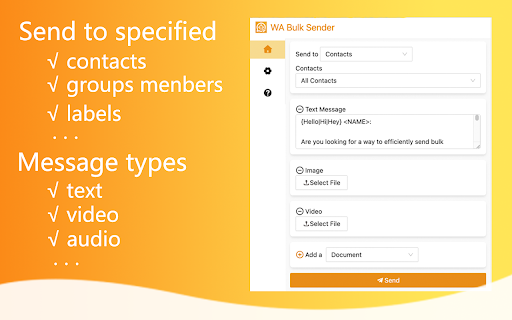
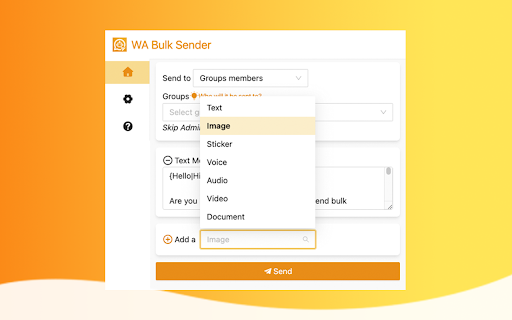
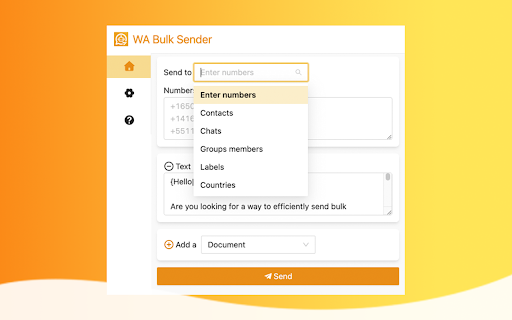
Boost your WhatsApp marketing efforts with WA Bulk Sender, the efficient and powerful tool for sending bulk messages. The ultimate Chrome extension for automating your WhatsApp communication! With this powerful tool, you can easily send customized messages to your customers, contacts, and leads without the hassle of manually saving numbers. Whether you're looking to expand your business, streamline your outreach, or simply stay in touch with friends and family, WA Bulk Sender is the perfect solution. Why WA Bulk Sender is the best choice: 🔹 Easy to use: Simply install the extension, log in to WA Web, and start communicating. 🔹 Powerful automation: Save time and effort by automating your communication and outreach. 🔹 No number saving required: Communicate with anyone without having to save their contact information first. 🔹 Personalized communication: Use placeholders and syntax templates to create custom messages for each recipient. 🔹 Compatible with all message types: Send text, images, voice notes, videos, audio, and document files. Features: ✅ Automated mass sending: Send customized messages to multiple recipients at once with just a few clicks. ✅ Content personalization: Use placeholders and syntax templates to create personalized communication for each recipient. ✅ Message types: Send text, images, voice notes, videos, audio, and document files. ✅ View once image and video: Send media that can only be viewed once. To avoid account bans and ensure the best possible performance, we recommend following these guidelines: 🔸 Wait at least 15 days after registering your account before using the extension. 🔸 Use a mobile phone and website IP address in the same area. 🔸 Avoid switching IP addresses frequently. 🔸 Limit communication to 50 on the first day and 300 on subsequent days. 🔸 Kindly do not use for SPAMMING which is WA™ strictly prohibited. Try WA Bulk Sender today and experience the ultimate WA communication automation tool! # Home Page https://wa-bulk-sender.watool.online/ We hope you enjoy using our extension! If you have any questions or feedback, please don't hesitate to contact us. (Email: hello@watool.online) #Legal WhatsApp is a trademark of WhatsApp LLC. This extension is an unofficial enhacement for WhatsApp™ Web and is not related in any way to WhatsApp LLC.

Contact Extractor for wa
Enhance WhatsApp contact management with WA Contacts Extractor. Easy contact extraction, versatile export formats. Transform your WhatsApp contact extraction experience with the Contacts Extractor for wa browser extension is a sophisticated tool that simplifies the process of extracting and handling your WA contacts. Contacts Extractor for wa is a highly efficient browser extension that is designed to extract your WA contacts and group contacts effortlessly. This user-friendly tool offers the added convenience of exporting your contacts in CSV, JSON, or Excel (XLSX) formats, making it an excellent choice for downloading WhatsApp contacts. WhatsApp Contacts Extractor is specifically designed to make the extraction and export of your WA contacts and group contacts a cinch. Simply choose the contacts or groups you want to export, and with a click of the button "Export Contacts", your contacts list is ready for download. Once you've extracted your desired contacts, the extension allows you to download your contact list in several formats including CSV, JSON, and XLSX(Excel) format. This versatility enables you to use your lists in a variety of applications or for various purposes, depending entirely on your needs. The exported contacts list provides you with essential details about each contact including Display Name, Public Name, Formatted Name, Phone, Formatted Phone, Country Code, Country Name, whether the contact belongs to you or it is blocked or a business contact, Labels, Last Message, Last Message Date, Last Message Status, Last Message From Me, and when it was scraped. This wealth of information makes the extension an invaluable tool for managing your contacts effectively. How to Use Contacts Extractor for wa. 1. Launch https://web.whatsapp.com/ You’ll find the export button above the chat window on the left. Click this button to open a dialog box where you can select the contacts or groups you want to export. 2. Click "Export Contacts" to begin the extraction of your WhatsApp contacts list. 3. Click the "Download Items" button to save your contacts as a local file, available in your chosen format. Data Privacy Your data stays on your device and is not stored or transmitted to our servers. We prioritize keeping your information secure and confidential. In-App Purchases Our Extension is a freemium product with a nominal subscription fee. With a paid subscription, you can export up to 5000 contacts at a time and receive premium support. The exact cost is displayed in the extension's interface, ensuring transparency and ease of understanding. Disclaimer This extension is an independently developed product by ExtensionsBox and has no association with WhatsApp LLC.

WA Filter & Number Checker: Check & Verify WhatsApp Numbers
A premium WA Filter to verify, check, and filter WhatsApp numbers for efficient marketing campaigns. WA Filter & Number Checker is the ultimate tool to verify WhatsApp numbers in bulk with speed and accuracy! Whether you're looking for a powerful WhatsApp number checker, a reliable contact cleaner, or a fast validator for your CRM campaigns- WA Filter is your go-to extension. Master WhatsApp number filtering and improve campaign accuracy with the best WhatsApp verifier in the market. ⚙️ Core Features of WA Filter: ✅ Bulk WhatsApp Number Verifier ● Paste numbers directly or import via Excel/CSV to instantly verify which are active on WhatsApp ● Avoid failed campaigns and clean up outdated data ✅ Auto Number Generator ● Generate WhatsApp numbers with international country codes ● Ideal for outreach in new regions and building fresh lists ✅ Downloadable Reports (Last 5) ● Automatically stores last 5 filter sessions ● Export your results and integrate into any CRM or outreach platform ✅ CSV Import + Sample File ● Quickly upload bulk contacts with our sample CSV template ● Designed for teams that work with high-volume lead lists ✅ One-Click Filter + Copy Output ● Click “Start Filter” and copy filtered results instantly ● Fast and responsive, built for daily professional use ✅ Built-in Tutorial Video ● Step-by-step video included right inside the extension ● Get started within minutes- no learning curve required 💡 Why Choose WA Filter? ✔️ Instantly verify 1000+ WhatsApp™ numbers ✔️ Clean, intuitive interface- no login needed ✔️ Full on-browser operation- your data stays 100% private ✔️ Ideal for marketing, sales, and CRM data validation ✔️ Lightweight Chrome extension- no software installation ✔️ 24×7 customer support via WhatsApp, email, or call WA Filter is perfect for anyone who wants a smart, fast, and reliable solution to filter WhatsApp contacts and boost campaign accuracy. Stop wasting resources on inactive contacts- filter smarter and market better! 🧰 Use Cases ✅ Marketing Agencies – Clean and verify WhatsApp leads for campaigns ✅ Recruiters – Validate candidate phone numbers before outreach ✅ Sales Teams – Pre-check contacts for pipeline integrations ✅ CRM Managers – Improve database health by filtering inactive entries ✅ Growth Hackers – Create and test country-based number pools 🛠️ How to Install WA Filter Step 1: Go to https://www.wa-filter.com/ Step 2: Click “Add to Chrome” and pin the extension for quick access Step 3: Paste your WhatsApp numbers or upload a CSV file Step 4: Use “Start Filter” and watch the tool verify each number Step 5: Download results or copy them for WhatsApp campaigns 🔐 Privacy Policy All filtering is performed locally in your browser. No data is uploaded, stored, or tracked externally. Your data = your control. ⚠️ Disclaimer: This extension is not endorsed by WhatsApp™ or Meta™. It is an independent tool built to help users verify WhatsApp contacts in line with WhatsApp™ policies. ————————————— LEGAL ————————————— WhatsApp™ is a trademark of WhatsApp Inc., registered in the U.S. and other countries. WA Filter is not affiliated with WhatsApp™ or Meta™.

WA WorkFlow
Enhance your WhatsApp experience by incorporating additional tools for WhatsApp Web that prioritize security and reliability. WA WorkFlow Enhance your WhatsApp experience by incorporating additional tools and options for WhatsApp Web that prioritize security and reliability. Brings all the missing features to WhatsApp Web, for personal and business use. Note: WhatsApp is a trademark of WhatsApp Inc., registered in the U.S. and other countries. This extension is an independent product developed by WA WorkFlow and has no relationship to WhatsApp, WhatsApp Inc, or Facebook Inc. It is not an official WhatsApp or Facebook product.

WA Audio & Voice Message to Text | WASBB.COM
Convert all WhatsApp voice messages into text with ease – automatic or one-click transcription. Audio to Text for WhatsApp Web 🎙️➡️📝 Convert WhatsApp voice messages into text with this extension! Whether you're in a meeting, on the go, or in a quiet place, this tool ensures you can read voice messages without playing them aloud. 🔑 Features - 🎙️ Automatic Transcription: Instantly converts voice messages to text as they arrive, saving time and effort. - ✔️ Manual Transcription Option: Gives you full control to transcribe specific messages with a simple click. - 🌐 Multilingual Support: Handles multiple languages seamlessly, making it ideal for international and multilingual conversations. - 🗂️ Organized and Searchable: Save transcribed messages as text for easy search and future reference. - 🔍 Accurate and Reliable: Advanced transcription technology ensures clear and precise results every time. - 🚀 Lightweight and Fast: Runs smoothly within WhatsApp Web without slowing down your browser. - 🔗 Seamless Integration: Works natively within WhatsApp Web, no need to switch between tools or tabs. - 🔒 Secure and Private: Keeps your transcriptions local to your browser, ensuring data privacy. 👥 Who Can Benefit: - 👩💻 Professionals: Stay focused at work by silently reviewing voice messages without interrupting tasks. - 📚 Students: Convert voice notes into text for effortless studying and quick referencing. - 🚇 Commuters: Keep up with conversations in noisy environments or while on the move. - 🧏 Accessibility: Ensure WhatsApp communication is inclusive and accessible to everyone. - 👨👩👧👦 Parents: Easily transcribe voice messages from family chats to stay updated without playing audio. - 💼 Freelancers: Organize and save client voice messages as searchable text for better project management. - 🌐 Language Learners: Transcribe and translate messages to improve language skills and understanding. - 🛠️ Tech Enthusiasts: Simplify voice-to-text tasks directly within WhatsApp Web for added convenience. - 🕵️ Researchers: Archive and analyze voice messages for academic or professional purposes. - 🤝 Remote Workers: Quickly read messages during virtual meetings or shared workspaces without disturbing others. 📚 Use Cases: - 📢 Busy or Noisy Spaces: Transcribe voice messages when it’s too loud to listen clearly. - 🤫 Quiet Environments: Read voice messages silently in libraries, meetings, or other quiet places. - 🗂️ Save Important Info: Archive transcribed voice messages for quick access and organization. - 🌍 Language Learners: Transcribe and translate voice messages to practice and enhance language skills. - 🕒 Time-Saving Chats: Quickly scan long voice messages without needing to listen to them entirely. - 🎓 Study Sessions: Turn WhatsApp voice notes into text for better note-taking and study materials. - 🚌 Commuting Scenarios: Manage voice messages discreetly during your daily commute. - 👨👩👧👦 Family Chats: Convert long family voice notes into text to keep track of important updates. - 💼 Client Communication: Save and organize voice messages from clients for easy referencing during projects. - 📋 Task Management: Convert voice reminders into actionable text for better task tracking. - 🔍 Quick Reviews: Skim through multiple voice messages faster by reading the transcriptions. Upgrade your WhatsApp Web experience today! 🚀 Install Audio to Text for WhatsApp Web and never miss a word from your voice messages again. 💬✨ This is an independent tool with no official association with WhatsApp LLC.
