
mbfdhkodejajhcnoljjgkdbdmacahcoc
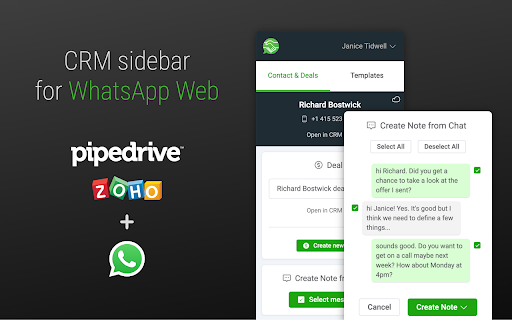


Connect your CRM to use template messages, manage contacts, deals, and activities. Pipechat is a Chrome extension that adds a CRM sidebar to WhatsApp Web to connect your Pipedrive or Zoho account. With Pipechat, you can quickly add the most important messages as notes to your deals, add your WhatsApp contacts to your CRM with one click and create new deals as you chat. You can also schedule your next WhatsApp chats and use template messages in your conversations. Simply install the extension and open WhatsApp Web to start using the Pipechat's sidebar.

Surfe
Bring your CRM to where your sales are. Access and edit your CRM from anywhere, move with ease, and build better relationships. Surfe is the intelligent sales solution that helps you find and enrich accurate B2B data of companies and contacts that match your ICP. Built for sales teams who use business social platforms to drive pipeline, Surfe eliminates manual tasks and equips you with everything you need to find the right people, enrich contact and company data, and sync it directly with your CRM. Compatible with CRMs like Salesforce, HubSpot, Pipedrive, Copper, and Google Sheets and sales enablement tools like Lemlist, Salesloft, and Outreach. Find your best-fit leads instantly Use advanced search filters to discover people and companies that match your ideal customer profile. Refine by job title, seniority, location, industry, revenue, company size, tech stack, and more. Add contacts to your CRM in one click No more copy-pasting and manual data entry. Add contacts directly into your CRM. Surfe auto-maps fields and keeps everything clean and organized so you avoid CRM duplicates. Enrich with verified emails and phone numbers Surfe’s Waterfall Enrichment checks 15+ data sources in real-time, giving you verified contact info, company data, and insights with industry leading find rates. Get real-time buying signals Be the first to know when prospects change jobs, companies raise funding, your target accounts start hiring, or other intent signals emerge. Surfe surfaces these insights automatically so you can engage with the right message at the right time. GDPR compliant and ISO27001 certified Surfe is built for modern sales teams that care about data privacy, accuracy, and compliance. Trusted by 40,000+ users including global revenue teams at Google, AWS, and more. Surfe was named in VivaTech’s Top 100 Rising European Startups and is one of the Top 100 Fastest Growing Products on G2.

WhatsApp AI Agents With CRM Integration | Eazybe
WhatsApp AI agents with CRM integration (HubSpot, Zoho, Salesforce, Sheets), scheduling, privacy blur, and more. WhatsApp AI agent with CRM integration (HubSpot, Zoho, Salesforce, Sheets), scheduling, privacy blur and more. Eazybe is a powerful WhtasApp Chrome extension that enables WhatsApp AI Agent with CRM integrations, helping you automate sales, support, and operations directly from WhatsApp Web. If you want a human-like AI + deep CRM automation in one tool, Eazybe dominates. We support deep integrations including: Manage all your customer conversations and CRM workflows without switching tabs. ------------------------------- 🤖 AI AGENTS ON WHATSAPP ------------------------------- AI Customer Support Agent: Answers customer questions instantly 24/7 using your CRM data via HubSpot WhatsApp integration, Zoho WhatsApp integration, and Freshdesk WhatsApp integration to provide accurate, brand-aligned help. AI Sales Agent: Identify and close deals faster with insights synced across Salesforce WhatsApp integration, Pipedrive WhatsApp integration, and Monday WhatsApp integration. AI RevOps Agent: Maintain clean pipelines with automated syncing using: - Google Sheets integration - Webhooks WhatsApp integration - CRM integrations like Salesforce and Zoho AI Lead Qualification Agent: Automatically qualifies high-intent prospects and rejects non-leads 24/7 to ensure only ready-to-buy opportunities hit your CRM like; HubSpot, Zoho, LeadSquared, Bitrix24. Efficiency Power-Up: Our WhatsApp AI agents work 4x faster 24/7 to clear backlogs and repetitive tasks in any language, syncing your CRM data instantly with no mistakes and no extra hiring needed. ------------------------------------ ⚡ CRM & PRODUCTIVITY FEATURES ------------------------------------ WhatsApp CRM Integration: Eazybe offers the best WhatsApp CRM integration tool to automatically backup your WhatsApp chats and update deal stages directly in your CRM. AI Sync & Backup: Never lose a lead. AI auto-syncs WhatsApp chats to the correct contact in your CRM, ensuring your data is always up-to-date. Trigger workflows using Webhooks WhatsApp integration. AI Task Management: AI helps you create tasks inside HubSpot, Zoho, Salesforce directly from WhatsApp. It even suggests tasks based on your conversation so you never forget a follow-up. AI Team Accountability: Use a shared team inbox where AI tracks ownership and helps assign conversations to the right person, keeping the whole team aligned. Smart Advanced Tools: Use AI-powered templates and automated reminders to keep the conversation moving while staying 100% compliant with Meta's policies. -------------------------------- 💁 Google Workspace Integrations: -------------------------------- - Google Sheets WhatsApp integration for automatic data logging. - Google Calendar WhatsApp integration for scheduling & reminders. -------------------------- 🔒 Privacy and Compliance -------------------------- End-to-End Encryption: Your data stays secure on your device. Meta Compliant: Built to work safely with WhatsApp Business requirements. Quality Focused: Designed for professional CRM-focused teams, not spam. ----------------------- 📈 Benefits at a Glance ----------------------- Handle More Work: Manage a 200-ticket backlog easily with AI doing the heavy lifting. Scale Without Hiring: Grow your business and handle more customers without adding to your payroll. Zero Mistakes: AI ensures every lead is logged and every task is scheduled perfectly. -------------- 📞 Get Started -------------- Email Us: hey@eazybe.com Disclaimer: WhatsApp™ is a trademark of WhatsApp LLC. This extension is an independent tool developed by Eazybe and is not affiliated with, endorsed by, or sponsored by WhatsApp LLC or Meta Platforms, Inc. This extension enhances the functionality of WhatsApp Web for productivity and CRM use cases and does not modify, store, or transmit WhatsApp user data outside the user's browser.

AppCursor - All App Widgets inside CRM, Desk
Ulgebra - AppCursor - Any App Widgets for CRM, Desk. Integrates third-party apps directly inside your CRM platform Access all the authorized apps of Ulgebra in just a click. Visit the Ulgebra App Marketplace, through the link below, to install and authorize the desired applications. Post installation, use the Ulgebra icon available in all locations within your CRM/Desk to sign in and utilize the features of all the authorized extensions as given below. Initiate conversation with any contact through any of the authorized applications. Click on the Ulgebra floating icon, available on the contact page, to view the list of authorized applications and select the application to send the message from. Access the Ulgebra icon from anywhere within your platform to get in touch with all required contacts at any moment. View all authorized apps using the Ulgebra icon. Include the desired contacts using the 'Add Recipients' option. Here you can add the required contact numbers, search of a specific contact or select a CRM/Desk filter to include the contacts pertaining to the filter as recipients. Enable workflows to send automated messages based on your requirements. Select any app, enter the message and click on 'Get Workflow Code'. You can now derive the code required to send automated messages for the given details. Create a workflow using the code received as per the steps given within the Workflows section under your profile. Use existing message templates to send messages as and when required in just a few clicks. Under 'Insert Template' you can view the list of message templates. Click on 'Add New Template' to create a new template. Enter the name and content of the template. Include placeholders and emojis to customize your templates. Allow users to receive desktop notifications for your incoming messages. Under your profile within the application interface, select 'Message Notifications'. Here you can enter the email id of the required user who must have an Ulgebra account and click on 'Add user'. Share the link receive with the respective user. The user must now access the link to enable desktop notifications. Click on the notification received to view the message within the respective contact. Use the 'Manage App Users' option to view the list of CRM/Desk users within the organization. This feature allows the added users to use the account of the respective messaging platform authorized by the admin. The admin can add and remove the desired users. View the incoming messages within the respective contact. Select the incoming settings based on your requirements to sync the incoming messages and create new contacts if required. Access the calendar extension to view the past and upcoming bookings associated. Select any appointment to go through the details of the appointment and reschedule or cancel any upcoming event. View all your booking links and derive single-use links to be shared with contacts to schedule an appointment. Enable users to utilize the authorized account of the scheduling platform using the 'Manage App Users' option. The CRM/Desk admin can add and remove users based on their requirements. Map the respective CRM/Desk users with the respective agent within the calendar to sync their specific incoming appointments. Determine the fields to be mapped for required events which would provide further clarity regarding appointments booked by contacts. Disclaimer: This Chrome plugin is not endorsed by any of the services in this app. This is an unofficial enhancement tool. Our Extension Privacy policy: https://ulgebra.com/privacy-policy

Whats Link
Adiciona um botão "Abrir no whatsapp" nas opções do botão direito Os termos citados nas descrições como "whatsapp" são apenas indicações do que poderá acontecer, e de algumas configurações, sem nenhuma ligação com a empresa WhatsApp LLC. V1.0.0: * Adiciona opção de selecionar entre api.whatsapp.com e web.whatsapp.com para abrir a conversa. * Adiciona função de ao tentar abrir a conversa sem ter a opção selecionada um modal para seleção aparece na tela. * Atualiza o manifesto para a versão 3. Adiciona uma opção para abrir o telefone selecionado diretamente no whatsapp
