
maegpdgafnnbhhdfomdkalpkekfnjolj

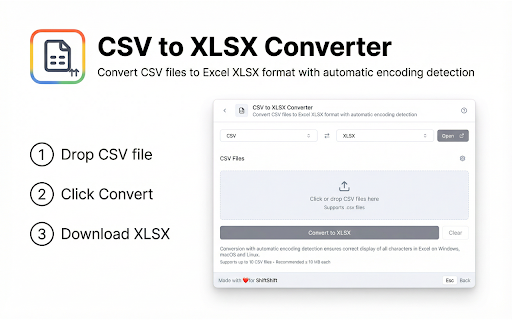
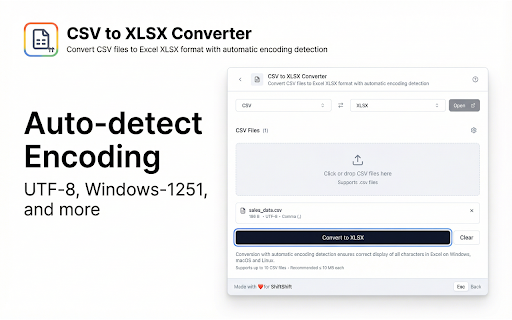


Convert CSV files to Excel XLSX format with automatic encoding detection Convert CSV files to Excel XLSX format instantly with this powerful CSV to XLSX converter Chrome extension. This tool helps you transform comma separated value files into professional Excel spreadsheets with automatic encoding detection, delimiter recognition, and proper formatting that preserves all your data accurately. Do you struggle with CSV files that display incorrectly in Excel due to encoding issues? Are you tired of manually configuring delimiters and character sets for each file? This CSV to XLSX converter solves these problems by automatically detecting file encoding and delimiters, ensuring your data converts perfectly every time. Key benefits of this CSV converter extension: 1️⃣ Convert multiple CSV files to XLSX format simultaneously 2️⃣ Automatic encoding detection supports UTF-8, Windows-1251, Windows-1252, and ISO-8859-1 3️⃣ Intelligent delimiter recognition identifies commas, semicolons, tabs, and pipe characters 4️⃣ Preserves all data integrity with proper character encoding handling 5️⃣ Works completely offline in your browser with no data uploads required ➤ Drag and drop CSV files or click to browse and select files ➤ The tool automatically detects encoding and delimiter settings ➤ Click convert to transform your CSV files into XLSX format ➤ Download converted Excel files immediately with one click This CSV to Excel converter handles various file formats and character encodings seamlessly. The automatic detection technology analyzes your files to determine the optimal settings, eliminating guesswork and manual configuration. ▸ Data analysts converting CSV exports from databases and systems into Excel ▸ Business professionals working with CSV reports that need Excel formatting ▸ Researchers processing CSV data files for analysis and visualization ▸ Administrators handling CSV files from different sources and regions ▸ Anyone who needs reliable CSV to XLSX conversion without software installation Common use cases for this convert CSV tool: • Transform database exports into Excel spreadsheets for reporting • Convert CSV files with special characters and international text correctly • Process multiple CSV files at once for batch conversion workflows • Handle CSV files from different systems with varying delimiter formats • Create Excel files from CSV data without losing formatting or characters This XLSX converter provides detailed information about each conversion. See file sizes, row counts, column counts, and detected settings at a glance. Understanding these metrics helps you verify conversion accuracy. Access this tool instantly using the ShiftShift command palette. Three ways to open: 1. Double-tap Shift key quickly from any webpage 2. Press Cmd+Shift+P on Mac or Ctrl+Shift+P on Windows and Linux 3. Click the extension icon in your browser toolbar Navigate the command palette effortlessly with keyboard shortcuts: - Arrow keys Up and Down to move through the list - Enter to select and open items - Esc to go back or close the palette - Type to search across all your installed tools Customize your experience through Settings accessible from the command palette: Does it work offline? Yes, this extension processes files entirely in your browser. No internet connection required after installation. What encodings are supported? This CSV converter supports UTF-8, UTF-8 with BOM, Windows-1251, Windows-1252, and ISO-8859-1 encodings. Automatic detection handles most common file formats used worldwide. How accurate is the conversion? The Excel converter preserves all data exactly as it appears in your CSV files. Character encoding detection ensures special characters and international text display correctly. Privacy and security remain priorities in this CSV file converter. All processing happens locally in your browser with no external servers involved. Your files stay private on your device. No data collection, no tracking, no cloud uploads required. The extension works efficiently with files of various sizes. Small files convert instantly while larger files process smoothly without freezing your browser. Lightweight design ensures minimal impact on browser performance. Install this CSV converter Chrome extension today and transform how you work with CSV files. Stop struggling with encoding issues that corrupt your data. Start converting CSV to Excel instantly with reliable results.

JPG to ICO
Convert JPG images to ICO icon format with multiple sizes for favicons and desktop icons Convert JPG images to ICO icon format instantly with this powerful JPG to ICO converter Chrome extension. This tool helps you create multi-size icon files for favicons, desktop shortcuts, and application icons with customizable size options that work entirely in your browser. Do you need to create favicon files for your website from JPG photos? Are you looking for a way to convert JPG logos or graphics into Windows icon format without installing desktop software? This JPG to ICO converter Chrome extension solves these problems by providing fast, reliable icon creation directly in your browser. Key benefits of this JPG to ICO converter extension: 1️⃣ Convert JPG and JPEG files to ICO format with multiple embedded sizes 2️⃣ Choose from six standard icon sizes: 16x16, 32x32, 48x48, 64x64, 128x128, 256x256 3️⃣ Quick presets for Favicon, Windows, Desktop, and Minimal configurations 4️⃣ Real-time file size comparison showing conversion results 5️⃣ Works completely offline in your browser with no data uploads required ➤ Drag and drop JPG files or click to browse and select images ➤ Choose icon sizes using checkboxes or quick preset buttons ➤ Click convert to create your ICO file with all selected sizes ➤ Download the multi-size ICO file immediately with one click This JPG to ICO converter handles various image scenarios seamlessly. The automatic resizing technology scales your images to each selected size with high-quality interpolation, ensuring crisp icons at every dimension. ▸ Web developers creating favicons for websites and web applications ▸ Software developers packaging icons for Windows applications ▸ Designers preparing icon sets for clients and projects ▸ Content creators building branded desktop shortcuts ▸ Anyone who needs reliable JPG to ICO conversion without software installation Common use cases for this ICO creation tool: • Create multi-size favicon.ico files for websites with all standard sizes • Convert JPG logos into Windows desktop shortcut icons • Generate application icons for Windows software distribution • Build icon files for browser bookmarks and shortcuts • Prepare icons for Windows file associations and system integration This image format converter provides detailed information about each conversion. See original file sizes, converted sizes, dimensions, and all included icon sizes at a glance. Understanding these metrics helps you optimize your icons effectively. The ICO format explained simply: ICO files are container formats that hold multiple image sizes in a single file. When Windows or a browser needs an icon, it selects the most appropriate size from the container. Including multiple sizes ensures your icon looks sharp whether displayed as a tiny favicon or a large desktop icon. Standard icon sizes and their uses: Access this tool instantly using the ShiftShift command palette. Three ways to open: 1. Double-tap Shift key quickly from any webpage 2. Press Cmd+Shift+P on Mac or Ctrl+Shift+P on Windows and Linux 3. Click the extension icon in your browser toolbar Navigate the command palette effortlessly with keyboard shortcuts: - Arrow keys Up and Down to move through the list - Enter to select and open items - Esc to go back or close the palette - Type to search across all your installed tools Customize your experience through Settings accessible from the command palette: Extension Recommendations Feature: The Command Palette can display recommendations for other useful extensions from the ShiftShift ecosystem. These recommendations appear based on your usage patterns and help you discover complementary tools that enhance your productivity. You can dismiss any recommendation if you prefer not to see it. Does it work offline? Yes, this extension processes images entirely in your browser. No internet connection required after installation. What sizes should I choose? For favicons, use the Favicon preset with 16x16, 32x32, and 48x48. For desktop icons, include 256x256 for high-DPI displays. The Windows preset covers all common Windows icon requirements. Will my JPG quality be preserved? Yes, the converter uses high-quality image scaling algorithms. Each size in the ICO file is optimized for clarity at that specific dimension. Privacy and security remain priorities in this JPG to ICO converter Chrome extension. All image processing happens locally in your browser with no external servers involved. Your images stay private on your device. The extension connects to ShiftShift servers only for the extension recommendation feature. No image data collection, no tracking, no cloud uploads required. The extension works efficiently with images of various sizes. Small images convert instantly while larger files process smoothly without freezing your browser. Lightweight design ensures minimal impact on browser performance. Install this JPG to ICO converter Chrome extension today and transform how you create icon files. Stop struggling with complex desktop software for simple icon conversion. Start creating professional multi-size ICO files instantly with reliable results and full control over included sizes.

Twitch Quick Mod
Twitch Quick Mod (TQM) enhances your modding experience by providing quick access to all the necessary mod view widgets without leaving the page. Pair Twitch Quick Mod with Twitch Latency Button for full control over the UI. Quick Mod Widgets: Press the “Quick Mod” Button underneath the player for instant access to all important Mod View widgets. Fully Personalized: Reposition the Quick Mod button and customize its color to fit your aesthetic. Highly Customizable: Rearrange and disable the widgets to fit your moderating needs. Languages: German (DE), English (US), French (FR), Spanish (ES) and Dutch (NL).

PostMessage Inspector
Track and monitor postMessage communications between iframes and the main page. PostMessage Inspector adds a dedicated Post Messages tab to Chrome DevTools, giving you instant, real-time visibility into every postMessage flowing between your page and its iframes - across all frames, all origins, all directions. No setup. No build step. Just open DevTools and start inspecting. postMessage is the backbone of modern iframe communication - but it's notoriously hard to debug. Console logs get buried, events are easy to miss, and cross-origin frames make things even messier. PostMessage Inspector was built to fix that. Whether you're tracing a subtle race condition, verifying a third-party integration, or auditing security boundaries, you'll have everything you need in one place. Real-time capture Every postMessage send and receive across every frame - caught the moment it happens, displayed instantly in the panel. Powerful filtering Slice through the noise. Filter by origin, keyword, event type, or direction (sent / received) to zero in on exactly what matters. Full JSON payload viewer Click any message to inspect its complete payload with syntax highlighting. Switch to Compact Mode to focus on the data and nothing else. Sortable & resizable columns Sort by time, origin, direction, size, or frame depth. Resize columns to fit your workflow. Payload size & frame depth See the byte count of every message and track exactly which frame depth it originated from. Pause / Resume - without data loss Freeze the live feed at any moment. Messages keep buffering in the background, so you never miss anything when you resume. Keyboard navigation Move through messages with arrow keys - fast, focused, no mouse required. Export to JSON Capture a session and export all messages as a JSON file for sharing, archiving, or deeper analysis. Light & dark theme Follows your system preference automatically. Looks right wherever you work. WHO IS IT FOR? Frontend developers building embedded widgets, payment flows, or third-party integrations. QA engineers verifying iframe event contracts and catching unexpected message patterns. Security researchers auditing postMessage handlers for origin validation vulnerabilities. 1. Install the extension 2. Open Chrome DevTools (F12 or Cmd+Option+I) 3. Navigate to the Post Messages tab 4. Load or interact with any page - messages appear instantly

Accountability Shield - Free Website Blocker
Block websites with AI-powered coaching, insights and accountability partners. Stay focused with intelligent blocking. Take control of your digital life with Accountability Shield - the intelligent website blocker powered by AI. Block distracting websites and apps with AI that learns your patterns and adapts in real time. Get daily risk insights, smart blocking suggestions, and instant notifications to your accountability partners when you slip. • AI Analytics - Get intelligent insights into your browsing patterns, productivity trends, and distraction triggers • AI Coach - Have natural conversations with an AI that understands your goals. It manages your blocking groups, interprets your analytics, and takes actions. All through simple chat. • Smart Insights - Understand your digital behavior with detailed analytics on blocks, attempts, and productivity patterns • Block specific websites, wildcards, or keywords across all your devices • Create custom blocking groups for different contexts (work, study, personal growth) • Pre-built templates for common distractions (social media, adult content, shopping, gaming, etc.) • Schedule-based blocking - set specific times when sites are allowed or blocked • Works seamlessly across desktop and mobile (companion app available) • Add accountability partners who get notified when you attempt to visit blocked sites • Send and manage invites directly from the extension • Track partner status (pending, accepted, declined) • Multiple partners per blocking group for stronger accountability • Daily and weekly browsing analytics • Track blocked attempts and successful blocks • Identify your most productive and challenging times • Visual charts and trends powered by AI • Custom schedules for different days and times • Timezone-aware blocking for travelers • Enable/disable groups on the fly • App blocking on mobile devices (Android) • Sync across all your devices via cloud • Your data is encrypted and secure • No tracking of browsing history - only block attempts • Optional cloud sync with your own account • Works offline with local storage Perfect for: Students fighting procrastination Professionals improving focus Anyone breaking digital addictions Parents managing family screen time Teams building accountability cultures Create blocking groups for different types of distractions Add websites, apps, or keywords to block Set optional schedules for when blocking is active Invite accountability partners (optional but powerful!) Get AI-powered insights and coaching to improve over time Companion Mobile App Available Works seamlessly with our mobile app for iOS and Android, giving you complete cross-platform protection. Start building better digital habits today with Accountability Shield - where AI meets accountability!
