
madhogacekcffodccklcahghccobigof


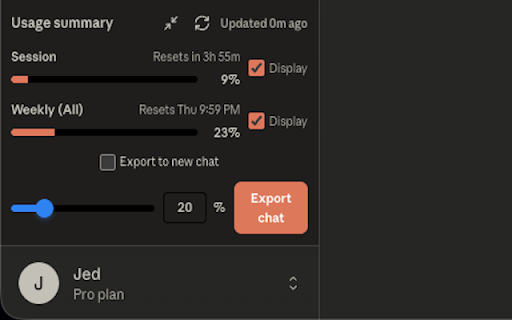
Track Claude.ai usage and limits, export chats to Markdown, jump into new chats — works on claude.ai and Claude Code. Claude Usage Tracker is the Chrome extension for monitoring your Claude.ai and Claude Code usage limits, exporting chat history to Markdown, and continuing long conversations seamlessly. Built for Claude Pro and Max subscribers who want clear visibility into their 5-hour session and weekly all-models usage — directly inside Claude's sidebar, with one-click export and resume. • Real-time usage tracking — Monitor your 5-hour session and weekly all-models limits, refreshed automatically every 30 seconds • Integrated sidebar panel — Usage stats display directly inside Claude's interface, with no separate window or tab • Smart export system — Export any portion (20%, 50%, or 100%) of your conversation to clean Markdown • One-click workflow — Export → Download → New chat → Auto-paste, in under 3 seconds • Works on Claude Code — Sidebar and export both supported on claude.ai/code conversations • Adaptive UI — Renders correctly in both expanded and collapsed sidebar modes 1. Install the extension 2. Visit claude.ai or claude.ai/code — the usage panel appears automatically inside Claude's sidebar 3. Watch your 5-hour and weekly limits update in real time 4. Click "Export" on any conversation to save it as Markdown 5. Choose 20%, 50%, or 100% of recent messages 6. Optionally auto-open a new chat with the exported content already pasted PERFECT FOR: • Long conversations approaching the context limit • Preserving important chat history before sessions reset • Continuing discussions in fresh sessions without losing context • Monitoring your Claude Pro or Max usage across the week • Developers using Claude Code in the browser who want to track web-session usage • No data collection — everything stays on your device • No external servers — the extension talks only to Claude's own API • No tracking, no analytics, no telemetry • Open source — code is published and reviewable Q: Does this work with Claude Code (the CLI / terminal tool)? A: It works on the web version of Claude Code at claude.ai/code. The terminal CLI tool is a separate product and is not tracked by this extension. Q: Does it track Opus usage separately? A: It tracks two limits: your 5-hour session and your 7-day all-models usage. These are the limits Claude.ai exposes. There is no separate Opus-only counter at the moment. Q: Where does my data go? A: Nowhere. The extension reads your usage from Claude's own /api/organizations/{id}/usage endpoint using your existing browser session. Nothing is sent anywhere else. Q: I'm on Claude Free / Pro / Max — does this work? A: Yes for all subscription tiers. The extension simply reads whatever limits Claude.ai reports for your account. Q: Why does the sidebar disappear sometimes? A: Claude.ai re-renders its sidebar during navigation. The extension automatically re-attaches the panel within a second. Support: jed.fan21@gmail.com Privacy Policy: https://github.com/jedfan21/claude-track-export-privacy-and-policy/blob/16f98c5637b7d4740821a6a7482c86b8e8dac183/privacy-policy.md Feature Requests: https://forms.gle/ptB6i9ie6ebep71T9

Claude Usage Monitor
Monitor Claude usage limits with visual charts and periodic updates Claude Usage Monitor displays your Claude usage statistics in a simple dashboard. - Shows your usage for different time periods (5-hour, 7-day limits) - Displays data as donut charts or progress bars - Updates automatically every 5 minutes - Lets you adjust the layout (1, 2, or 4 columns) When enabled, shows a purple line indicating the expected usage based on time elapsed. This helps you see if you're using credits faster or slower than average. Enter your Organization ID in the settings. The extension uses your existing browser session to fetch usage data. To find your Organization ID: 1. Log into Claude.ai 2. Go to Settings → Account 3. Copy the Organization ID All data is stored locally on your device. Nothing is sent to external servers. This is an unofficial tool. Use it in accordance with Anthropic's Terms of Service.

Claude Usage Tracker
Helps you track your claude.ai usage caps based on tokens sent. This extension helps you monitor how much of your Claude usage quota remains. It calculates token consumption from various sources including uploaded files, project knowledge, chat history, and AI responses. It will also send a notification when your usage limits have been replenished (if the site notified you that you were about to run out). Most elements in the chat UI (Namely the length, cost, estimate, caching status) have a tooltip explaining them further! Be sure to check them out. The extension tracks token usage from: - Files - Documents uploaded to chats or synced via Google Drive, Github, etc - Projects - Knowledge files and custom instructions - Personal preferences - Your configured settings - Message history - Full conversation context - System prompts - Enabled tools (analysis, artifacts) on a per-chat basis - MOST MCPs/Integrations - There are some limitations in cases where a "Knowledge" object is returned that I can't access, such as with web search Limitations: - Web search results - The full results are not exposed in the conversation history, so I can't track them properly (See above, Knowledge objects) - Research - Most of it happens on the backend, so I can't track it at all Token calculation is handled either through Anthropic's API (if you provide your key) or via gpt-tokenizer. The source code can be found here: https://github.com/lugia19/Claude-Usage-Extension

thredly — ChatGPT, Claude & DeepSeek Summarizer
Instantly summarize your ChatGPT, Claude, and DeepSeek conversations with thredly thredly is a free Chrome extension that adds a Summarise button directly inside ChatGPT, Claude, and DeepSeek. When your conversation gets too long, hit Summarise — thredly generates a structured continuation summary with your instructions, decisions, progress, and next steps. Paste it into a new chat and carry on from exactly where you left off. No copy-pasting giant transcripts. No rewriting context from scratch. No losing what you built. Open any long ChatGPT, Claude, or DeepSeek conversation Click the thredly Summarise button in the chat interface thredly generates a clean continuation summary Open a new chat, paste the summary, and continue Your original instructions and constraints Key decisions already made Work completed so far Current status and blockers Exact next steps Tone, format, and style preferences WORKS WITH: 30 summaries per month Saved threads for 7 days Export as .md & .txt Structured output Works inside ChatGPT, Claude & DeepSeek Unlimited summaries Saved threads for 30 days Export as .md & .txt Upgraded AI engine Priority processing queue Works inside ChatGPT, Claude & DeepSeek thredly is built for people who use AI every day: developers, writers, researchers, consultants, and anyone who has ever hit the "conversation too long" wall. Install free and try it on your next long chat.

ChatGPT Usage Limit Tracker
Displays usage limits and quotas for all ChatGPT models, including GPT-5, GPT-5 Thinking, and GPT-5 Pro (e.g., X msgs / X hrs). Displays usage limits (quotas) for all ChatGPT models, including gpt-5, gpt-5-thinking, gpt-5-pro. - We do not collect any of your data, and the full source code is publicly available on GitHub. - Supports switching between plans (Free/Plus/Team/Pro). - If there are any changes to the models or quotas, we will update accordingly. - Quota limits are for reference only, as they are not officially announced by OpenAI.
