
lpgjaokljpeghablngjklemnclijfclb

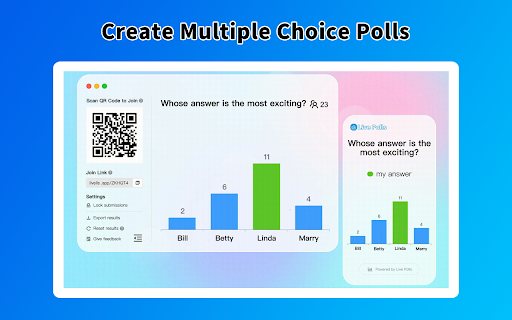


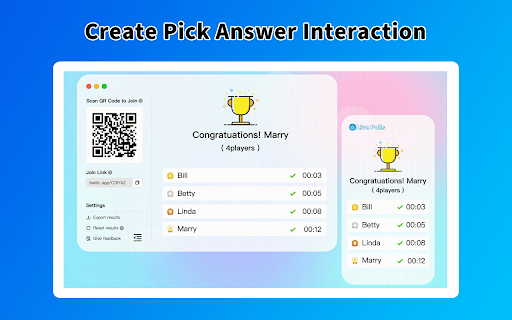
Make your meetings and classes more interactive. Include multiple choice, open text, word cloud, survey, Q&A, quizzes. ➤ Discover how you can use our poll maker 1)For Education For teachers, Keep your students engaged while you assess knowledge, and kickstart discussions. Create a more inclusive environment for your students. 2)For Work Whether you’re leading a meeting, hosting a workshop, or training your team make sure that you make it productive, inclusive, and fun. it can be also used for ice breaker games, brainstorming sessions, team building. 🔹Multiple choice Versatile poll type for ice breakers, collective-decision making, and capturing vote feedback. Keep your audience engaged by displaying poll results in real-time as visually-engaging charts. 🔹Word cloud Display the most popular answers in a beautiful word cloud. The more times a word is used, the bigger it gets. Word clouds are great conversation starters that are ideal for one-word submissions. 🔹Quizzes Create a live quiz with a timer and leaderboard and test people’s knowledge in a fun and interactive way. 🔹Rating Poll Choose between three different rating scales: icon, numeric, and draggable to capture instant feedback from your attendees. Run quick pulse surveys and get live results with average scores. 🔹Open text Let your participants type in their own answer or comment. Open text polls are great for feedback surveys and training sessions, or as a collaboration tool in small meetings. 🔹Ranking poll Ask people to prioritize different items based on their importance. A ranking poll can help you identify the most relevant topics, projects or areas and inform better decisions. We will support types of survey, Q&A, wheel spinner, trivia questions, spinner wheel, yes or no wheel, sweepstakes instantly. Finally, you can view and export your questions or voting or quizzes results for further analysis. Your data aren’t shared with anyone, including the add-on owner. We complies with privacy laws (especially GDPR & California Privacy Act) to protect your data.

AI Help for Job search
Your personal, AI-powered, job search partner! In today's competitive job market, increasingly companies use AI to screen candidates. You need your own personal AI Help. This extension provides a AI sidebar that uses ChatGPT to answer questions on job search sites such as Linkedin, Indeed, SImplyhired and others. You need to login to ChatGPT to use this extension. Chatgpt link: https://www.ai.com/

AI Baby Generator
Using AI to combine the characteristics of both parents to predict what a future child will look like. Harness the power of AI to envision your future child's appearance, artfully combining traits from both parents for an exciting preview of your family's next generation. By design, your data stays at all times on your Google account, never saved in our database. Your data aren’t shared with anyone, including the add-on owner. We complies with privacy laws (especially GDPR & California Privacy Act) to protect your data. All data you upload are automatically deleted every day.

StreamAlive - Polls, Word Clouds & Spinner Wheels
FREE: Chat-powered polls, word clouds, Q&As and more Run polls, word clouds, Q&As, spinner wheels, interactive maps, and more with StreamAlive. Simply ask your question and tell your audience to put their response in the native chat. StreamAlive reads the chat as it happens, updating the poll results and word clouds in real-time. It automatically curates questions into a Q&A bank and links into a link library that can be shared after the session. There’s no learning curve or second screen to look at for your audience as they participate in the interactions through the chat. It's easy to track live chat activity, analyze engagement patterns, and plan out your engagement strategy for every event. Power polls: Ask your audience a question and have them type their answer in the chat. Their response is updated in real-time on the screen. Q&As powered by AI: Make it easy for your audience to ask questions by simply having them type it in the chat. StreamAlive automatically picks up and curates the question into a Q&A bank, ensuring that you don’t miss anything when the chat is on fire or you’re focused on presenting. Word clouds, bubbles and tiles: Ask your audience an open-ended question and see their responses transformed into word clouds or even Tetris-inspired wall of tiles! Profanity and spam filters are “on” by default! Spinner wheels: From choosing a topic to picking which audience member will speak next to selecting a winner, spinner wheels can add some excitement and anticipation to your session. Interactive maps: When you ask your audience where they are joining from, StreamAlive can plot their locations on a map in real-time helping to give everyone a voice that is heard. Analytics: See how your session performed, which interactions were a hit, and share the poll and word cloud results with your audience on social media or in your next newsletter. Use AI to write your questions: When you’re in a hurry or low on inspiration, our AI integration comes up with relevant polls and questions to ask based on the type of session you’re running and the topic you’re presenting on. Packed with interactive features that boost audience engagement, we allow you to visualize chat messages from your audience in real-time. Because we read native live chats as they happen, you can tailor discussions based on audience behavior for more meaningful interactions. For the list of all supported platforms, please access our browser app at [app.streamalive.com](http://app.streamalive.com/).

ChatGPT Soliloquy
ChatGPT-Soliloquy is a Chrome extension that allows ChatGPT to engage in a conversation with itself. ChatGPT-Soliloquy is a Chrome extension that allows ChatGPT to engage in a conversation with itself.
